# Aurora Documentation
> Sovereign cloud infrastructure for data and AI
Complete documentation, 135 pages. Source: https://docs.aur.lu
---
Source: https://docs.aur.lu/docs/introduction
# Introduction
Aurora is a sovereign cloud platform for storing data, running AI models, and deploying compute workloads. Its services use familiar APIs and give organizations clear control over where their data and workloads are hosted.
## Products
### Object Storage
Store application data, backups, analytics datasets, and AI workloads through an S3-compatible API.
- [Get started with Object Storage](https://docs.aur.lu/docs/s3/getting-started)
- [Create buckets and access keys](https://docs.aur.lu/docs/s3/buckets-and-api-keys)
- [Browse supported tools and integrations](https://docs.aur.lu/docs/s3/tools/aws-cli)
### Inference
Run language models through OpenAI-compatible endpoints, with usage billed by input and output tokens. Prompts and outputs are not retained or used for training. Contact support if you have specific data residency requirements or need a dedicated model deployment.
- [Get started with Inference](https://docs.aur.lu/docs/inference/getting-started)
- [Browse the API reference](https://docs.aur.lu/docs/inference/api-reference)
- [Use the OpenAI Python SDK](https://docs.aur.lu/docs/inference/sdks/inference-python)
### Compute
> **Info — [Private preview]**
>
>
> Create and manage virtual machines, networks, and block storage with Aurora Compute. The service is currently available to selected private-preview customers. Documentation will be published before broader availability.
>
## Aurora Portal
The [Aurora Portal](https://portal.aur.lu/) is where you create resources, manage credentials, switch between organizations and workspaces, and review usage.
## APIs and automation
Use the [Portal API](https://docs.aur.lu/docs/portal-api) to automate common management tasks, such as creating buckets, rotating credentials, and provisioning compute resources.
Learn more about Aurora at [aurorainfra.ai](https://www.aurorainfra.ai/). If you need help, see [Support](https://docs.aur.lu/docs/support).
---
Source: https://docs.aur.lu/docs/ai-agents
# Docs for AI Agents
Every page on this site is also published as plain markdown. Use these formats
when you are supplying context to an assistant, building a retrieval index, or
pointing a coding agent at Aurora's APIs.
## Copy a single page
Each page has a **Copy page** button in its upper right corner. The button copies
that page as markdown, ready to paste into a conversation. The adjacent menu adds
three further actions:
- **View page source** — open this page's markdown in a new tab
- **Copy entire documentation** — every page in a single file
- **Copy documentation index** — page titles and links only
## Fetch a page as markdown
Append `.md` to any documentation URL to retrieve the same content
programmatically:
```bash
# The page you are reading
curl https://docs.aur.lu/docs/ai-agents.md
# Any other page
curl https://docs.aur.lu/docs/s3/getting-started.md
```
Responses contain the page content only—no navigation, no HTML. Interactive
elements are resolved to their default state, so code samples arrive with a
working endpoint already substituted rather than a placeholder.
Each HTML page declares its markdown equivalent, so tooling can discover it
without constructing URLs:
```html
```
## Site-wide bundles
Two files cover the entire documentation set, following the
[llmstxt.org](https://llmstxt.org) convention:
| File | Contents | Use it for |
| --- | --- | --- |
| [`/llms.txt`](https://docs.aur.lu/llms.txt) | Title, description, and markdown link for every page | Letting an agent choose which pages to fetch |
| [`/llms-full.txt`](https://docs.aur.lu/llms-full.txt) | Every page concatenated into a single document | Loading the complete documentation into one context window |
```bash
curl https://docs.aur.lu/llms.txt
curl https://docs.aur.lu/llms-full.txt
```
> **Tip**
>
> The header of `/llms.txt` states the current size of the full bundle.
Both files are also available from the **Copy page** menu on any page.
## Portal API
API reference pages are published as markdown like every other page, with each
endpoint's method, path, authentication, parameters, request body, and responses
rendered as text.
Client generation should use the [OpenAPI Specification](https://docs.aur.lu/docs/portal-api/portal-api-openapi-spec) page for the authoritative Swagger 2.0 documentation.
Markdown output is regenerated on every deployment to maintain consistency with the rendered documentation.
---
Source: https://docs.aur.lu/docs/support
# Support
For technical questions or problems, contact the Aurora support team by email.
## Contact support
- **Email:** [support@aurorainfra.ai](mailto:support@aurorainfra.ai)
## What to include
To help us resolve your issue quickly, please include:
- Your Tenant name and ID.
- The service and resource involved (for example, a bucket, model, or virtual machine).
- A clear description of the problem and what you expected to happen.
- Any relevant error messages, and timestamps.
- The steps needed to reproduce the issue.
## Other contacts
- **Legal notices:** [legal@aurorainfra.ai](mailto:legal@aurorainfra.ai)
- **Abuse / illegal-content reports:** [abuse@aurorainfra.ai](mailto:abuse@aurorainfra.ai)
See [Legal contact points](https://docs.aur.lu/docs/legal/contact) for the full list of designated contacts.
## Before you write
Many common problems are covered in the documentation:
- [S3 troubleshooting](https://docs.aur.lu/docs/s3/reference/troubleshooting) and [S3 FAQ](https://docs.aur.lu/docs/s3/reference/faq)
- [Inference integrations troubleshooting](https://docs.aur.lu/docs/inference/integrations)
---
Source: https://docs.aur.lu/docs/s3/getting-started
# Getting Started
This guide helps you log in and orient yourself in the Aurora Dashboard.
## Prerequisites
- Organization invite or credentials from your Aurora administrator
- A modern web browser
## Access the Dashboard
Navigate to the **Aurora Global Dashboard** at:
**[https://portal.aur.lu/](https://portal.aur.lu/)**
## Quick Start Steps
1. **Sign in** to the Aurora Dashboard with your credentials
2. **Select your organization** and workspace from the dashboard
3. **Review your buckets** on the Buckets page
4. **Create your first bucket** and API keys (see [Buckets and API Keys](https://docs.aur.lu/docs/s3/buckets-and-api-keys))
## Next Steps
Once you're logged in and have created your first bucket and API keys, you can:
- Configure [AWS CLI](https://docs.aur.lu/docs/s3/tools/aws-cli) to interact with your buckets
- Set up [rclone](https://docs.aur.lu/docs/s3/tools/rclone) for file synchronization
- Start uploading and managing your data through the S3-compatible API
---
Source: https://docs.aur.lu/docs/s3/buckets-and-api-keys
# Buckets & API Keys
## Buckets
Buckets are top‑level containers for objects. Use buckets to organize data by application, team, or retention policy. Bucket settings, such as server-side encryption, versioning, and object lock apply to all objects inside. You can also scope access per bucket so API keys only reach the data they need.
### Create a bucket
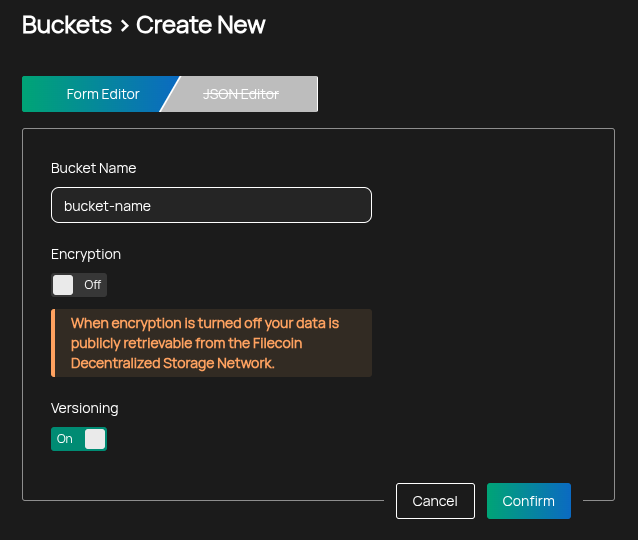
1. Go to Buckets → Create Bucket.
2. Enter a globally unique name.
- Must contain only lowercase letters, numbers, periods (.), and hyphens (-)
- Must start and end with a letter or number
3. Choose server‑side encryption.
- Enabled by default; encryption can only be chosen during bucket creation and cannot be changed afterwards
- Turning encryption off requires a per-bucket confirmation that the bucket will not contain personal data or confidential or regulated data
- If encryption is disabled, data is publicly retrievable from the Filecoin network
- SSE-KMS Managed by Aurora when enabled; AWS SSE-S3 semantics do not apply
- Cannot be configured via CLI or API
- For custom KMS solutions, contact Aurora support
4. Choose whether to enable versioning.
- Can only be enabled during bucket creation in the Dashboard UI
- When enabled, each write creates a new immutable version
- You can restore older versions and audit changes over time
- Deleting without a version ID creates a delete marker rather than permanently removing prior versions
### Delete a bucket
You can delete a bucket from the Portal when it is empty and not shared. Deletion is irreversible, and the bucket's name remains reserved by your tenant afterwards. See [Deleting Buckets](https://docs.aur.lu/docs/s3/guides/deleting-buckets) for the full requirements.
## API Keys
API keys are S3-compatible credentials for programmatic access. Use them with tools like AWS CLI, [rclone](https://docs.aur.lu/docs/s3/tools/rclone), CI/CD pipelines, or application backends. Keys can be restricted to selected buckets, granted only specific permissions, and optionally set to expire to simplify rotation and reduce risk.
### Create an API key
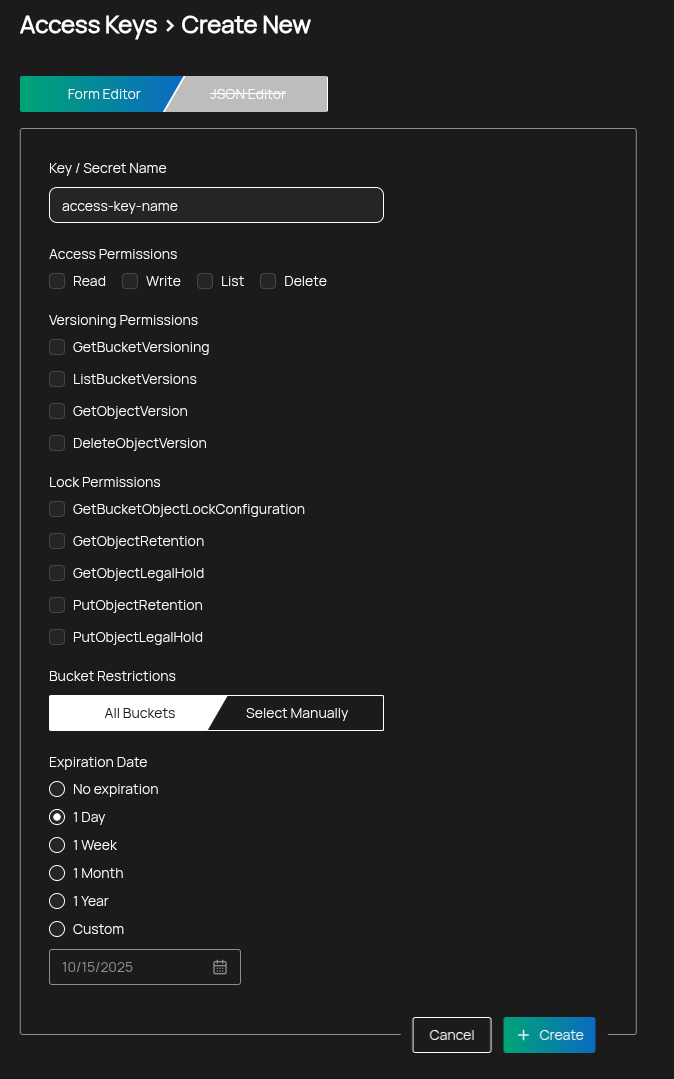
1. Go to Credentials → S3 Access Keys, then select New Access Key.
2. Select the permissions the key should have (see below).
3. Optionally restrict the key to specific buckets.
4. Optionally set an expiration date.
5. Create the key and copy the Access Key and Secret immediately — they are shown only once.
### Permissions
When permissions are selected, a minimal set of defaults is always included so the key can discover buckets it is allowed to use:
- Default (always included): `s3:GetBucketLocation`, `s3:ListAllMyBuckets`
The following permissions can be granted explicitly:
#### Access
- Read — download objects and inspect multipart upload parts
- S3 actions: `s3:GetObject`, `s3:ListMultipartUploadParts`
- Write — upload objects and manage ongoing multipart uploads
- S3 actions: `s3:PutObject`, `s3:AbortMultipartUpload`
- List — list objects and multipart uploads within a bucket
- S3 actions: `s3:ListBucket`, `s3:ListBucketMultipartUploads`
- Delete — delete the current object version (or create a delete marker on versioned buckets)
- S3 action: `s3:DeleteObject`
> **Note**
>
> If List is not granted, clients can still access an object by its exact key if they have Read permission, but they will not be able to enumerate bucket contents.
#### Versioning
- GetBucketVersioning — view whether versioning is enabled on a bucket
- S3 action: `s3:GetBucketVersioning`
- ListBucketVersions — list all versions of objects in a bucket
- S3 action: `s3:ListBucketVersions`
- GetObjectVersion — download a specific object version by version ID
- S3 action: `s3:GetObjectVersion`
- DeleteObjectVersion — permanently delete a specific object version
- S3 action: `s3:DeleteObjectVersion`
> **Warning**
>
> Deleting specific versions is irreversible and may be blocked by object lock/retention policies.
#### Lock (Object Lock)
- GetBucketObjectLockConfiguration — view the bucket’s object lock settings
- S3 action: `s3:GetBucketObjectLockConfiguration`
- GetObjectRetention — view retention policy and expiry for an object version
- S3 action: `s3:GetObjectRetention`
- GetObjectLegalHold — view legal hold state for an object version
- S3 action: `s3:GetObjectLegalHold`
- PutObjectRetention — set or update retention for an object version (subject to bucket policy/mode)
- S3 action: `s3:PutObjectRetention`
- PutObjectLegalHold — add or remove a legal hold on an object version
- S3 action: `s3:PutObjectLegalHold`
> **Note**
>
> In compliance mode, retention cannot be shortened or removed, and legal holds must be cleared before deletion where required by policy.
### Bucket restrictions
You can scope a key to specific buckets or allow all buckets:
- All Buckets — key applies to all buckets you can access
- Select Manually — choose one or more buckets; the key’s policy limits access to those buckets only
### Expiration
Set an expiration to automatically disable the key after a date:
- No expiration — key remains valid until you revoke it
- Custom date — key expires at the end of the selected day (23:59:59 UTC)
### Security tips
- Prefer least privilege: grant only the permissions a workflow needs
- Restrict keys to specific buckets whenever possible
- Rotate keys periodically and store secrets in a secure vault
---
Source: https://docs.aur.lu/docs/s3/concepts/versioning-and-encryption
# Versioning & Encryption
Aurora’s S3-compatible storage supports bucket versioning and server-side encryption to protect data at rest and simplify recovery from accidental changes or malicious deletions.
## Versioning
- When versioning is enabled on a bucket, every write produces an immutable version.
- Overwriting a key creates a new version; the previous versions remain retrievable.
- Deleting without a version ID creates a delete marker instead of removing prior versions.
- Combining versioning with Object Lock provides strong immutability guarantees.
### Enable versioning
Versioning can only be enabled during bucket creation in the Dashboard UI. It cannot be enabled later via CLI or API.
> Available S3 endpoint: `a-s3.aur.lu` (France, Albi).
```bash
# View versioning state
aws --profile aurora --endpoint-url https://a-s3.aur.lu s3api get-bucket-versioning \
--bucket my-bucket
```
### Work with object versions
```bash
# Upload creates the first version
aws --profile aurora --endpoint-url https://a-s3.aur.lu s3 cp file.txt s3://my-bucket/file.txt
# List versions
aws --profile aurora --endpoint-url https://a-s3.aur.lu s3api list-object-versions \
--bucket my-bucket \
--prefix file.txt
# Download a specific version
aws --profile aurora --endpoint-url https://a-s3.aur.lu s3api get-object \
--bucket my-bucket \
--key file.txt \
--version-id ./file.txt
# Delete a specific version (irreversible)
aws --profile aurora --endpoint-url https://a-s3.aur.lu s3api delete-object \
--bucket my-bucket \
--key file.txt \
--version-id
```
## Server-side encryption (SSE)
- Encryption at rest is enabled by default when creating a bucket in the Dashboard UI.
- Encryption is chosen at bucket creation and cannot be changed afterwards.
- Disabling encryption requires a per-bucket confirmation in the Dashboard UI that the bucket will not contain personal data or confidential or regulated data.
- It cannot be configured or changed via CLI or API.
### Notes
- If encryption is disabled, bucket contents are publicly retrievable from the Filecoin network.
- For customer-managed keys (KMS integration), contact Aurora support.
- Object Lock retention applies to encrypted and non-encrypted objects alike.
---
Source: https://docs.aur.lu/docs/s3/object-lock
# Object Lock & Retention
Object Lock provides write-once-read-many (WORM) protection for objects by preventing deletion or modification for a configured retention period. Aurora supports S3-compatible Object Lock semantics, including Governance and Compliance modes, per-object retention, default bucket retention, and legal holds.
## Prerequisites
- **Bucket versioning**: must be enabled.
- **Object Lock at creation**: buckets must be created with Object Lock enabled; you cannot enable it later for an existing bucket that did not have it.
## Concepts
- **Governance mode**: Prevents users without special permissions from removing or shortening retention.
- **Who can change retention/lifecycle**: principals with explicit governance-bypass permission (for example, `s3:BypassGovernanceRetention`) can shorten or remove per-object retention and update protected versions.
- **What it takes to delete**: privileged principals can permanently delete protected versions only when sending the governance bypass header; others must wait until retention expires.
- **Bucket default retention changes**: require administrative permission to update the bucket’s object lock configuration; changing defaults does not reduce retention already applied to existing versions.
- **Compliance mode**: Absolutely prevents removing or shortening retention until the retention period expires (strongest protection; cannot be bypassed by administrators).
- **Who can change retention/lifecycle**: no principal can remove or shorten per-object retention before expiry; bucket default retention may be changed, but it affects only future uploads.
- **What it takes to delete**: permanent deletion of protected versions is blocked until retention expires and no legal hold is present; creating a delete marker does not remove protected versions.
- **Retention period**: Duration during which an object version is immutable. Defined by days or years, or by a specific retained‑until date.
- **Default retention**: Bucket‑level default applied automatically to new objects if no per‑object retention is provided.
- **Legal hold**: Independent, on/off flag that prevents deletion regardless of retention settings. Must be cleared before deletion.
> **Note**
>
> In Governance mode, bypass requires the special header `x-amz-bypass-governance-retention:true` and appropriate permission. Avoid granting this permission to routine keys.
## Enabling Object Lock
Create a bucket in the Dashboard UI with Versioning and Object Lock enabled:
1. **Buckets → Create Bucket**.
2. **Bucket name**: enter a name.
3. **Versioning**: enable.
4. **Object Lock**: enable (if presented) or ensure the bucket is created with Object Lock enabled by your administrator.
5. **Create** the bucket.
After the bucket exists and versioning is enabled, you can configure default retention via bucket UI.
## Recommended Access Key Permissions
For the most secure setups, grant only the permissions required by the workflow. Avoid Delete permissions and never grant governance bypass.
- **Backup writer** (upload with retention):
- **Access**: Write (upload objects)
- **Lock**: PutObjectRetention (set per-object retention) and/or rely on bucket default retention
- **List (optional)**: enumerate keys for verification
- **Auditor/restore** (read-only with version awareness):
- **Access**: Read, List
- **Versioning**: GetBucketVersioning, ListBucketVersions, GetObjectVersion
> **Tip**
>
> Configure keys per bucket to ensure strict data scoping.
## Practical Examples
> Available S3 endpoint: `a-s3.aur.lu` (France, Albi).
### Ransomware-protected backups (180 days)
Goal: Ensure backups cannot be deleted or altered for 180 days.
1. **Create a bucket** in the Dashboard UI with Versioning and Object Lock enabled. Enable encryption.
2. **Default retention**: in the UI set COMPLIANCE for 180 days (strongest protection)
3. **Upload backups** (inherits default 180-day retention):
```bash
aws --profile aurora --endpoint-url https://a-s3.aur.lu s3 cp ./backup.tar s3://backups-immutable/2025-01-01/backup.tar
```
4. **Use multiple keys** with least privilege:
- **Backup Writer key** (for upload only): Write, Optional List. Cannot read or delete, cannot shorten retention.
- **Restore Reader key**: Read, List, Versioning: GetBucketVersioning, ListBucketVersions, GetObjectVersion. Cannot delete.
Rationale: Separating duties limits blast radius if a key is compromised and supports clean audit trails.
### Compliance archives (7 years)
Goal: Retain records for 7 years without the ability to shorten or remove retention.
1. **Create a bucket** in the Dashboard UI with Versioning and Object Lock enabled. Enable encryption.
2. **Default retention**: in the UI set COMPLIANCE for 7 years
3. **Upload records** (inherit default retention):
```bash
aws --profile aurora --endpoint-url https://a-s3.aur.lu s3 cp ./record.json s3://records-archives/2025/01/record.json
```
4. **Legal hold (optional)**: place a legal hold on specific versions during investigation:
```bash
# Upload and capture version ID (versioning must be enabled)
aws --profile aurora --endpoint-url https://a-s3.aur.lu s3api put-object \
--bucket records-archives \
--key invoices/2025/01/invoice-123.json \
--body invoice-123.json \
--object-lock-mode COMPLIANCE \
--object-lock-retain-until-date 2032-01-01T00:00:00Z
# Look up the version ID if needed
aws --profile aurora --endpoint-url https://a-s3.aur.lu s3api list-object-versions \
--bucket records-archives \
--prefix invoices/2025/01/invoice-123.json
# Apply legal hold to a specific version (replace VERSION_ID)
aws --profile aurora --endpoint-url https://a-s3.aur.lu s3api put-object-legal-hold \
--bucket records-archives \
--key invoices/2025/01/invoice-123.json \
--legal-hold Status=ON \
--version-id VERSION_ID
```
5. **Use multiple keys** with least privilege:
- **Ingest Writer key**: Write only (rely on bucket default). Cannot read or delete.
- **Compliance Officer key**: PutObjectRetention, GetObjectRetention, GetObjectLegalHold (no Write/Delete). Can view and apply retention/holds.
- **Reviewer key**: Read, List, GetBucketVersioning, ListBucketVersions, GetObjectVersion (no Delete). Can verify objects and versions.
Why multiple keys: Separates ingestion, compliance control, and read access for accountability and reduced blast radius.
### Immutable logs (30 days, Governance mode)
Goal: Ensure logs are tamper-evident and immutable for 30 days, with the option for emergency admin overrides (Governance mode).
1. **Create a bucket** in the Dashboard UI with Versioning and Object Lock enabled. Enable encrypiton for private data.
2. **Default retention**: set GOVERNANCE for 30 days in the UI
3. **Upload logs** (inherit default retention):
```bash
aws --profile aurora --endpoint-url https://a-s3.aur.lu s3 cp ./app.log s3://logs-immutable/2025-01-01/app.log
```
4. **Use multiple keys** with least privilege:
- **Log Ingest key**: Write only. Cannot read/delete.
- **Log Reader key**: Read, List. Cannot delete or change retention.
- **Retention Adjuster** (optional): PutObjectRetention only for exceptions.
## Notes
- **Compliance mode**: retention cannot be shortened or removed.
- **Legal holds**: must be removed before deletion and are independent of retention.
- **Deletion permissions**: avoid granting Delete and DeleteObjectVersion on keys used for immutable workloads.
---
Source: https://docs.aur.lu/docs/s3/architecture/gateway-data-architecture
# Gateway Data Architecture
This page explains how Aurora’s data storage solutions work under the hood.
## High-level overview
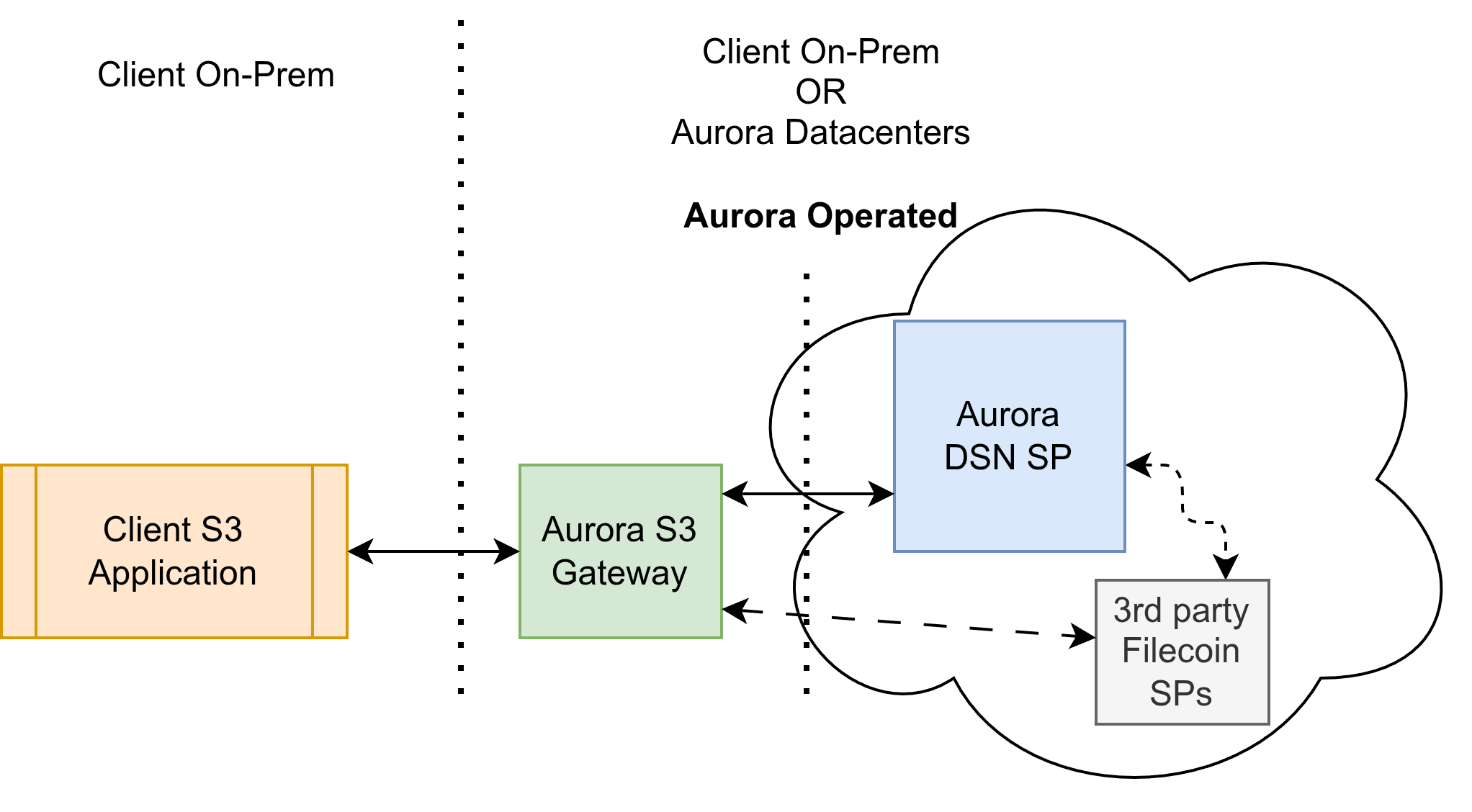
At the core, our storage architecture comprises two components:
1. Gateway — a virtual appliance that exposes familiar, compatible storage APIs.
2. DSN backend — a software-and-hardware stack that leverages decentralized storage network principles to provide the underlying storage infrastructure.
## Physical data location
Client applications are generally assumed to run on‑premises. Aurora can also provide compute (including confidential compute) and AI services hosted by Aurora.
The Gateway deployment strategy depends on client requirements; Aurora recommends an approach for each client. As a rule of thumb, clients with large data volumes or I/O patterns that require low latency or very high bandwidth benefit from co‑locating more components - Gateway, and for larger deployments, the DSN - with their infrastructure. When on‑premises presence is warranted but not feasible, Aurora can establish presence geographically close to the client (within the same city or jurisdiction).
Clients retain full control over data placement, access, and encryption. Aurora can facilitate data migrations between regions and jurisdictions as needed.
## Storage architecture
Aurora operates two storage engines:
* **Aurora IPLD Gateway** — an IPLD‑first engine that maximizes data integrity. It uses multiple layers of integrity checks and is optimized for strongly adversarial environments.
* **Aurora Sovereign Gateway** — optimized for enterprise environments, maximizing performance, efficiency, and availability while retaining strong provenance capabilities.
## Aurora IPLD Gateway
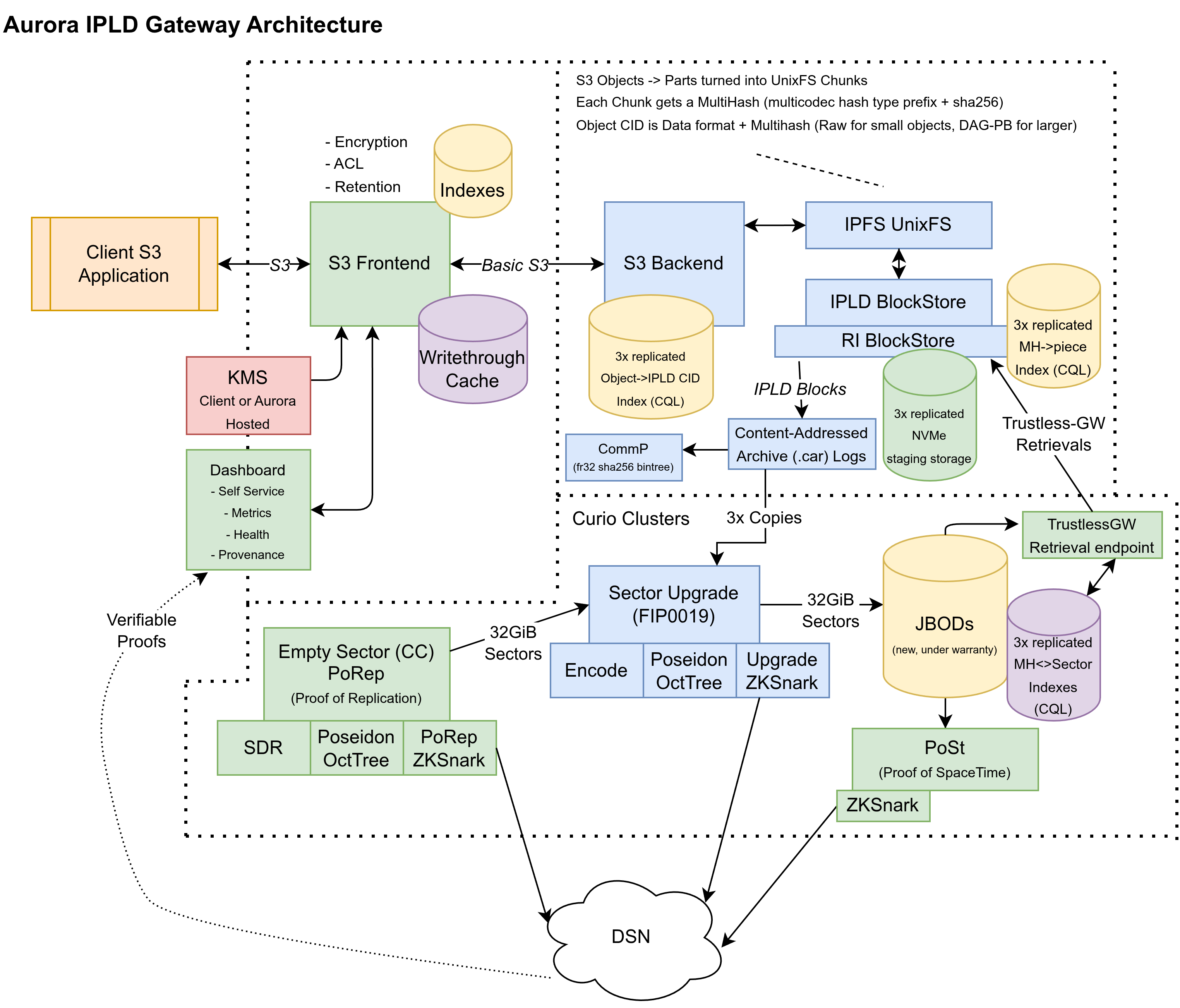
Aurora IPLD Gateway distills years of R&D into an easy‑to‑use, compatible, and scalable storage product. It provides a high level of assurance for data integrity through extensive use of content‑addressed, immutable [IPLD](https://ipld.io/specs/) data structures and advanced Merkle‑tree applications.
### Component overview
The IPLD Gateway comprises several components:
* Storage protocol frontends and backends
* For S3, the frontend implements advanced S3 features, while the backend focuses on robust basic storage primitives and exposing provenance data.
* Other storage protocols and primitives (IPLD objects, files, block namespaces) are not currently supported on this gateway.
### HeadObject with Aurora IPLD Gateway metadata
- Clients opt in to Aurora metadata by including the query parameter `fil-include-meta=1` on `HEAD` requests.
- When the object is not yet offloaded, the gateway adds `X-Fil-Offload-Status: staging`.
- The Aurora Gateway (AGW) `HeadObject` response will contain:
- `X-Fil-Cid`: [IPLD CID](https://github.com/multiformats/cid) of the object represented as unixfs v1 file
- `X-Fil-Offload-Status`: current DSN offload status
- These headers are added to the S3 response sent back to the client.
### Client usage tips
- To retrieve Aurora metadata for an object without downloading it, send:
- `HEAD s3://bucket/key?fil-include-meta=1`
- Inspect the `X-Fil-Cid` and `X-Fil-Offload-Status` headers.
- Standard S3 tools can be used unchanged; gateway behavior is transparent unless the Aurora extension is requested.
## Aurora Sovereign Gateway
Aurora Sovereign Gateway is an evolution of the original Aurora Gateway, re‑engineered to take advantage of modern hyperscale hardware, enabling sovereign data solutions at exabyte scale.
The architecture employs carefully designed, advanced data structures that enable a much higher degree of hardware acceleration, unlocking new kinds of AI applications. It also provides stronger provenance capabilities: clients can tag and track all data assets, create proofs of data origination and proofs of existence at a point in time, and define fine‑grained access grants to data, including for attested confidential compute (TEE) enclaves.
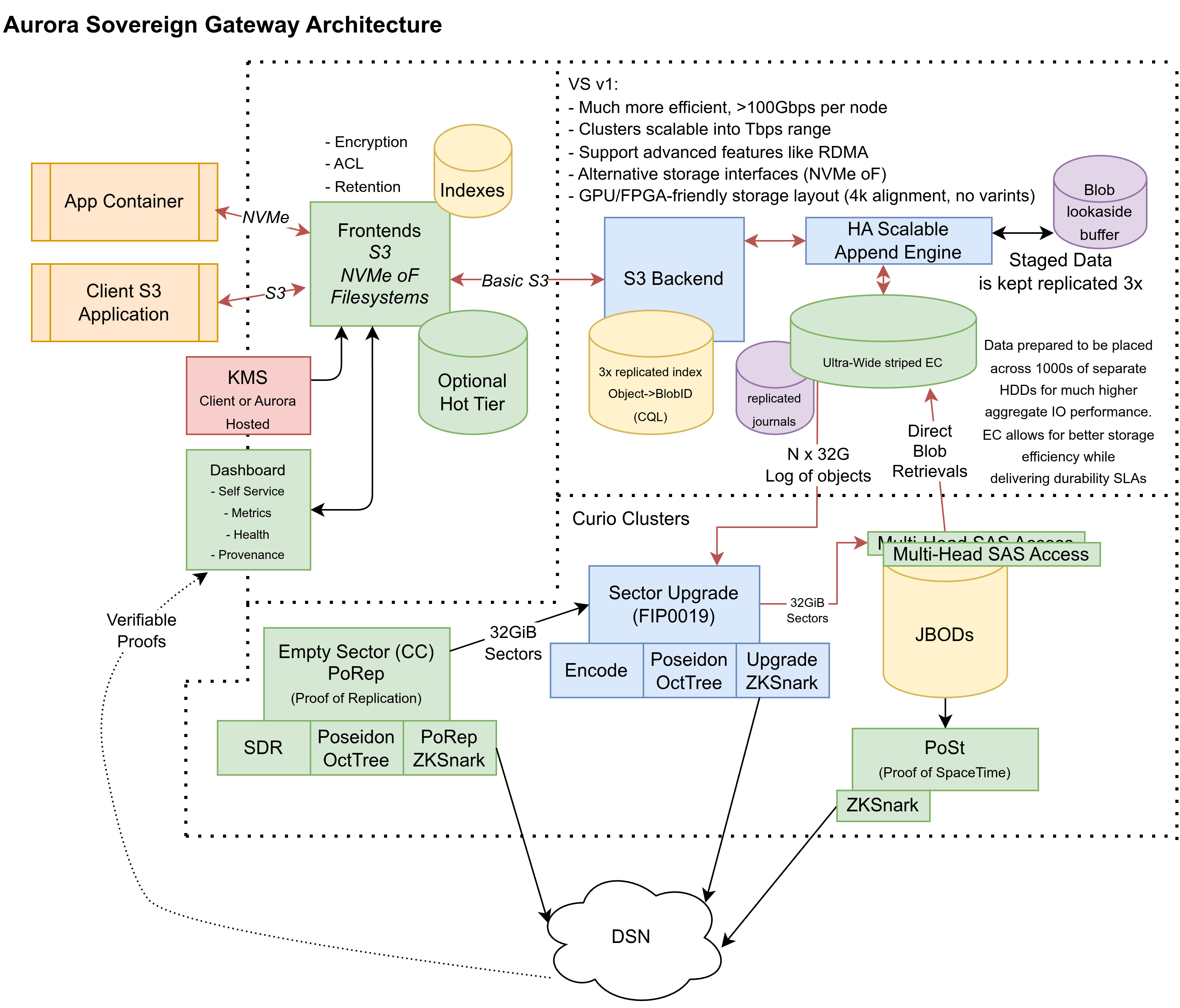
Note: The Sovereign Gateway is currently in late‑stage R&D and not yet available for production use.
---
Source: https://docs.aur.lu/docs/s3/guides/multipart-uploads
# Multipart Uploads
Multipart upload lets you upload large objects in parts, enabling parallelism, retries of failed parts, and resuming interrupted transfers.
## When to use multipart upload
- Objects larger than 100 MB (recommended)
- Unreliable networks where retrying parts is beneficial
- Parallelizing uploads to increase throughput
> Available S3 endpoint: `a-s3.aur.lu` (France, Albi).
## Using AWS CLI
### Simple approach (aws s3)
The `aws s3 cp` command automatically uses multipart for large files:
```bash
aws --profile aurora --endpoint-url https://a-s3.aur.lu s3 cp ./bigfile.tar s3://my-bucket/bigfile.tar
```
### Fine-grained control (aws s3api)
```bash
# 1) Create the multipart upload
aws --profile aurora --endpoint-url https://a-s3.aur.lu s3api create-multipart-upload --bucket my-bucket --key bigfile.tar
# Save the returned UploadId as UPLOAD_ID
# 2) Upload parts (example shows 3 parts)
aws --profile aurora --endpoint-url https://a-s3.aur.lu s3api upload-part --bucket my-bucket --key bigfile.tar --part-number 1 --body ./part1.bin --upload-id $UPLOAD_ID
aws --profile aurora --endpoint-url https://a-s3.aur.lu s3api upload-part --bucket my-bucket --key bigfile.tar --part-number 2 --body ./part2.bin --upload-id $UPLOAD_ID
aws --profile aurora --endpoint-url https://a-s3.aur.lu s3api upload-part --bucket my-bucket --key bigfile.tar --part-number 3 --body ./part3.bin --upload-id $UPLOAD_ID
# 3) List uploaded parts (optional)
aws --profile aurora --endpoint-url https://a-s3.aur.lu s3api list-parts --bucket my-bucket --key bigfile.tar --upload-id $UPLOAD_ID
# 4) Complete the upload (provide ETags and part numbers)
aws --profile aurora --endpoint-url https://a-s3.aur.lu s3api complete-multipart-upload --bucket my-bucket --key bigfile.tar --multipart-upload file://parts.json --upload-id $UPLOAD_ID
# Abort a stuck multipart upload
aws --profile aurora --endpoint-url https://a-s3.aur.lu s3api abort-multipart-upload --bucket my-bucket --key bigfile.tar --upload-id $UPLOAD_ID
```
## Best practices
- Prefer at least 5–25 MB part sizes; 8–64 MB is a common sweet spot.
- Upload parts in parallel; 4–16 workers fit many networks.
- Keep a manifest of part ETags to safely resume and complete.
- Regularly list and abort stale multipart uploads.
- Incomplete multipart uploads are automatically deleted after 24 hours.
---
Source: https://docs.aur.lu/docs/s3/guides/migration
# Data Migration Guide
This guide covers moving data from existing S3-compatible systems to Aurora.
> Available S3 endpoint: `a-s3.aur.lu` (France, Albi).
## Strategy overview
- Inventory and segment data by bucket/prefix.
- Decide on transfer tooling (AWS CLI, [rclone](https://docs.aur.lu/docs/s3/tools/rclone), SDKs).
- Use multipart uploads for large files.
- Validate integrity (size, ETag, checksums, counts).
- Cutover with delta sync, then switch writers.
## Option 1: rclone
```bash
# Initial bulk copy
rclone copy s3:source-bucket aurora:dest-bucket --progress --s3-no-check-bucket --transfers 16 --checkers 32
# Delta sync just before cutover
rclone sync s3:source-bucket aurora:dest-bucket --progress --s3-no-check-bucket --transfers 16 --checkers 32
```
## Integrity validation
- Count objects per prefix and compare.
- Compare total bytes transferred.
- Spot-check object downloads and verify checksums.
- Use `list-object-versions` if migrating versioned buckets.
## Permissions and security
- Create minimally privileged keys per migration job.
- Avoid Delete permissions during migration.
- If using Object Lock, ensure retention allows copying required metadata.
---
Source: https://docs.aur.lu/docs/s3/guides/performance
# Performance Tuning
Optimize throughput and latency when interacting with Aurora’s S3-compatible endpoints.
> Available S3 endpoint: `a-s3.aur.lu` (France, Albi).
## Uploads
- Use multipart uploads for files >100 MB.
- Parallelize parts (4–16 workers typical; tune to network/CPU).
- Choose part sizes 8–64 MB; larger parts reduce overhead, smaller parts increase parallelism.
## Downloads
- Use ranged GETs to parallelize large object downloads when needed.
- Reuse HTTP connections (keep-alive) in SDKs.
## Listing at scale
- Use prefixes and delimiters to partition listings.
- Paginate using `ContinuationToken`.
## Example: aws CLI parallel config
```bash
# ~/.aws/config
[profile aurora]
max_concurrent_requests = 20
max_bandwidth = 50MB/s
```
## Networking
- Place compute close to the selected endpoint region.
- Prefer persistent connections and HTTP/2 where SDK supports it.
---
Source: https://docs.aur.lu/docs/s3/guides/security-compliance
# Security & Compliance
Aurora provides security controls to meet stringent compliance requirements.
## Core controls
- Optional server-side encryption at rest (enable at bucket creation in the UI).
- Bucket versioning for recovery and audit.
- Object Lock for WORM immutability (Governance/Compliance modes).
- Fine-grained API key permissions scoped to buckets.
## Recommendations
- Use least-privilege API keys; avoid Delete on immutable workloads.
- Separate duties (writer, reader, retention manager) to minimize blast radius.
- Enable Object Lock for regulated data and set default retention.
- Log and monitor access patterns via your application.
## Data residency and sovereignty
- Choose an endpoint region appropriate to your residency requirements.
- Coordinate with Aurora if you need custom residency assurances.
---
Source: https://docs.aur.lu/docs/s3/guides/deleting-buckets
# Deleting Buckets
Deleting a bucket permanently removes it. Because deletion is irreversible, it is important to understand the requirements below before you proceed.
## When a bucket can be deleted
A bucket can be deleted only when **all** of the following are true:
- **The bucket is empty** — it contains no objects and no object versions.
- **The bucket is not actively shared** — it has no active bucket shares.
- **The bucket is active** — it exists and is not already in the process of being deleted.
## Delete a bucket in the Portal
The Delete action is available only when the bucket meets all the requirements above. If a bucket cannot be deleted, the Portal shows why so you can resolve it first.
## Delete a bucket via the API
You can delete a bucket programmatically with the Portal API.
See the [Delete bucket](https://docs.aur.lu/docs/portal-api/reference/delete-bucket) reference for the full request and error details.
## The name stays reserved
> **Warning**
>
> A bucket name remains **reserved by its original owner** even after the bucket is deleted. You cannot create another bucket with the same name.
Bucket names are unique within the platform, and this uniqueness is enforced against every bucket that has ever been created — not only the ones that are currently active. After you delete a bucket, its name is permanently tied to the tenant that originally created it and cannot be reused. For more on valid bucket names, see [limitations and quotas](https://docs.aur.lu/docs/s3/reference/limits-quotas).
---
Source: https://docs.aur.lu/docs/s3/sdks/sdk-python
# SDK – Python (boto3)
Use `boto3` to interact with Aurora’s S3-compatible endpoint.
> Available S3 endpoint: `a-s3.aur.lu` (France, Albi).
## Install
```bash
pip install boto3
```
## Configure client
```python
import boto3
session = boto3.session.Session(
aws_access_key_id="",
aws_secret_access_key="",
region_name="us-east-1",
)
s3 = session.client(
"s3",
endpoint_url="https://a-s3.aur.lu",
)
# List buckets
for b in s3.list_buckets()["Buckets"]:
print(b["Name"])
```
## Upload and download
```python
# Upload
s3.upload_file("./file.txt", "my-bucket", "file.txt")
# Download
s3.download_file("my-bucket", "file.txt", "./file.txt")
```
## Multipart upload
```python
import math
from concurrent.futures import ThreadPoolExecutor
MB = 1024 * 1024
part_size = 16 * MB
bucket = "my-bucket"
key = "bigfile.bin"
path = "./bigfile.bin"
mpu = s3.create_multipart_upload(Bucket=bucket, Key=key)
upload_id = mpu["UploadId"]
parts = []
with open(path, "rb") as f:
size = f.seek(0, 2) or f.tell()
f.seek(0)
total_parts = math.ceil(size / part_size)
def upload_part(i: int):
f.seek(i * part_size)
body = f.read(part_size)
resp = s3.upload_part(
Bucket=bucket,
Key=key,
PartNumber=i + 1,
UploadId=upload_id,
Body=body,
)
return {"ETag": resp["ETag"], "PartNumber": i + 1}
with ThreadPoolExecutor(max_workers=8) as pool:
parts = list(pool.map(upload_part, range(total_parts)))
s3.complete_multipart_upload(
Bucket=bucket,
Key=key,
UploadId=upload_id,
MultipartUpload={"Parts": parts},
)
```
---
Source: https://docs.aur.lu/docs/s3/sdks/sdk-nodejs
# SDK – Node.js (AWS SDK v3)
Interact with Aurora using the AWS SDK for JavaScript v3.
> Available S3 endpoint: `a-s3.aur.lu` (France, Albi).
## Install
```bash
npm i @aws-sdk/client-s3
```
## Configure client
```typescript
import { S3Client, ListBucketsCommand, PutObjectCommand, GetObjectCommand } from "@aws-sdk/client-s3";
const s3 = new S3Client({
endpoint: "https://a-s3.aur.lu",
region: "us-east-1",
credentials: {
accessKeyId: process.env.AURORA_ACCESS_KEY!,
secretAccessKey: process.env.AURORA_SECRET_KEY!,
},
forcePathStyle: true,
});
async function main() {
const buckets = await s3.send(new ListBucketsCommand({}));
console.log(buckets.Buckets);
await s3.send(new PutObjectCommand({
Bucket: "my-bucket",
Key: "file.txt",
Body: Buffer.from("hello"),
}));
}
main().catch(console.error);
```
---
Source: https://docs.aur.lu/docs/s3/sdks/sdk-go
# SDK – Go (aws-sdk-go-v2)
Use the AWS SDK for Go v2 with a custom endpoint.
> Available S3 endpoint: `a-s3.aur.lu` (France, Albi).
## go.mod
```go
module example
go 1.22
require (
github.com/aws/aws-sdk-go-v2 v1.30.0
github.com/aws/aws-sdk-go-v2/config v1.28.0
github.com/aws/aws-sdk-go-v2/service/s3 v1.66.0
)
```
## Example
```go
package main
import (
"context"
"fmt"
"os"
awscfg "github.com/aws/aws-sdk-go-v2/config"
"github.com/aws/aws-sdk-go-v2/credentials"
"github.com/aws/aws-sdk-go-v2/service/s3"
)
func main() {
endpoint := "https://a-s3.aur.lu"
cfg, err := awscfg.LoadDefaultConfig(context.Background(),
awscfg.WithRegion("us-east-1"),
awscfg.WithCredentialsProvider(credentials.NewStaticCredentialsProvider(
os.Getenv("AURORA_ACCESS_KEY"),
os.Getenv("AURORA_SECRET_KEY"),
"",
)),
)
if err != nil { panic(err) }
client := s3.NewFromConfig(cfg, func(o *s3.Options) {
o.BaseEndpoint = &endpoint
o.UsePathStyle = true
})
out, err := client.ListBuckets(context.Background(), &s3.ListBucketsInput{})
if err != nil { panic(err) }
for _, b := range out.Buckets {
fmt.Println(*b.Name)
}
}
```
---
Source: https://docs.aur.lu/docs/s3/tools/aws-cli
# AWS CLI
> Available S3 endpoint: `a-s3.aur.lu` (France, Albi).
Configure AWS CLI with your S3-compatible endpoint and Aurora credentials.
## Installation
If you don't have AWS CLI installed, follow the [official installation guide](https://docs.aws.amazon.com/cli/latest/userguide/getting-started-install.html).
## Configuration
Create a profile (replace values accordingly):
```bash
aws configure --profile aurora
# AWS Access Key ID [None]:
# AWS Secret Access Key [None]:
# Default region name [None]: us-east-1
# Default output format [None]: json
```
## Usage
Use the custom endpoint URL when running commands. Your selected endpoint is: **a-s3.aur.lu**
```bash
aws --profile aurora --endpoint-url https://a-s3.aur.lu s3 ls
```
## Common Commands
### List buckets
```bash
aws --profile aurora --endpoint-url https://a-s3.aur.lu s3 ls
```
### Upload a file
```bash
aws --profile aurora --endpoint-url https://a-s3.aur.lu s3 cp ./file.txt s3://my-bucket/
```
### Sync a folder
```bash
aws --profile aurora --endpoint-url https://a-s3.aur.lu s3 sync ./local-folder s3://my-bucket/
```
### Download a file
```bash
aws --profile aurora --endpoint-url https://a-s3.aur.lu s3 cp s3://my-bucket/file.txt ./local-file.txt
```
---
Source: https://docs.aur.lu/docs/s3/tools/rclone
# rclone
> Available S3 endpoint: `a-s3.aur.lu` (France, Albi).
Configure an rclone remote for Aurora's S3-compatible storage.
- rclone: [Homepage](https://rclone.org/) · [Docs](https://rclone.org/docs/)
## Installation
If you don't have rclone installed, follow the [official installation guide](https://rclone.org/install/).
## Configuration
Your selected endpoint is: **a-s3.aur.lu**
Create a remote in `~/.config/rclone/rclone.conf`:
```ini
[aurora]
type = s3
provider = Other
env_auth = false
access_key_id =
secret_access_key =
endpoint = https://a-s3.aur.lu
region = us-east-1
```
Alternatively, configure interactively:
```bash
rclone config
# Choose: n (New remote)
# Name: aurora
# Storage: s3
# Provider: Other
# env_auth: false
# access_key_id:
# secret_access_key:
# endpoint: https://a-s3.aur.lu
# region: us-east-1
# (Accept defaults for remaining options)
```
## Usage
### List buckets
```bash
rclone lsd aurora:
```
### List files in a bucket
```bash
rclone ls aurora:my-bucket
```
### Copy files to Aurora
```bash
rclone copy ./local-folder aurora:my-bucket --progress --s3-no-check-bucket
```
### Copy files from Aurora
```bash
rclone copy aurora:my-bucket ./local-folder --progress --s3-no-check-bucket
```
### Sync folders
```bash
rclone sync ./local-folder aurora:my-bucket --progress --s3-no-check-bucket
```
---
Source: https://docs.aur.lu/docs/s3/tools/backup-archival
# Backup & Archival
Use Aurora's S3-compatible storage as a durable, offsite backup target.
> Available S3 endpoint: `a-s3.aur.lu` (France, Albi).
## Restic
Modern, deduplicating backup tool with client‑side encryption and fast incremental snapshots. Commonly used for server and workstation backups with reliable point‑in‑time restores.
- Homepage: [Restic](https://restic.net/)
- Docs: [restic.readthedocs.io](https://restic.readthedocs.io/)
```bash
export RESTIC_REPOSITORY=s3:https://a-s3.aur.lu/my-backups/restic
export AWS_ACCESS_KEY_ID=
export AWS_SECRET_ACCESS_KEY=
export AWS_DEFAULT_REGION=us-east-1
restic init # one-time
restic backup /data
restic snapshots
restic restore latest --target ./restore
```
Tips: use `--option s3.list-objects-v1=true` for legacy clients if needed; keep `--pack-size` reasonable for egress.
## Duplicati
Encrypted incremental backups with an easy web UI and CLI. Popular for desktops and small servers, supports scheduling, retention policies, and S3‑compatible targets.
- Homepage: [Duplicati](https://www.duplicati.com/)
- Docs: [duplicati.readthedocs.io](https://duplicati.readthedocs.io/)
- Backend: S3 compatible
- Advanced options: `s3-ext-endpointurl=https://{endpoint}`, `s3-ext-forcepathstyle=true`
```bash
duplicati-cli backup s3://my-backups/duplicati --s3-ext-endpointurl=https://a-s3.aur.lu --s3-ext-forcepathstyle=true --aws-access-key-id= --aws-secret-access-key= /data
```
## Borgmatic + rclone
`borgmatic` provides simple, declarative configuration and verification for Borg backups. A common pattern is to keep a local deduplicated Borg repository and push encrypted archives offsite with [rclone](https://docs.aur.lu/docs/s3/tools/rclone) to S3‑compatible storage.
- Borgmatic: [Homepage](https://torsion.org/borgmatic/)
- Borg: [Homepage](https://www.borgbackup.org/) · [Docs](https://borgbackup.readthedocs.io/)
- rclone: [Aurora Setup Guide](https://docs.aur.lu/docs/s3/tools/rclone) · [Homepage](https://rclone.org/) · [Docs](https://rclone.org/docs/)
```yaml title="~/.config/borgmatic/config.yaml"
location:
source_directories:
- /data
repositories:
- /var/backups/borg
storage:
encryption_passphrase:
```
```bash
# Define rclone remote (see rclone setup guide)
rclone copy /var/backups/borg aurora:my-backups/borg --s3-endpoint https://a-s3.aur.lu --s3-no-check-bucket --s3-force-path-style
```
---
Source: https://docs.aur.lu/docs/s3/tools/container-registry
# Container Registry / Artifact Storage
Use Aurora S3 as the object layer for OCI registries and charts.
> Available S3 endpoint: `a-s3.aur.lu` (France, Albi).
## Harbor
Enterprise‑grade OCI registry for container images and Helm charts. Supports S3 backends for registry blob storage, with features like replication, vulnerability scanning, and RBAC.
- Homepage: [goharbor.io](https://goharbor.io/)
- Docs: [Harbor Documentation](https://goharbor.io/docs/)
```yaml title="harbor.yml excerpt"
storage_service:
s3:
bucket: harbor-registry
accesskey:
secretkey:
region: us-east-1
regionendpoint: https://a-s3.aur.lu
secure: true
v4auth: true
s3forcepathstyle: true
```
## Quay
OCI registry by Red Hat with integrated security scanning and team workflows. Quay can use S3‑compatible storage for image layers and metadata.
- Homepage: [Quay](https://quay.io/)
- Docs: [Quay Documentation](https://docs.redhat.com/en/documentation/red_hat_quay)
```yaml title="/etc/quay/config.yaml excerpt"
DISTRIBUTED_STORAGE_CONFIG:
default:
- S3Storage
- host: a-s3.aur.lu
port: 443
s3_bucket: quay-registry
access_key:
secret_key:
is_secure: true
s3_location: us-east-1
s3_use_sigv4: true
s3_path_style: true
```
---
Source: https://docs.aur.lu/docs/s3/tools/ml-data-science
# Machine Learning & Data Science
Aurora works with common ML tooling via S3-compatible URLs.
> Available S3 endpoint: `a-s3.aur.lu` (France, Albi).
## Hugging Face Datasets (fsspec/s3fs)
High‑level dataset loader with out‑of‑the‑box support for S3 via fsspec/s3fs. Ideal for large, streaming datasets stored in Parquet/JSON on S3‑compatible storage.
- Homepage: [Hugging Face Datasets](https://huggingface.co/docs/datasets)
- fsspec: [Docs](https://filesystem-spec.readthedocs.io/)
- s3fs: [Docs](https://s3fs.readthedocs.io/)
```python
from datasets import load_dataset
storage_options = {
"key": "",
"secret": "",
"client_kwargs": {"endpoint_url": "https://a-s3.aur.lu"},
}
ds = load_dataset(
"json",
data_files="s3://my-bucket/datasets/*.json",
storage_options=storage_options,
)
print(ds)
```
## DVC (Data Version Control)
Data versioning and remote storage for ML projects. Track and push datasets and models to S3 remotes, enabling reproducible pipelines and CI.
- Homepage: [DVC](https://dvc.org/)
- Docs: [DVC Docs](https://dvc.org/doc)
```bash
dvc remote add -d aurora s3://my-bucket/my-project
dvc remote modify aurora endpointurl https://a-s3.aur.lu
dvc remote modify aurora access_key_id
dvc remote modify aurora secret_access_key
dvc push
```
## Feast (Feature Store)
Open‑source feature store. Use S3 as an offline store for batch features, interoperating with your data lake and training pipelines.
- Homepage: [Feast](https://feast.dev/)
- Docs: [Feast Docs](https://docs.feast.dev/)
```yaml title="feature_store.yaml"
project: my_project
offline_store:
type: file
location: s3://my-bucket/feast/offline
```
---
Source: https://docs.aur.lu/docs/s3/tools/analytics-data-lake
# Analytics / Data Lake
Run analytics directly against data in Aurora buckets.
> Available S3 endpoint: `a-s3.aur.lu` (France, Albi).
## Apache Spark (S3A)
Distributed compute engine widely used for ETL and analytics. The S3A connector reads/writes datasets on S3‑compatible storage.
- Homepage: [Apache Spark](https://spark.apache.org/)
- Hadoop/S3A: [Docs](https://hadoop.apache.org/docs/current/hadoop-aws/tools/hadoop-aws/index.html)
```properties title="spark-defaults.conf"
fs.s3a.endpoint https://a-s3.aur.lu
fs.s3a.access.key
fs.s3a.secret.key
fs.s3a.path.style.access true
fs.s3a.connection.ssl.enabled true
fs.s3a.impl org.apache.hadoop.fs.s3a.S3AFileSystem
```
## Trino / Presto (Hive connector)
Distributed SQL query engine for data lake analytics. Configure the Hive/Delta connectors to query data directly in S3 buckets.
- Trino: [Homepage](https://trino.io/) · [Docs](https://trino.io/docs/current/)
- Presto: [Homepage](https://prestodb.io/) · [Docs](https://prestodb.io/docs/current/)
```properties title="catalog/hive.properties"
connector.name=hive
hive.s3.endpoint=https://a-s3.aur.lu
hive.s3.aws-access-key=
hive.s3.aws-secret-key=
hive.s3.path-style-access=true
hive.s3.ssl.enabled=true
```
## DuckDB
In‑process analytics database. Can read Parquet/CSV over S3 URLs for quick interactive queries and data exploration.
- Homepage: [DuckDB](https://duckdb.org/)
- Docs: [DuckDB Documentation](https://duckdb.org/docs/)
```sql
SET s3_endpoint='https://a-s3.aur.lu';
SET s3_access_key_id='';
SET s3_secret_access_key='';
SET s3_url_style='path';
SELECT count(*)
FROM read_parquet('s3://my-bucket/lake/data/*.parquet');
```
---
Source: https://docs.aur.lu/docs/s3/tools/sync-file-sharing
# Sync & File-Sharing
> Available S3 endpoint: `a-s3.aur.lu` (France, Albi).
## Seafile (S3 backend)
Open‑source file syncing and collaboration platform. Uses S3 for storing blocks and revisions at scale.
- Homepage: [Seafile](https://www.seafile.com/)
- Docs: [Seafile Manual](https://manual.seafile.com/)
```ini title="seafile.conf"
[storage]
type = s3
bucket = seafile-data
host = a-s3.aur.lu
use_https = true
use_path_style_request = true
access_key_id =
secret_access_key =
```
---
Source: https://docs.aur.lu/docs/s3/tools/cicd-artifacts-cache
# CI/CD Artifacts & Cache
> Available S3 endpoint: `a-s3.aur.lu` (France, Albi).
## GitLab Runner (cache, artifacts)
Run CI jobs with distributed caching and artifact storage in S3‑compatible backends to speed up builds and share outputs.
- GitLab Runner: [Homepage](https://docs.gitlab.com/runner/)
- Caching/Artifacts: [Docs](https://docs.gitlab.com/runner/configuration/autoscale/#distributed-runners-caching)
```toml title="config.toml excerpt"
[runners.cache]
Type = "s3"
Shared = true
Path = "gitlab-cache"
[runners.cache.s3]
ServerAddress = "a-s3.aur.lu"
Insecure = false
BucketName = "gitlab-cache"
BucketLocation = "us-east-1"
AccessKey = ""
SecretKey = ""
PathStyle = true
```
## Drone CI (S3 plugin)
Lightweight CI system with an official S3 plugin for publishing artifacts from builds.
- Homepage: [Drone](https://www.drone.io/)
- S3 Plugin: [Docs](https://plugins.drone.io/plugins/s3/)
```yaml title=".drone.yml excerpt"
- name: publish-artifacts
image: plugins/s3
settings:
endpoint: https://a-s3.aur.lu
bucket: ci-artifacts
access_key:
secret_key:
source: build/**
target: releases/
path_style: true
```
## Argo Workflows (artifactRepository)
Kubernetes‑native workflow engine. Integrate S3 as an artifact repository for passing files between steps and persisting results.
- Homepage: [Argo Workflows](https://argoproj.github.io/workflows/)
- Artifact Repository: [Docs](https://argoproj.github.io/argo-workflows/artifact-repositories/)
```yaml title="workflow-controller-configmap"
artifactRepository:
s3:
bucket: argo-artifacts
endpoint: a-s3.aur.lu
accessKeySecret:
name: argo-artifacts
key: accesskey
secretKeySecret:
name: argo-artifacts
key: secretkey
insecure: false
useSDKCreds: false
forcePathStyle: true
```
---
Source: https://docs.aur.lu/docs/s3/tools/logging-observability
# Logging & Observability
> Available S3 endpoint: `a-s3.aur.lu` (France, Albi).
## Loki (boltdb-shipper, object store)
Horizontally‑scalable log aggregation system. Stores log chunks and indexes in S3‑compatible object storage when using boltdb‑shipper.
- Homepage: [Loki](https://grafana.com/oss/loki/)
- Docs: [Loki Documentation](https://grafana.com/docs/loki/latest/)
```yaml title="loki-config.yaml excerpt"
storage_config:
aws:
s3: s3://:@a-s3.aur.lu
s3forcepathstyle: true
s3signatureversion: v4
boltdb_shipper:
shared_store: s3
schema_config:
configs:
- from: 2024-01-01
store: boltdb-shipper
object_store: s3
schema: v13
```
## Tempo (traces)
Distributed tracing backend optimized for cost‑effective storage. Supports S3 for storing trace blocks.
- Homepage: [Tempo](https://grafana.com/oss/tempo/)
- Docs: [Tempo Documentation](https://grafana.com/docs/tempo/latest/)
```yaml title="tempo.yaml excerpt"
storage:
trace:
backend: s3
s3:
bucket: tempo-traces
endpoint: a-s3.aur.lu
access_key:
secret_key:
insecure: false
path_style_access: true
```
## Thanos / Mimir (metrics long-term storage)
Long‑term Prometheus metrics at massive scale. Use S3‑compatible storage as the object store for blocks.
- Thanos: [Homepage](https://thanos.io/) · [Docs](https://thanos.io/tip/thanos/quick-tutorial.md/)
- Mimir: [Homepage](https://grafana.com/oss/mimir/) · [Docs](https://grafana.com/docs/mimir/latest/)
```yaml title="thanos config excerpt"
objstore:
config:
type: S3
config:
bucket: thanos-metrics
endpoint: a-s3.aur.lu
access_key:
secret_key:
insecure: false
signature_version2: false
sse_config: null
```
---
Source: https://docs.aur.lu/docs/s3/tools/vm-container-backups
# VM & Container Backups
> Available S3 endpoint: `a-s3.aur.lu` (France, Albi).
## Velero (Kubernetes)
Kubernetes cluster backup and restore. Uses S3 for backup storage, protecting cluster resources and persistent volumes.
- Homepage: [Velero](https://velero.io/)
- Docs: [Velero Documentation](https://velero.io/docs/)
```bash
velero install --provider aws --plugins velero/velero-plugin-for-aws:v1.9.0 --bucket aurora-velero --secret-file ./credentials-velero --use-volume-snapshots=false --backup-location-config s3ForcePathStyle=true,s3Url=https://a-s3.aur.lu,region=us-east-1
```
## Proxmox Backup Server (remote S3 target)
Enterprise backup for VMs, containers, and hosts. Configure a remote S3‑compatible target for off‑site copies.
- Homepage: [Proxmox Backup Server](https://www.proxmox.com/en/products/proxmox-backup-server/overview)
- Docs: [PBS Documentation](https://pbs.proxmox.com/docs/)
```bash
# In PBS UI/API: Add Remote with S3-compatible endpoint
# Endpoint: https://a-s3.aur.lu
# Bucket: pbs-offsite
# Access/Secret: /
# Path-style: enabled
```
## Kopia
Fast, deduplicated backups with client‑side encryption and verification. Supports S3‑compatible repositories for secure offsite storage.
- Homepage: [Kopia](https://kopia.io/)
- Docs: [Kopia Docs](https://kopia.io/docs/)
```bash
kopia repository create s3 --bucket=aurora-kopia --endpoint=https://a-s3.aur.lu --access-key= --secret-access-key= --region=us-east-1
kopia snapshot create /data
```
---
Source: https://docs.aur.lu/docs/s3/tools/encryption-gateways
# Encryption Gateways / Object FS
> Available S3 endpoint: `a-s3.aur.lu` (France, Albi).
## rclone mount (FUSE)
Mount S3 buckets as a local filesystem. Useful for quick access and simple tooling; prefer native S3 clients for performance‑critical workloads.
- rclone: [Aurora Setup Guide](https://docs.aur.lu/docs/s3/tools/rclone) · [Homepage](https://rclone.org/) · [Docs](https://rclone.org/docs/)
```bash
rclone mount aurora:my-bucket /mnt/aurora --s3-endpoint https://a-s3.aur.lu --s3-force-path-style --s3-no-check-bucket --daemon
```
## goofys / s3fs-fuse
FUSE filesystems that present buckets as POSIX mounts. Good for legacy workflows; note differences from real filesystems (eventual consistency, semantics).
- goofys: [Homepage](https://github.com/kahing/goofys)
- s3fs-fuse: [Homepage](https://github.com/s3fs-fuse/s3fs-fuse)
```bash
# goofys
AWS_ACCESS_KEY_ID= AWS_SECRET_ACCESS_KEY= goofys --endpoint https://a-s3.aur.lu --use-path-request -f my-bucket /mnt/aurora
# s3fs
echo : > ~/.passwd-s3fs && chmod 600 ~/.passwd-s3fs
s3fs my-bucket /mnt/aurora -o url=https://a-s3.aur.lu -o use_path_request_style
```
---
Source: https://docs.aur.lu/docs/s3/tools/etl-data-pipelines
# ETL / Data Pipelines
> Available S3 endpoint: `a-s3.aur.lu` (France, Albi).
## Airbyte
Open‑source data integration platform with connectors for S3 as both source and destination.
- Homepage: [Airbyte](https://airbyte.com/)
- Docs: [Airbyte Docs](https://docs.airbyte.com/)
## Apache NiFi
Low‑code data flow and ETL tool. Use S3 processors (Get/Put) with endpoint overrides for S3‑compatible storage.
- Homepage: [Apache NiFi](https://nifi.apache.org/)
- Docs: [NiFi User Guide](https://nifi.apache.org/docs.html)
```properties
nifi.properties overrides:
nifi.s3.endpoint=https://a-s3.aur.lu
nifi.s3.path.style.access=true
```
## Dagster (S3IOManager)
Modern data orchestrator with S3 IO managers for asset storage and caching.
- Homepage: [Dagster](https://dagster.io/)
- Docs: [Dagster AWS](https://docs.dagster.io/integrations/libraries/aws/s3)
```python
from dagster_aws.s3 import s3_pickle_io_manager
io_manager = s3_pickle_io_manager.configured({
"s3_bucket": "my-bucket",
"s3_prefix": "dagster/io",
"endpoint_url": "https://a-s3.aur.lu",
"aws_access_key_id": "",
"aws_secret_access_key": "",
"s3_path_style": True,
})
```
---
Source: https://docs.aur.lu/docs/s3/tools/database-backups
# Database Backups
> Available S3 endpoint: `a-s3.aur.lu` (France, Albi).
## Postgres (pgBackRest)
Reliable, feature‑rich backups for PostgreSQL with S3 repository support (full, incr, WAL archiving).
- Homepage: [pgBackRest](https://pgbackrest.org/)
- Docs: [pgBackRest Documentation](https://pgbackrest.org/user-guide.html)
```ini title="pgbackrest.conf"
[global]
repo1-type=s3
repo1-bucket=pgbackrest
repo1-s3-endpoint=a-s3.aur.lu
repo1-path=/org1/clusterA
repo1-s3-key=
repo1-s3-key-secret=
repo1-s3-verify-ssl=y
repo1-s3-uri-style=path
```
## MySQL (mysqldump + rclone)
Simple logical backups using `mysqldump`, then push compressed dumps to Aurora via [rclone](https://docs.aur.lu/docs/s3/tools/rclone).
- MySQL: [Docs](https://dev.mysql.com/doc/)
- rclone: [Docs](https://rclone.org/docs/)
```bash
mysqldump --all-databases | gzip > dump.sql.gz
rclone copy dump.sql.gz aurora:db-backups/mysql/ --s3-no-check-bucket --s3-endpoint https://a-s3.aur.lu --s3-force-path-style
```
---
Source: https://docs.aur.lu/docs/s3/tools/media-cdn
# Media & CDN Pipelines
> Available S3 endpoint: `a-s3.aur.lu` (France, Albi).
## Pimcore / Strapi / Ghost
Popular CMS platforms can store media in S3‑compatible storage via official or community plugins.
- Pimcore: [Homepage](https://pimcore.com/) · [Docs](https://pimcore.com/docs/)
- Ghost: [Homepage](https://ghost.org/) · [S3 storage adapters](https://docs.ghost.org/)
## FFmpeg to S3 (via AWS CLI)
Transcode or compress media locally and upload outputs to S3 buckets as part of your pipeline.
```bash
ffmpeg -i input.mp4 -c:v libx264 -preset fast -crf 20 output.mp4
aws --profile aurora --endpoint-url https://a-s3.aur.lu s3 cp output.mp4 s3://media-bucket/outputs/output.mp4
```
## imgproxy / Thumbor
Image resizing proxies for on‑the‑fly transformations, with S3 input/output support.
- imgproxy: [Homepage](https://imgproxy.net/)
- Thumbor: [Homepage](https://thumbor.readthedocs.io/)
---
Source: https://docs.aur.lu/docs/s3/tools/checkpointing-results
# Computation Checkpointing & Result Storage
> Available S3 endpoint: `a-s3.aur.lu` (France, Albi).
## Ray (checkpoints)
Distributed compute framework for Python/AI workloads. Store training checkpoints and artifacts on S3‑compatible storage for resilience and portability.
- Homepage: [Ray](https://www.ray.io/)
- Docs: [Ray Docs](https://docs.ray.io/)
```python
import ray
ray.init()
uri = "s3://my-bucket/ray-checkpoints"
options = {
"aws_access_key_id": "",
"aws_secret_access_key": "",
"endpoint_url": "https://a-s3.aur.lu",
}
# Use uri/options in your trainers or custom checkpoint logic
```
## Snakemake (remote S3)
Workflow engine for reproducible science. The S3 remote provider enables cloud storage of intermediate and final outputs.
- Homepage: [Snakemake](https://snakemake.github.io/)
- Docs: [Snakemake Docs](https://snakemake.readthedocs.io/)
```python title="Snakefile"
from snakemake.remote.S3 import RemoteProvider as S3RemoteProvider
S3 = S3RemoteProvider(host="a-s3.aur.lu", secure=True)
rule all:
input: S3.remote("s3://my-bucket/pipeline/output.txt")
```
## Prefect 2.x
Orchestration platform for data/ML with blocks for S3‑backed flow and result storage.
- Homepage: [Prefect](https://www.prefect.io/)
- Docs: [Prefect AWS](https://docs.prefect.io/integrations/prefect-aws/)
```python
from prefect_aws.s3 import S3Bucket
block = S3Bucket(
bucket_name="prefect-results",
endpoint_url="https://a-s3.aur.lu",
aws_access_key_id="",
aws_secret_access_key="",
)
block.save("aurora-s3")
```
---
Source: https://docs.aur.lu/docs/s3/reference/limits-quotas
# Limits & Quotas
This page describes default limits for the Aurora S3 Platform. Quotas can be raised by contacting Aurora support.
## Object and bucket limits
- Bucket name length: 3–63 characters
- Object key length: up to 1024 bytes
- Maximum buckets per organization: 100/tenant
- Maximum objects per bucket: virtually unlimited
## Size limits
- Single PUT object size (non-multipart): up to 5 GB
- Multipart upload: up to 5 TB
- Minimum multipart part size (except last): 5 MB
- Maximum parts per multipart upload: 10,000
## API and performance
- Request rate: designed for high concurrency; scale with prefixes for listings
- List pagination: 1,000 keys per page (typical); use continuation tokens
## Versioning and Object Lock
- Versions per object: no fixed limit; monitor storage usage
- Retention maximums: governed by compliance requirements; contact support
---
Source: https://docs.aur.lu/docs/s3/reference/endpoints-networking
# Endpoints & Networking
Aurora exposes regional S3-compatible endpoints. Choose the endpoint closest to your compute or required data residency.
> Available S3 endpoint: `a-s3.aur.lu` (France, Albi).
## Current endpoints
- a-s3.aur.lu — France, Albi (default)
- Additional regions: contact support
## Connectivity
- Protocols: HTTPS (TLS 1.2+)
- Path-style addressing is supported and recommended for consistent SDK behavior.
- DNS: Ensure outbound DNS resolution from your network to `a-s3.aur.lu`.
## Firewall and proxies
- Allow outbound 443/TCP to the selected endpoint.
- If using a corporate proxy, configure SDK/CLI with proxy environment variables.
## Timeouts and retries
- Use SDK defaults; consider exponential backoff on 5xx and throttling.
- Tune connection pools for high-concurrency workloads.
---
Source: https://docs.aur.lu/docs/s3/reference/troubleshooting
# Troubleshooting
Common issues and fixes when using Aurora’s S3-compatible API.
## Authentication errors (403, SignatureDoesNotMatch)
- Verify access key and secret are correct.
- Ensure the profile and endpoint URL are used in every command.
- Check for clock skew >15 minutes; sync system time (NTP).
## Access denied (403, AccessDenied)
- The key may not have permissions for the bucket/prefix.
- Listing requires `s3:ListBucket`; reading requires `s3:GetObject`.
- If scoped to specific buckets, confirm the target bucket is included.
## NoSuchBucket / NoSuchKey
- Confirm the bucket exists and name is spelled correctly.
- Use path-style addressing consistently.
## Multipart upload stuck
- Incomplete multipart uploads are automatically deleted after 24 hours.
- To manually abort: list ongoing uploads and abort stale ones.
- Re-upload missing parts and complete with correct ETags.
## Object Lock prevents deletion
- In Compliance mode, deletion is blocked until retention expires.
- In Governance mode, deletion requires bypass header and permission.
---
Source: https://docs.aur.lu/docs/s3/reference/faq
# FAQ
### Is Aurora S3-compatible?
Yes. Standard S3 tools and SDKs work. Use the regional endpoint and path-style addressing.
### Do I need to enable versioning for Object Lock?
Yes. Versioning must be enabled; Object Lock must be configured at bucket creation.
### How do I choose an endpoint?
Pick the closest region to your compute or required data residency.
### Can I bring my own keys (KMS)?
When enabled, Aurora encrypts data at rest. For customer-managed keys, contact support.
### How do I raise limits?
Open a support request with expected workload details.
---
Source: https://docs.aur.lu/docs/inference
# Inference API
Aurora Inference API lets you run large language models through an OpenAI-compatible API, with per-token billing and usage tracking. Connect coding agents, chat applications, and SDKs by configuring your Aurora base URL and API token. See the [integration guides](https://docs.aur.lu/docs/inference/integrations) for OpenCode, Pi, Hermes Agent, OpenClaw, Chatbox AI, and more.
## Base URL
```text
https://ai.aur.lu/v1
```
## OpenAI Compatibility
The API supports the following OpenAI-compatible operations:
| Endpoint | Description |
|-----------------------------|-----------------------------------------------------------------------|
| `GET /v1/models` | List default models, or tenant models when authenticated |
| `GET /v1/models/{model}` | Get a default model, or a tenant model when authenticated |
| `POST /v1/chat/completions` | Chat completions (streaming + non-streaming; authentication required) |
| `POST /v1/completions` | Text completions (streaming + non-streaming; authentication required) |
Model discovery is public: both model endpoints work without authentication and return the models enabled by default.
When a request carries an API token, they return the models available to your tenant instead.
Chat and text completions require an API token. See [Getting started](https://docs.aur.lu/docs/inference/getting-started) for authentication and account prerequisites.
Chat and text completions support streaming via server-sent events (SSE).
Tool calling, multimodal input, structured output, and sampling options depend on the selected model.
Compatibility is limited to the documented operations. OpenAI `/v1/responses` and
Anthropic `/v1/messages` are not supported.
## Next Steps
- [Getting Started](https://docs.aur.lu/docs/inference/getting-started) — obtain an API token and make your first request
- [Models and pricing](https://docs.aur.lu/docs/inference/models-and-pricing) — choose a model and understand usage costs
- [API reference](https://docs.aur.lu/docs/inference/api-reference) — request fields, responses, streaming, and errors
- [OpenAPI specification](https://docs.aur.lu/docs/inference/openapi) — download the specification for clients and tools
- [Integrations](https://docs.aur.lu/docs/inference/integrations) — connect coding agents, chat applications, and libraries
- [OpenAI Python](https://docs.aur.lu/docs/inference/sdks/inference-python) and [JavaScript / TypeScript](https://docs.aur.lu/docs/inference/integrations/openai-javascript) — use the official OpenAI SDKs
---
Source: https://docs.aur.lu/docs/inference/getting-started
# Getting Started
> Available Inference endpoint: `https://ai.aur.lu/v1` (Aurora).
## Get an API Token
1. Navigate to the [Aurora Portal](https://portal.aur.lu/)
2. Go to **Credentials → API Tokens**
3. Click **New Token**, enter a descriptive name, select `execute:inference:requests`, and create it
4. Copy and securely store the token. It is displayed only once
Use this token to authenticate requests to the Inference API. Never commit it to
source control. If it is exposed, revoke it in the Aurora Portal and create a new
one.
## Using the Token
Include the token in the `Authorization` header using the Bearer scheme:
```
Authorization: Bearer
```
## Base URL
```text
https://ai.aur.lu/v1
```
Append the endpoint paths shown below to this base URL.
## Quick Start
Store your token in an environment variable:
```bash
export AURORA_API_TOKEN=""
```
List the public model catalog (no API token required):
```bash
curl https://ai.aur.lu/v1/models
```
With an API token, the same endpoint returns the models available to your tenant:
```bash
curl https://ai.aur.lu/v1/models \
-H "Authorization: Bearer $AURORA_API_TOKEN"
```
Then send your first chat completion request:
```bash
curl https://ai.aur.lu/v1/chat/completions \
-H "Authorization: Bearer $AURORA_API_TOKEN" \
-H "Content-Type: application/json" \
-d '{
"model": "deepseek/deepseek-v4-flash",
"messages": [
{"role": "user", "content": "Say hello in one sentence."}
]
}'
```
## Stream a response
Set `stream` to `true` to receive text as it is generated. Use `curl -N` to display
chunks without buffering, and request token usage with `stream_options.include_usage`:
```bash
curl -N https://ai.aur.lu/v1/chat/completions \
-H "Authorization: Bearer $AURORA_API_TOKEN" \
-H "Content-Type: application/json" \
-d '{
"model": "deepseek/deepseek-v4-flash",
"messages": [{"role": "user", "content": "Say hello in one sentence."}],
"stream": true,
"stream_options": {"include_usage": true}
}'
```
For the streaming response format and error handling, see
[Create a chat completion](https://docs.aur.lu/docs/inference/api-reference/create-inference-chat-completion).
## Next Steps
- Explore the [API reference](https://docs.aur.lu/docs/inference/api-reference)
- Review the [available models and pricing](https://docs.aur.lu/docs/inference/models-and-pricing)
- Choose an [integration](https://docs.aur.lu/docs/inference/integrations) for your coding agent, chat application, or SDK
---
Source: https://docs.aur.lu/docs/inference/models-and-pricing
# Models and pricing
Inference usage is billed per 1 million tokens. Rates vary by model and token type:
- **Input**: Tokens included in your prompt
- **Cached input**: Input tokens served from cache
- **Output**: Tokens generated by the model
The same rates are shown per model under **Inference API → Models** in the [Aurora Portal](https://portal.aur.lu/).
## Available models and pricing
The table is loaded from the live [model catalog](https://docs.aur.lu/docs/inference/api-reference/list-inference-models) of the
selected inference endpoint, so it always reflects current availability and rates. Prices are in USD per 1 million
tokens.
> The model table is rendered in the browser from `GET https://ai.aur.lu/v1/models`; fetch that URL for the current list and prices (see the note below).
To read the current model list and prices programmatically, call `GET https://ai.aur.lu/v1/models` (no authentication required).
The full response format is in the [API reference](https://docs.aur.lu/docs/inference/api-reference/list-inference-models).
Aurora hosts these models as-is; each model remains subject to its upstream license, linked in the table. The `GET /v1/models`
response includes each model's `license`, `license_url`, `model_card` and `pricing` (USD per token).
Use the exact model ID returned by the catalog in your requests, including its author prefix.
You can also use any compatibility alias in the model's `aliases` array.
## Compatibility aliases
Compatibility aliases keep older model IDs callable after a model update. They resolve to the current
model and share its availability, capabilities, and prices. An alias preserves the accepted name,
not the behavior of the older model.
`GET /v1/models` lists each model once, with its aliases. Looking up an alias with
`GET /v1/models/{alias}` returns the alias in `id` and the current model ID in `resolved_model`.
Completion responses, including streaming chunks, retain the model ID you requested. The
`X-Aurora-Resolved-Model` response header identifies the current model selected for the request.
## Monitor usage and costs
Open **Inference API → Dashboard** in the Aurora Dashboard to view token usage and costs by model. You can filter the
data by time range.
Usage through compatibility aliases is grouped under the resolved model, so aliases share one usage
series with that model.
---
Source: https://docs.aur.lu/docs/inference/api-reference/list-inference-models
# List available models
```http
GET /models
```
Base URL: `https://ai.aur.lu/v1`
Operation ID: `listInferenceModels`
Authentication: PortalToken (HTTP bearer)
Returns the models enabled by default. No authentication is required. When the request carries an API token, the response applies the tenant's model overrides instead.
## Responses
### 200 — Available model catalog (may be empty).
Content type: `application/json`
- `object` (string, required, one of: `list`)
- `data` (array of object, required)
- items (object)
- `id` (string, required, example: `deepseek/deepseek-v4-flash`) — Public model ID to pass in completion requests.
- `aliases` (array of string) — Compatibility names accepted for this model. Aliases share its availability, capabilities and pricing; they do not preserve older model behavior.
- `resolved_model` (string) — Canonical model ID when this detail response was requested using an alias. The id field retains the requested alias.
- `object` (string, required, one of: `model`)
- `canonical_slug` (string)
- `hugging_face_id` (string, nullable)
- `name` (string, required)
- `created` (integer, required) — Creation time as Unix seconds.
- `description` (string)
- `input_modalities` (array of string, nullable)
- `output_modalities` (array of string, nullable)
- `context_length` (integer, required) — Context window in tokens.
- `max_output_tokens` (integer) — Configured maximum output tokens; zero means unspecified.
- `pricing` (object, required) — Decimal USD prices encoded as strings. Token prices are per token, not per million tokens. Additional pricing dimensions may be present.
- `prompt` (string, required, example: `0.0000001`)
- `completion` (string, required, example: `0.0000002`)
- `input_cache_read` (string, required, example: `0.00000005`)
- `per_request_limits` (any) — Model-specific request limits; may be null.
- `supported_sampling_parameters` (array of string, nullable)
- `supported_features` (array of string, nullable)
- `architecture` (object) — OpenRouter-compatible summary of the model's modalities, derived from input_modalities and output_modalities.
- `modality` (string, required, example: `text->text`) — Input and output modalities joined with '+' and separated by '->'.
- `input_modalities` (array of string, required)
- `output_modalities` (array of string, required)
- `license` (string)
- `license_url` (string)
- `model_card` (string)
### 500 — The service could not process the request.
Content type: `application/json`
- `error` (object, required)
- `message` (string, required)
- `type` (string, required) — Error types include invalid_request_error, billing_error, internal_error, server_error, and service_unavailable.
---
Source: https://docs.aur.lu/docs/inference/api-reference/get-inference-model
# Retrieve a model
```http
GET /models/{model}
```
Base URL: `https://ai.aur.lu/v1`
Operation ID: `getInferenceModel`
Authentication: PortalToken (HTTP bearer)
Use the exact ID from GET /models. IDs can contain slashes (for example,
deepseek/deepseek-v4-flash).
Without authentication, only models enabled by default are returned; with an API
token, the tenant's model overrides apply.
## Parameters
### Path parameters
- `model` (string, required) — Model ID from the catalog, including any organization prefix.
## Responses
### 200 — Model metadata.
Content type: `application/json`
- `id` (string, required, example: `deepseek/deepseek-v4-flash`) — Public model ID to pass in completion requests.
- `aliases` (array of string) — Compatibility names accepted for this model. Aliases share its availability, capabilities and pricing; they do not preserve older model behavior.
- `resolved_model` (string) — Canonical model ID when this detail response was requested using an alias. The id field retains the requested alias.
- `object` (string, required, one of: `model`)
- `canonical_slug` (string)
- `hugging_face_id` (string, nullable)
- `name` (string, required)
- `created` (integer, required) — Creation time as Unix seconds.
- `description` (string)
- `input_modalities` (array of string, nullable)
- `output_modalities` (array of string, nullable)
- `context_length` (integer, required) — Context window in tokens.
- `max_output_tokens` (integer) — Configured maximum output tokens; zero means unspecified.
- `pricing` (object, required) — Decimal USD prices encoded as strings. Token prices are per token, not per million tokens. Additional pricing dimensions may be present.
- `prompt` (string, required, example: `0.0000001`)
- `completion` (string, required, example: `0.0000002`)
- `input_cache_read` (string, required, example: `0.00000005`)
- `per_request_limits` (any) — Model-specific request limits; may be null.
- `supported_sampling_parameters` (array of string, nullable)
- `supported_features` (array of string, nullable)
- `architecture` (object) — OpenRouter-compatible summary of the model's modalities, derived from input_modalities and output_modalities.
- `modality` (string, required, example: `text->text`) — Input and output modalities joined with '+' and separated by '->'.
- `input_modalities` (array of string, required)
- `output_modalities` (array of string, required)
- `license` (string)
- `license_url` (string)
- `model_card` (string)
### 404 — Unknown or unavailable model, or unsupported endpoint. Refresh GET /models to discover available IDs.
Content type: `application/json`
- `error` (object, required)
- `message` (string, required)
- `type` (string, required) — Error types include invalid_request_error, billing_error, internal_error, server_error, and service_unavailable.
Example:
```json
{
"error": {
"message": "model not found",
"type": "invalid_request_error"
}
}
```
### 500 — The service could not process the request.
Content type: `application/json`
- `error` (object, required)
- `message` (string, required)
- `type` (string, required) — Error types include invalid_request_error, billing_error, internal_error, server_error, and service_unavailable.
---
Source: https://docs.aur.lu/docs/inference/api-reference/create-inference-chat-completion
# Create a chat completion
```http
POST /chat/completions
```
Base URL: `https://ai.aur.lu/v1`
Operation ID: `createInferenceChatCompletion`
Authentication: PortalToken (HTTP bearer)
Requires the execute:inference:requests permission and access to inference.
Prepaid accounts must have positive inference credit. Select a model from
GET /models; tool calling, structured output, and multimodal input support
depend on the selected model.
With stream=true, the response is an SSE stream of JSON chat completion
chunks with choices[].delta, followed by data: [DONE].
Clients must accept usage-only chunks with an empty choices array.
Errors before streaming use an HTTP error response;
an interrupted stream is not a complete response.
## Request body (required)
Content type: `application/json`
Supported options and defaults depend on the selected model.
- `model` (string, required) — Exact public ID or compatibility alias from GET /models.
- `stream` (boolean, default: `false`)
- `stream_options` (object)
- `include_usage` (boolean) — Streaming responses include usage information. Clients must accept usage-only chunks with an empty choices array.
- `max_tokens` (integer) — Maximum generated tokens; model-dependent limits apply.
- `temperature` (number) — Sampling temperature; range and default depend on the selected model.
- `top_p` (number) — Nucleus sampling probability.
- `n` (integer) — Number of choices where supported.
- `stop` (one of string | array of string) — Stop sequence or sequences where supported.
- `variant 1` (string, nullable)
- `variant 2` (array of string)
- `presence_penalty` (number)
- `frequency_penalty` (number)
- `seed` (integer)
- `user` (string) — Optional end-user identifier.
- `messages` (array of object, required)
- items (object)
- `role` (string, required, one of: `system`, `developer`, `user`, `assistant`, `tool`)
- `content` (one of string | array of object) — Text or model-supported content parts. May be null for assistant tool calls.
- `variant 1` (string, nullable)
- `variant 2` (array of object)
- items (object)
- `type` (string, required)
- `text` (string)
- `image_url` (object)
- `url` (string)
- `detail` (string)
- `name` (string)
- `tool_call_id` (string) — Required for a tool result; matches the assistant tool call ID.
- `tool_calls` (array of object)
- items (object)
- `id` (string, required)
- `type` (string, required, one of: `function`)
- `function` (object, required)
- `name` (string, required)
- `arguments` (string, required) — JSON-encoded arguments. Validate before executing a tool.
- `max_completion_tokens` (integer) — Model-dependent alternative to max_tokens.
- `tools` (array of object)
- items (object)
- `type` (string, required, one of: `function`)
- `function` (object, required)
- `name` (string, required)
- `description` (string)
- `parameters` (object) — JSON Schema describing function arguments.
- `strict` (boolean) — Model-dependent strict schema enforcement.
- `tool_choice` (one of string | object) — auto, none, required, or an object selecting a function; model-dependent.
- `variant 1` (string, one of: `auto`, `none`, `required`)
- `variant 2` (object)
- `type` (string, one of: `function`)
- `function` (object)
- `name` (string)
- `parallel_tool_calls` (boolean)
- `response_format` (object) — Model-dependent format, such as text, json_object, or json_schema.
- `type` (string)
- `json_schema` (object)
Example:
```json
{
"model": "deepseek/deepseek-v4-flash",
"messages": [
{
"role": "user",
"content": "Say hello in one sentence."
}
],
"max_tokens": 128
}
```
## Responses
### 200 — A JSON chat completion, or SSE chunks when stream=true. Streaming ends with data: [DONE].
- `X-Aurora-Resolved-Model` (string) — Canonical model selected for this request. The response body retains the requested model ID or alias.
Content type: `application/json`
- `id` (string, required)
- `object` (string, required, one of: `chat.completion`)
- `created` (integer, required) — Unix timestamp in seconds.
- `model` (string, required) — Public model ID.
- `usage` (object, nullable)
- `prompt_tokens` (integer)
- `completion_tokens` (integer)
- `total_tokens` (integer)
- `prompt_tokens_details` (object)
- `cached_tokens` (integer)
- `completion_tokens_details` (object)
- `choices` (array of object, required)
- items (object)
- `index` (integer)
- `message` (object)
- `role` (string, required, one of: `system`, `developer`, `user`, `assistant`, `tool`)
- `content` (one of string | array of object) — Text or model-supported content parts. May be null for assistant tool calls.
- `variant 1` (string, nullable)
- `variant 2` (array of object)
- items (object)
- `type` (string, required)
- `text` (string)
- `image_url` (object)
- `url` (string)
- `detail` (string)
- `name` (string)
- `tool_call_id` (string) — Required for a tool result; matches the assistant tool call ID.
- `tool_calls` (array of object)
- items (object)
- `id` (string, required)
- `type` (string, required, one of: `function`)
- `function` (object, required)
- `name` (string, required)
- `arguments` (string, required) — JSON-encoded arguments. Validate before executing a tool.
- `finish_reason` (string, nullable) — For example stop, length, tool_calls, or content_filter.
- `logprobs` (object, nullable)
Example:
```json
{
"id": "chatcmpl-example",
"object": "chat.completion",
"created": 1788998400,
"model": "deepseek/deepseek-v4-flash",
"choices": [
{
"index": 0,
"message": {
"role": "assistant",
"content": "Hello! How can I help you today?"
},
"finish_reason": "stop"
}
],
"usage": {
"prompt_tokens": 14,
"completion_tokens": 10,
"total_tokens": 24
}
}
```
Content type: `text/event-stream`
SSE data frames contain JSON chunks with id, object=chat.completion.chunk, created, model, choices (index, delta, finish_reason), and optional usage. Delta may contain content, role, reasoning extensions, or partial tool_calls (index, id, type, function name/arguments). Accumulate fragments before parsing tool arguments.
Type: `string`
Example:
```text
data: {"id":"chatcmpl-example","object":"chat.completion.chunk","created":1788998400,"model":"deepseek/deepseek-v4-flash","choices":[{"index":0,"delta":{"role":"assistant","content":"Hello!"},"finish_reason":null}]}
data: {"id":"chatcmpl-example","object":"chat.completion.chunk","created":1788998400,"model":"deepseek/deepseek-v4-flash","choices":[{"index":0,"delta":{},"finish_reason":"stop"}]}
data: {"id":"chatcmpl-example","object":"chat.completion.chunk","created":1788998400,"model":"deepseek/deepseek-v4-flash","choices":[],"usage":{"prompt_tokens":14,"completion_tokens":2,"total_tokens":16}}
data: [DONE]
```
### 400 — Invalid request. Send an application/json body with the required fields.
Content type: `application/json`
- `error` (object, required)
- `message` (string, required)
- `type` (string, required) — Error types include invalid_request_error, billing_error, internal_error, server_error, and service_unavailable.
### 401 — Missing, invalid, or expired bearer token.
Content type: `application/json`
- `message` (string, required)
### 402 — Insufficient prepaid inference credit. Add credits in the Portal before retrying.
Content type: `application/json`
- `error` (object, required)
- `message` (string, required)
- `type` (string, required) — Error types include invalid_request_error, billing_error, internal_error, server_error, and service_unavailable.
Example:
```json
{
"error": {
"message": "insufficient prepaid inference credit",
"type": "billing_error"
}
}
```
### 403 — Missing required permission or account access to inference.
Content type: `application/json`
- `variant 1` (object, example: `{"message":"Missing permission execute:inference:requests"}`)
- `message` (string, required)
- `variant 2` (object, example: `{"error":{"message":"insufficient prepaid inference credit","type":"billing_error"}}`)
- `error` (object, required)
- `message` (string, required)
- `type` (string, required) — Error types include invalid_request_error, billing_error, internal_error, server_error, and service_unavailable.
### 404 — Unknown or unavailable model, or unsupported endpoint. Refresh GET /models to discover available IDs.
Content type: `application/json`
- `error` (object, required)
- `message` (string, required)
- `type` (string, required) — Error types include invalid_request_error, billing_error, internal_error, server_error, and service_unavailable.
Example:
```json
{
"error": {
"message": "model not found",
"type": "invalid_request_error"
}
}
```
### 429 — Request rate limit exceeded. Retry after a delay.
Content type: `application/json`
Type: `any`
### 500 — The service could not process the request.
Content type: `application/json`
- `error` (object, required)
- `message` (string, required)
- `type` (string, required) — Error types include invalid_request_error, billing_error, internal_error, server_error, and service_unavailable.
### 502 — The service could not complete the inference request. Retry after a delay.
Content type: `application/json`
- `error` (object, required)
- `message` (string, required)
- `type` (string, required) — Error types include invalid_request_error, billing_error, internal_error, server_error, and service_unavailable.
### 503 — Service is temporarily unavailable. Retry after the indicated delay.
- `Retry-After` (integer) — Suggested delay in seconds before retrying.
Content type: `application/json`
- `error` (object, required)
- `message` (string, required)
- `type` (string, required) — Error types include invalid_request_error, billing_error, internal_error, server_error, and service_unavailable.
Example:
```json
{
"error": {
"message": "service temporarily unavailable",
"type": "service_unavailable"
}
}
```
---
Source: https://docs.aur.lu/docs/inference/api-reference/create-inference-completion
# Create a text completion
```http
POST /completions
```
Base URL: `https://ai.aur.lu/v1`
Operation ID: `createInferenceCompletion`
Authentication: PortalToken (HTTP bearer)
Generate text from a prompt. Requires the execute:inference:requests
permission and access to inference. Prepaid accounts must have positive
inference credit. Select a model from GET /models; support depends on
the selected model.
With stream=true, the response is an SSE stream of JSON text completion
chunks with choices[].text, followed by data: [DONE]. Clients must accept
usage-only chunks with an empty choices array. Errors before streaming
use an HTTP error response; an interrupted stream is not a complete response.
## Request body (required)
Content type: `application/json`
Supported options and defaults depend on the selected model.
- `model` (string, required) — Exact public ID or compatibility alias from GET /models.
- `stream` (boolean, default: `false`)
- `stream_options` (object)
- `include_usage` (boolean) — Streaming responses include usage information. Clients must accept usage-only chunks with an empty choices array.
- `max_tokens` (integer) — Maximum generated tokens; model-dependent limits apply.
- `temperature` (number) — Sampling temperature; range and default depend on the selected model.
- `top_p` (number) — Nucleus sampling probability.
- `n` (integer) — Number of choices where supported.
- `stop` (one of string | array of string) — Stop sequence or sequences where supported.
- `variant 1` (string, nullable)
- `variant 2` (array of string)
- `presence_penalty` (number)
- `frequency_penalty` (number)
- `seed` (integer)
- `user` (string) — Optional end-user identifier.
- `prompt` (one of string | array of string | array of integer | array of array of integer, required) — Text, a batch of texts, token IDs, or a batch of token ID sequences; model support varies.
- `variant 1` (string)
- `variant 2` (array of string)
- `variant 3` (array of integer)
- `variant 4` (array of array of integer)
- `echo` (boolean)
- `suffix` (string, nullable)
- `logprobs` (integer, nullable)
- `best_of` (integer)
Example:
```json
{
"model": "deepseek/deepseek-v4-flash",
"prompt": "Once upon a time",
"max_tokens": 128
}
```
## Responses
### 200 — A JSON text completion, or SSE chunks when stream=true. Streaming ends with data: [DONE].
- `X-Aurora-Resolved-Model` (string) — Canonical model selected for this request. The response body retains the requested model ID or alias.
Content type: `application/json`
- `id` (string, required)
- `object` (string, required, one of: `text_completion`)
- `created` (integer, required) — Unix timestamp in seconds.
- `model` (string, required) — Public model ID.
- `usage` (object, nullable)
- `prompt_tokens` (integer)
- `completion_tokens` (integer)
- `total_tokens` (integer)
- `prompt_tokens_details` (object)
- `cached_tokens` (integer)
- `completion_tokens_details` (object)
- `choices` (array of object, required)
- items (object)
- `index` (integer)
- `text` (string)
- `finish_reason` (string, nullable)
- `logprobs` (object, nullable)
Example:
```json
{
"id": "cmpl-example",
"object": "text_completion",
"created": 1788998400,
"model": "deepseek/deepseek-v4-flash",
"choices": [
{
"index": 0,
"text": ", there was a friendly dragon.",
"finish_reason": "stop",
"logprobs": null
}
],
"usage": {
"prompt_tokens": 4,
"completion_tokens": 7,
"total_tokens": 11
}
}
```
Content type: `text/event-stream`
SSE data frames contain JSON chunks with id, object=text_completion, created, model, choices (index, text, finish_reason, logprobs), and optional usage.
Type: `string`
Example:
```text
data: {"id":"cmpl-example","object":"text_completion","created":1788998400,"model":"deepseek/deepseek-v4-flash","choices":[{"index":0,"text":", there was a friendly dragon.","finish_reason":null,"logprobs":null}]}
data: {"id":"cmpl-example","object":"text_completion","created":1788998400,"model":"deepseek/deepseek-v4-flash","choices":[{"index":0,"text":"","finish_reason":"stop","logprobs":null}]}
data: {"id":"cmpl-example","object":"text_completion","created":1788998400,"model":"deepseek/deepseek-v4-flash","choices":[],"usage":{"prompt_tokens":4,"completion_tokens":7,"total_tokens":11}}
data: [DONE]
```
### 400 — Invalid request. Send an application/json body with the required fields.
Content type: `application/json`
- `error` (object, required)
- `message` (string, required)
- `type` (string, required) — Error types include invalid_request_error, billing_error, internal_error, server_error, and service_unavailable.
### 401 — Missing, invalid, or expired bearer token.
Content type: `application/json`
- `message` (string, required)
### 402 — Insufficient prepaid inference credit. Add credits in the Portal before retrying.
Content type: `application/json`
- `error` (object, required)
- `message` (string, required)
- `type` (string, required) — Error types include invalid_request_error, billing_error, internal_error, server_error, and service_unavailable.
Example:
```json
{
"error": {
"message": "insufficient prepaid inference credit",
"type": "billing_error"
}
}
```
### 403 — Missing required permission or account access to inference.
Content type: `application/json`
- `variant 1` (object, example: `{"message":"Missing permission execute:inference:requests"}`)
- `message` (string, required)
- `variant 2` (object, example: `{"error":{"message":"insufficient prepaid inference credit","type":"billing_error"}}`)
- `error` (object, required)
- `message` (string, required)
- `type` (string, required) — Error types include invalid_request_error, billing_error, internal_error, server_error, and service_unavailable.
### 404 — Unknown or unavailable model, or unsupported endpoint. Refresh GET /models to discover available IDs.
Content type: `application/json`
- `error` (object, required)
- `message` (string, required)
- `type` (string, required) — Error types include invalid_request_error, billing_error, internal_error, server_error, and service_unavailable.
Example:
```json
{
"error": {
"message": "model not found",
"type": "invalid_request_error"
}
}
```
### 429 — Request rate limit exceeded. Retry after a delay.
Content type: `application/json`
Type: `any`
### 500 — The service could not process the request.
Content type: `application/json`
- `error` (object, required)
- `message` (string, required)
- `type` (string, required) — Error types include invalid_request_error, billing_error, internal_error, server_error, and service_unavailable.
### 502 — The service could not complete the inference request. Retry after a delay.
Content type: `application/json`
- `error` (object, required)
- `message` (string, required)
- `type` (string, required) — Error types include invalid_request_error, billing_error, internal_error, server_error, and service_unavailable.
### 503 — Service is temporarily unavailable. Retry after the indicated delay.
- `Retry-After` (integer) — Suggested delay in seconds before retrying.
Content type: `application/json`
- `error` (object, required)
- `message` (string, required)
- `type` (string, required) — Error types include invalid_request_error, billing_error, internal_error, server_error, and service_unavailable.
Example:
```json
{
"error": {
"message": "service temporarily unavailable",
"type": "service_unavailable"
}
}
```
---
Source: https://docs.aur.lu/docs/inference/openapi
# OpenAPI specification
Download the Aurora Inference API specification in [JSON](https://docs.aur.lu/inference-api-spec.json)
or [YAML](https://docs.aur.lu/inference-api-spec.yaml). Both describe the same API using OpenAPI 3.0.3.
## Use the specification
Import the specification into an API tool, use it to generate a client, or provide
it to a coding assistant. It describes authentication, request and response
schemas, streaming responses, and errors.
Tools that accept a specification URL can use:
```text
https://docs.aur.lu/inference-api-spec.json
```
The API base URL is `https://ai.aur.lu/v1`.
## Related documentation
- [Getting started](https://docs.aur.lu/docs/inference/getting-started) — create a token and send your first request.
- [API reference](https://docs.aur.lu/docs/inference/api-reference) — browse operations and schemas.
- [Inference API](https://docs.aur.lu/docs/inference) — review supported capabilities and compatibility.
---
Source: https://docs.aur.lu/docs/inference/sdks/inference-opencode
# OpenCode
Use Aurora as a custom provider in [OpenCode](https://opencode.ai/), a terminal
coding agent. This configuration selects the OpenAI-compatible Chat Completions
adapter and assigns both the main and small helper model to Aurora.
> Available Inference endpoint: `https://ai.aur.lu/v1` (Aurora).
## Install and prepare
Install OpenCode using its [installation guide](https://opencode.ai/docs/), then
create an [Aurora API token](https://docs.aur.lu/docs/inference/getting-started) and check the
[model catalog](https://docs.aur.lu/docs/inference/integrations#discover-models-and-verify-authentication).
```bash
export AURORA_API_TOKEN=""
```
## Configure the provider
Create `opencode.json` in your project, or use
`~/.config/opencode/opencode.json` for all projects. Merge these keys into an
existing configuration:
```json
{
"$schema": "https://opencode.ai/config.json",
"model": "aurora/deepseek/deepseek-v4-flash",
"small_model": "aurora/deepseek/deepseek-v4-flash",
"provider": {
"aurora": {
"npm": "@ai-sdk/openai-compatible",
"name": "Aurora Inference",
"options": {
"baseURL": "https://ai.aur.lu/v1",
"apiKey": "{env:AURORA_API_TOKEN}"
},
"models": {
"deepseek/deepseek-v4-flash": {
"name": "DeepSeek V4 Flash"
}
}
}
}
}
```
The `aurora/` prefix selects the local provider. The remaining
`deepseek/deepseek-v4-flash` is the exact model ID sent to Aurora. The base URL
already includes `/v1`; OpenCode appends `/chat/completions`.
To store the credential through OpenCode instead, omit `options.apiKey`, start
OpenCode, run `/connect`, select **Other**, use `aurora` as the provider ID, and
paste your Aurora token. The credential provider ID must match the config key.
## Start a session
From your project directory, in the shell where you exported the token:
```bash
opencode
```
Run `/models` and select **Aurora Inference → DeepSeek V4 Flash**. Ask:
```text
Read README.md and summarize the project in three bullets. Do not edit files.
```
Use a different existing text file if the project has no README. Expect a file
read followed by a summary of that file. OpenCode handles response streaming.
For a one-shot check:
```bash
opencode run --model aurora/deepseek/deepseek-v4-flash "Say hello in one sentence."
```
## Troubleshooting
- **Provider missing:** Check the configuration location, JSON syntax, and that
the token is available through the environment or `/connect`.
- **Model not found:** The model-map key is the Aurora ID; the top-level `model`
and `small_model` include the additional `aurora/` provider prefix.
- **Authentication works only in the terminal:** A desktop-launched instance may
not inherit the token. Use `/connect` in that instance.
- **Tool calls fail:** Check the model's tool support and test a simple file read.
Use the [shared troubleshooting guide](https://docs.aur.lu/docs/inference/integrations#troubleshooting)
to distinguish a request error from an agent permission or tool error.
Upstream references: [Custom providers](https://opencode.ai/docs/providers/#custom-provider),
[configuration](https://opencode.ai/docs/config/).
---
Source: https://docs.aur.lu/docs/inference/integrations/pi
# Pi
[Pi](https://pi.dev/) is an extensible terminal coding harness. Register Aurora
as a custom provider in Pi's model configuration.
> Available Inference endpoint: `https://ai.aur.lu/v1` (Aurora).
## Install and prepare
Install the coding agent using the [Pi installation instructions](https://github.com/badlogic/pi-mono/tree/main/packages/coding-agent#quick-start).
With Node.js and npm installed, the current package is:
```bash
npm install -g --ignore-scripts @earendil-works/pi-coding-agent
export AURORA_API_TOKEN=""
```
Create the token using [Getting started](https://docs.aur.lu/docs/inference/getting-started). Check the
[catalog](https://docs.aur.lu/docs/inference/integrations#discover-models-and-verify-authentication) before choosing a model.
## Configure Aurora
Create `~/.pi/agent/models.json`, or merge `aurora` into its existing `providers`:
```json
{
"providers": {
"aurora": {
"baseUrl": "https://ai.aur.lu/v1",
"api": "openai-completions",
"apiKey": "$AURORA_API_TOKEN",
"authHeader": true,
"models": [
{
"id": "deepseek/deepseek-v4-flash",
"name": "DeepSeek V4 Flash (Aurora)",
"input": ["text"]
}
]
}
}
}
```
In Pi, `openai-completions` means **Chat Completions**, not the legacy text
Completions endpoint. `baseUrl` already ends in `/v1`.
`$AURORA_API_TOKEN` resolves the environment variable; the bare string
`AURORA_API_TOKEN` is a literal in current Pi versions.
The minimal model entry uses Pi's default token budgets. For longer sessions,
set `contextWindow` and `maxTokens` to the selected model's verified limits.
Only enable reasoning or image capabilities after checking model support.
Omitted local cost metadata does not mean Aurora requests are free.
## Start and verify
Run from a project directory:
```bash
pi --provider aurora --model deepseek/deepseek-v4-flash
```
Ask:
```text
Read README.md and summarize the project in three bullets. Do not edit files.
```
Expect a read-tool result followed by a streamed summary. Substitute an existing
text file if needed. Use `/model` to select another configured model; Pi reloads
`models.json` when opening the picker.
For a one-shot text check:
```bash
pi --provider aurora --model deepseek/deepseek-v4-flash -p "Say hello in one sentence."
```
## Troubleshooting
- **Model absent:** Verify valid JSON and that the exported token is visible to
Pi. Custom models without resolved authentication can remain unavailable.
- **Requests go to `/responses`:** Change `api` to `openai-completions`.
- **An optional parameter is rejected:** Pi exposes per-provider/model `compat`
settings. Adjust only the field identified by the error, using the upstream
reference; do not copy another provider's reasoning options blindly.
- **Summary succeeds but tools fail:** Check model tool support and the tool
result itself; authentication alone does not verify an agent's full tool loop.
See [shared troubleshooting](https://docs.aur.lu/docs/inference/integrations#troubleshooting) and Pi's
[custom models reference](https://github.com/badlogic/pi-mono/blob/main/packages/coding-agent/docs/models.md).
---
Source: https://docs.aur.lu/docs/inference/integrations/hermes
# Hermes Agent
Connect [Nous Research's Hermes Agent](https://hermes-agent.nousresearch.com/)
to Aurora as a custom OpenAI-compatible endpoint. Aurora supplies inference;
Hermes runs the agent tools and manages sessions.
> Available Inference endpoint: `https://ai.aur.lu/v1` (Aurora).
## Install and prepare
Follow the [Hermes installation guide](https://hermes-agent.nousresearch.com/docs/getting-started/installation)
for your operating system. Create an [Aurora token](https://docs.aur.lu/docs/inference/getting-started).
Store this entry in `~/.hermes/.env` (create the file if needed):
```dotenv
AURORA_API_TOKEN=
```
If you use a Hermes profile or custom `HERMES_HOME`, use that profile's `.env`
and `config.yaml`. Keep the secret file out of source control.
## Configure the main model
In `~/.hermes/config.yaml`, replace the existing `model` value with this mapping:
```yaml
model:
provider: custom
default: deepseek/deepseek-v4-flash
base_url: https://ai.aur.lu/v1
api_key: ${AURORA_API_TOKEN}
api_mode: chat_completions
```
Use the complete Aurora model ID. Hermes expands environment references in
configuration from its environment and `.env`; `api_mode: chat_completions`
selects the supported API explicitly.
For interactive setup, run `hermes model` **outside a chat session**, choose
**Custom endpoint**, and enter the selected base URL, Aurora token, and model ID.
Check the resulting configuration uses Chat Completions. The `/model` command
inside a session switches existing providers; it does not perform initial setup.
## Start and verify
From the project directory:
```bash
hermes chat
```
Ask:
```text
Read README.md and summarize the project in three bullets. Do not edit files.
```
Use an existing text file accessible to the configured terminal backend. Expect
a file-tool result and a summary. With a Docker or remote backend, host files
must be available in that backend's workspace.
Start a new session after editing the main model configuration. Existing chats
can retain their model selection. Hermes manages streaming for the session.
## Auxiliary models and troubleshooting
Hermes has separate model slots for compression, titles, vision, and other tasks.
Review them in **Models → Show auxiliary**, particularly on an existing install.
Text tasks can use the main Aurora model; vision requires a vision-capable model,
and speech or image generation needs a separately configured service.
- **Wrong endpoint:** Set `model.base_url` in YAML. `OPENAI_BASE_URL` applies to
Hermes' `openai-api` provider, not this custom-provider configuration.
- **Token unresolved:** Check the active profile's `.env` and restart the client.
- **New model not taking effect:** Open a new session or explicitly switch the
active session with `/model`.
- **Tool or compression errors:** Check the tool backend and auxiliary model
assignments as well as the main connection.
See [shared troubleshooting](https://docs.aur.lu/docs/inference/integrations#troubleshooting),
[Hermes custom endpoints](https://hermes-agent.nousresearch.com/docs/integrations/providers#custom--self-hosted-llm-providers),
and [model configuration](https://hermes-agent.nousresearch.com/docs/user-guide/configuring-models).
---
Source: https://docs.aur.lu/docs/inference/integrations/openclaw
# OpenClaw
Use Aurora as the inference provider for an [OpenClaw](https://openclaw.ai/)
assistant. Configure a custom provider and select its model as the agent default.
> Available Inference endpoint: `https://ai.aur.lu/v1` (Aurora).
## Install and prepare
Follow the [OpenClaw getting-started guide](https://docs.openclaw.ai/start/getting-started)
to install and initialize the gateway. Create an [Aurora token](https://docs.aur.lu/docs/inference/getting-started).
For an interactive process:
```bash
export AURORA_API_TOKEN=""
```
If the gateway runs as a service, put the variable in its service environment or
OpenClaw's `~/.openclaw/.env` file instead:
```dotenv
AURORA_API_TOKEN=
```
## Configure the provider and default model
Merge this into `~/.openclaw/openclaw.json`:
```json
{
"models": {
"mode": "merge",
"providers": {
"aurora": {
"baseUrl": "https://ai.aur.lu/v1",
"apiKey": "${AURORA_API_TOKEN}",
"api": "openai-completions",
"models": [
{
"id": "deepseek/deepseek-v4-flash",
"name": "DeepSeek V4 Flash (Aurora)",
"input": ["text"]
}
]
}
}
},
"agents": {
"defaults": {
"model": {
"primary": "aurora/deepseek/deepseek-v4-flash"
}
}
}
}
```
`openai-completions` selects Chat Completions. OpenClaw uses the first `aurora/`
segment for routing and sends `deepseek/deepseek-v4-flash` to Aurora.
Registering a provider alone does not change the default model; both sections matter.
For long conversations, configure model-specific `contextWindow` and `maxTokens`
from the selected model's limits. OpenClaw's fallback budgets and zero-valued
custom-provider cost estimates are not Aurora limits or pricing.
## Start and verify
For an installed gateway service, restart it to load the credential, then check
the model configuration:
```bash
openclaw gateway restart
openclaw models list
openclaw models status
openclaw tui
```
If you run the gateway in the foreground, restart that process instead. Start a
new chat in the TUI and confirm the Aurora model is selected. Ask it to say hello,
then ask:
```text
Read AGENTS.md in your workspace and summarize it in three bullets. Do not edit files.
```
Substitute another existing workspace file if needed. Expect a tool result and
an answer based on the file. OpenClaw handles streaming in its chat interface.
## Troubleshooting
- **Missing environment variable:** A gateway service does not inherit exports
from your current terminal. Configure its environment and restart it.
- **Another model still answers:** Check agent-specific overrides, existing
sessions, and fallback models in addition to `agents.defaults.model.primary`.
- **Provider exists but model is missing:** Include the model in
`models.providers.aurora.models`; an alias alone does not register it.
- **Text works, other features fail:** Web search, embeddings, audio, and image
generation have their own configuration. This connects the main text model.
See [shared troubleshooting](https://docs.aur.lu/docs/inference/integrations#troubleshooting) and OpenClaw's
[custom provider reference](https://docs.openclaw.ai/concepts/model-providers/custom-providers).
---
Source: https://docs.aur.lu/docs/inference/integrations/aider
# Aider
[Aider](https://aider.chat/) pairs with you in the terminal to discuss and edit
code. Its OpenAI-compatible provider can send requests directly to Aurora.
> Available Inference endpoint: `https://ai.aur.lu/v1` (Aurora).
## Install and prepare
Install with the upstream installer, or follow the
[platform-specific instructions](https://aider.chat/docs/install.html):
```bash
python -m pip install aider-install
aider-install
export AURORA_API_TOKEN=""
```
Create the token using [Getting started](https://docs.aur.lu/docs/inference/getting-started).
## Configure and launch
In the shell where you will run Aider:
```bash
export OPENAI_API_BASE="https://ai.aur.lu/v1"
export OPENAI_API_KEY="$AURORA_API_TOKEN"
aider --model openai/deepseek/deepseek-v4-flash
```
Run the command from your project directory. The leading `openai/` is Aider's
LiteLLM routing prefix; `deepseek/deepseek-v4-flash` remains the Aurora model ID.
Do not use the bare Aurora ID here, because provider auto-detection may choose
the direct DeepSeek API instead.
To persist the model choice, merge this into `.aider.conf.yml` in the project:
```yaml
model: openai/deepseek/deepseek-v4-flash
```
Keep the base URL and token in the launching environment. The URL already
includes `/v1` and Aider adds the chat path.
## Verify file context
In Aider, add a small existing file as read-only context and ask about it:
```text
/read-only README.md
/ask Summarize README.md in three bullets.
```
Expect a streamed summary of the file. Substitute another file if needed.
This tests file context; Aider's editing workflow differs from agents that use
native file-reading tool calls. Use `/add` when you want Aider to edit files.
## Troubleshooting
- **Unknown model / pricing warning:** Aider may lack metadata for a custom
model. It is not proof of an API error. Use Aurora's catalog for limits and
Portal for billing; configure metadata using Aider's advanced model settings
if needed.
- **Wrong provider:** Keep `openai/` before the full Aurora model ID and set
`OPENAI_API_BASE` (not `OPENAI_BASE_URL`).
- **Edits fail despite working chat:** Check Aider's selected edit format and
model suitability. Chat compatibility does not guarantee reliable patch output.
- **Helper calls fail:** Review any configured weak/editor models; they need
valid routes and model IDs too.
See [shared troubleshooting](https://docs.aur.lu/docs/inference/integrations#troubleshooting),
[Aider's OpenAI-compatible setup](https://aider.chat/docs/llms/openai-compat.html),
and [advanced model settings](https://aider.chat/docs/config/adv-model-settings.html).
---
Source: https://docs.aur.lu/docs/inference/integrations/continue
# Continue
Connect [Continue](https://continue.dev/) to Aurora for IDE chat and editing.
This guide uses Continue's YAML configuration and disables the Responses API.
> Available Inference endpoint: `https://ai.aur.lu/v1` (Aurora).
## Install and prepare
Install the [Continue IDE extension](https://docs.continue.dev/ide-extensions/install)
and create an [Aurora token](https://docs.aur.lu/docs/inference/getting-started).
Put the token in `~/.continue/.env`:
```dotenv
AURORA_API_TOKEN=
```
## Configure the model
Open the local configuration from Continue's model/configuration selector.
For a new `~/.continue/config.yaml`, use:
```yaml
name: Aurora
version: 1.0.0
schema: v1
models:
- name: DeepSeek V4 Flash (Aurora)
provider: openai
model: deepseek/deepseek-v4-flash
apiBase: https://ai.aur.lu/v1
apiKey: ${{ secrets.AURORA_API_TOKEN }}
useResponsesApi: false
roles:
- chat
- edit
- apply
```
For an existing configuration, append just the model entry to `models`. Keep the
full Aurora model ID; `provider: openai` already selects the adapter, so no
`openai/` model prefix is needed. The URL includes `/v1`.
## Try chat and agent mode
Reload the local configuration, choose **DeepSeek V4 Flash (Aurora)**, attach
an existing `README.md` through Continue's context picker, and ask:
```text
Summarize the attached README in three bullets.
```
Expect a streamed response based on the attachment. For **Agent** mode, verify
the model supports tool calling, then add this key to its model entry:
```yaml
capabilities:
- tool_use
```
Switch to Agent mode and ask it to read a different small project file and
summarize it without edits. Expect a tool result followed by the summary.
The capability setting tells Continue to expose tools; it does not add tool
support to the model.
## Troubleshooting
- **Secret not found:** Check `~/.continue/.env`, the exact secret name, and
reload the extension. The YAML uses Continue's `secrets` syntax, not a shell export.
- **`/responses` errors:** Keep `useResponsesApi: false`; do not enable
Responses-only features on this entry.
- **Agent mode unavailable:** Check `tool_use` and the selected model's support.
- **Autocomplete or indexing fails:** This guide configures chat/edit/apply
roles. Autocomplete and embeddings are separate model roles; an Aurora chat
connection does not configure an embedding endpoint.
See [shared troubleshooting](https://docs.aur.lu/docs/inference/integrations#troubleshooting),
[Continue's OpenAI-compatible configuration](https://docs.continue.dev/customize/model-providers/top-level/openai),
and the [YAML reference](https://docs.continue.dev/reference).
---
Source: https://docs.aur.lu/docs/inference/integrations/cline
# Cline
Use Aurora with [Cline](https://cline.bot/) by selecting its **OpenAI Compatible**
provider in the VS Code extension.
> Available Inference endpoint: `https://ai.aur.lu/v1` (Aurora).
## Install and prepare
Install Cline from the VS Code Extensions view, then open its sidebar. Create an
[Aurora API token](https://docs.aur.lu/docs/inference/getting-started) and choose a model from the
[catalog](https://docs.aur.lu/docs/inference/integrations#discover-models-and-verify-authentication).
## Configure the connection
1. Open Cline's **Settings** using the gear icon.
2. Select **OpenAI Compatible** as the API Provider.
3. Set **Base URL** to:
```text
https://ai.aur.lu/v1
```
4. Paste your Aurora token into **API Key**, without `Bearer `.
5. Enter `deepseek/deepseek-v4-flash` as the **Model ID**.
6. Save the settings. If your installation uses separate Plan and Act model
configurations, configure both with the intended Aurora connection.
Use the full model ID without an extra client prefix. The base URL already has
`/v1`; do not append `/chat/completions`. Leave Azure identity authentication off.
Under **Model Configuration**, use context/output limits for the chosen model.
Only enable image or other capabilities that it supports. Custom-model pricing
fields are estimates; Aurora's Portal is the source for billed usage.
## Verify the agent loop
Open a project with a small README and start a new task:
```text
Read README.md and summarize the project in three bullets. Do not edit files.
```
Approve the file read if prompted. Expect the file contents to appear as a tool
result and a summary to follow. Cline displays the generated response as it arrives.
Replace the filename if necessary.
## Troubleshooting
- **Wrong API selected:** Use **OpenAI Compatible**, not the official OpenAI
provider or an Anthropic provider.
- **Works in Plan but fails in Act:** Check whether separate models are enabled
and repeat the connection settings for the other mode.
- **Model not found:** Use the complete catalog ID, including its author prefix
(for example `deepseek/`); a display name is not a catalog ID.
- **Tools fail after a successful answer:** Inspect the model's tool support,
Cline permissions, and the actual tool error. Reduce to the file-read test.
See [shared troubleshooting](https://docs.aur.lu/docs/inference/integrations#troubleshooting) and the
[Cline OpenAI Compatible reference](https://docs.cline.bot/provider-config/openai-compatible).
---
Source: https://docs.aur.lu/docs/inference/integrations/chatbox
# Chatbox AI
Use [Chatbox AI](https://chatboxai.app/) with your Aurora token through a custom
OpenAI API Compatible provider. This guide uses the desktop application's
bring-your-own-key settings. The fastest path is to import a ready-made provider
configuration from the clipboard and then fetch the model list from Aurora; the
manual steps below cover older versions and mobile builds.
> Available Inference endpoint: `https://ai.aur.lu/v1` (Aurora).
## Install and prepare
Download Chatbox from its [official site](https://chatboxai.app/en/guide/getting-started/download).
Create an [Aurora API token](https://docs.aur.lu/docs/inference/getting-started). The token goes into the
custom provider's settings, not the Chatbox AI subscription/license field.
## Import Aurora from the clipboard
Chatbox desktop **1.15.1 or later** can create a provider from a JSON
configuration on the clipboard. Mobile builds do not show this option; use the
[manual steps](https://docs.aur.lu/docs/inference/integrations/chatbox#add-aurora-manually) instead.
1. Copy the configuration below. The API Host is filled in from the endpoint
selected above.
```json
{
"id": "aurora",
"name": "Aurora",
"type": "openai",
"urls": { "website": "https://docs.aur.lu/" },
"settings": {
"apiHost": "https://ai.aur.lu/v1",
"apiPath": "/chat/completions"
}
}
```
2. Open **Settings → Model Provider → Add** and select **Import from clipboard**.
3. Review the **Import Provider Configuration** dialog. API Host should be the
selected Aurora endpoint and API Path `/chat/completions`. Click **Save**.
4. Open the new **Aurora** provider and paste your Aurora token into
**API Key**. The import dialog shows fields read-only, so the key is entered
after import.
5. Continue with [Add models](https://docs.aur.lu/docs/inference/integrations/chatbox#add-models).
Keep `apiPath` in the configuration. Chatbox defaults it to `/v1/chat/completions`,
and the API Host already includes `/v1`, so omitting it sends requests to
`/v1/v1/chat/completions`.
Importing again with the same `id` overwrites the existing Aurora provider. This
is a quick way to switch endpoints, but the API Key must be entered again unless
you add an `"apiKey"` field to the JSON before copying it.
## Add Aurora manually
Use these steps on mobile, on Chatbox versions before 1.15.1, or if the import
dialog reports an invalid configuration.
1. Open **Settings → Model Provider → Add**.
2. Select **Add Custom Provider**.
3. Name it `Aurora` and select **OpenAI API Compatible**.
4. Set **API Host** to:
```text
https://ai.aur.lu/v1
```
5. Set **API Path** to `/chat/completions`.
6. Paste your Aurora token into **API Key**.
The API Host already includes `/v1`. Chatbox combines the host and API path;
do not put `/v1/chat/completions` in API Path or repeat the path in API Host.
## Add models
### Fetch from Aurora (recommended)
Under **Models**, click **Fetch**. The list shows every model in the Aurora
catalog; add the ones you want to use. Chatbox fills in each model's ID, display
name, and context window from the catalog. It might not correctly infer other
model capabilities or **Max output tokens**. Verify these settings against the
[Aurora catalog and model information](https://docs.aur.lu/docs/inference/models-and-pricing).
Fetch does not update a model that is already in the list. To refresh its
metadata, delete the entry and fetch again.
### Add a model manually
If Fetch is unavailable, pick a model from the
[Aurora catalog and model information](https://docs.aur.lu/docs/inference/models-and-pricing), then click
**New** under **Models** and enter:
| Field | Value |
| ----------------------- | -------------------------------------------------------------- |
| Model ID | The model's complete catalog ID, including its author prefix |
| Display name / nickname | Any label, for example the catalog name followed by `(Aurora)` |
| Model type | **Chat** |
| Context window | The model's context length from the catalog |
| Max output tokens | An output budget within the model's limit |
Enable capabilities such as tool use or vision only after checking model support.
## Test the model
Run **Check** on an Aurora model, save, and select it in a **new chat**. Send:
```text
Say hello in one sentence, then list three things you can help me write.
```
Expect an answer in the chat pane. Chatbox supports streamed chat responses;
if the answer arrives all at once, check its streaming/network compatibility
settings and any proxy between the application and Aurora.
## Troubleshooting
- **"Invalid provider configuration format" on import:** Copy the whole JSON
block, including both outer braces, and undo any edits that broke the JSON.
Versions before 1.15.1 cannot import; use the manual steps.
- **"Failed to read from clipboard":** The clipboard must hold the configuration
when you click the option. Copy the block again and retry.
- **"Failed to fetch models":** Fetch requests `/models`. Check that
API Host is the selected Aurora endpoint and that API Key holds your token,
then retry. Add the model manually if the problem persists.
- **`404`:** Check API Host and API Path separately. The completed URL must end
in exactly `/v1/chat/completions`. For an imported provider, API Path must be
`/chat/completions`.
- **Check succeeds but another model answers:** Select the saved Aurora model
in the conversation, not a built-in Chatbox AI model.
- **Model not found:** Use the model's complete catalog ID, including its author
prefix, not the nickname. Fetch again if the catalog has changed.
- **Attachments or Work Mode fail:** Plain chat is the first connection test.
Images require a compatible model; knowledge-base embeddings, speech, and
other Work Mode services may need separate configuration.
See [shared troubleshooting](https://docs.aur.lu/docs/inference/integrations#troubleshooting) and Chatbox's
[custom-provider examples](https://chatboxai.app/en/guide/byok/other-platforms)
and [provider import format](https://docs.chatboxai.app/en/guides/providers/import-config).
---
Source: https://docs.aur.lu/docs/inference/integrations/open-webui
# Open WebUI
Connect a self-hosted [Open WebUI](https://openwebui.com/) instance to Aurora
through an OpenAI-compatible connection. Requests in this setup go from the
Open WebUI server to Aurora.
> Available Inference endpoint: `https://ai.aur.lu/v1` (Aurora).
## Install and prepare
Follow the [Open WebUI quick start](https://docs.openwebui.com/getting-started/quick-start)
to install the application and create an administrator account. Obtain an
[Aurora token](https://docs.aur.lu/docs/inference/getting-started). The server or container running Open WebUI
must be able to reach the selected Aurora endpoint over HTTPS.
## Add the connection
1. Sign in as an administrator and open **Settings → Admin → Connections**
(called **Admin Panel → Settings → Connections** in some versions).
2. Find **Manage OpenAI API Connections** and click **Add Connection**.
3. Set **Connection Type** to **External** and set **URL** to:
```text
https://ai.aur.lu/v1
```
4. Enter your Aurora token as **API Key**. Use bearer/API-key authentication if
the dialog offers an authentication selector.
5. Leave **Provider** at **Default** and use **Chat Completions**, not Responses.
6. Leave **Model IDs (Filter)** empty for automatic discovery, or add
`deepseek/deepseek-v4-flash` to limit the visible models.
7. Leave **Prefix ID** empty for this initial setup and save.
The URL includes `/v1`; Open WebUI adds endpoint paths. The Aurora token is an
upstream credential, not an Open WebUI API key. Users allowed to use this
connection consume inference billed to the Aurora account behind that token.
## Start a chat
Open a new chat, select `deepseek/deepseek-v4-flash`, and send:
```text
Explain the difference between a model and a coding agent in three sentences.
```
Expect a streamed answer. Test plain chat first, before adding tools or files.
Review task-model settings for titles, tags, and follow-up suggestions if the
instance already uses other providers. Embeddings for retrieval, speech, and
image generation are configured independently of this connection.
## Troubleshooting
- **No models:** Check the server's network access and any model filter or user
access restrictions. Discover the ID with Aurora's public catalog.
- **Model list loads but chat fails:** Verify the token with an authenticated
request; Aurora model discovery itself does not require authentication.
- **Browser works but container fails:** Test network/DNS/proxy configuration
from the Open WebUI server environment.
- **Streaming buffered:** Check the reverse proxy in front of Open WebUI for
response buffering and streaming timeouts.
- **Environment changes do not apply:** Existing connections can be stored in
Open WebUI's database. Update the saved connection in the Admin settings.
See [shared troubleshooting](https://docs.aur.lu/docs/inference/integrations#troubleshooting) and
[Open WebUI's compatible-provider guide](https://docs.openwebui.com/getting-started/quick-start/connect-a-provider/starting-with-openai-compatible).
---
Source: https://docs.aur.lu/docs/inference/sdks/inference-python
# OpenAI Python
Use the official `openai` Python library with Aurora's base URL and API token.
Call `client.chat.completions.create`; the library's Responses API examples do
not apply to Aurora.
> Available Inference endpoint: `https://ai.aur.lu/v1` (Aurora).
## Install and prepare
Use a supported Python version in a virtual environment:
```bash
python -m venv .venv
source .venv/bin/activate
python -m pip install --upgrade openai
export AURORA_API_TOKEN=""
```
On Windows, activate with `.venv\Scripts\Activate.ps1` in PowerShell. Obtain the
token through [Getting started](https://docs.aur.lu/docs/inference/getting-started).
## Send a chat request
Save as `aurora_chat.py`:
```python
import os
from openai import OpenAI
client = OpenAI(
base_url="https://ai.aur.lu/v1",
api_key=os.environ["AURORA_API_TOKEN"],
)
response = client.chat.completions.create(
model="deepseek/deepseek-v4-flash",
messages=[{"role": "user", "content": "Say hello in one sentence."}],
)
print(response.choices[0].message.content)
print(response.usage)
```
```bash
python aurora_chat.py
```
Expect a generated greeting and token usage. The base URL includes `/v1`; the SDK
appends the request path. Use a full ID from the [model catalog](https://docs.aur.lu/docs/inference/models-and-pricing).
To inspect the catalog with the same client:
```python
for model in client.models.list():
print(model.id)
```
## Stream the answer
Replace the request and print statements in `aurora_chat.py` with:
```python
stream = client.chat.completions.create(
model="deepseek/deepseek-v4-flash",
messages=[{"role": "user", "content": "Explain streaming in three sentences."}],
stream=True,
stream_options={"include_usage": True},
)
with stream:
for chunk in stream:
if chunk.choices:
print(chunk.choices[0].delta.content or "", end="", flush=True)
if chunk.usage is not None:
print("\nUsage:", chunk.usage)
print()
```
The final usage chunk can have an empty `choices` array, so check before indexing.
For asynchronous applications, instantiate `AsyncOpenAI` with the same settings
and await `client.chat.completions.create(...)`.
## Troubleshooting
- **`KeyError: AURORA_API_TOKEN`:** Export the token in the shell running Python.
- **Import errors:** Do not name your script `openai.py`; confirm the package was
installed in the active environment.
- **HTTP errors:** Catch `openai.APIStatusError` to inspect `status_code` and the
error response. Avoid logging the token or authorization headers.
- **Unsupported endpoint:** Use `chat.completions`, not `responses.create`,
Assistants, embeddings, or audio APIs.
See [shared troubleshooting](https://docs.aur.lu/docs/inference/integrations#troubleshooting) and the
[OpenAI Python SDK reference](https://github.com/openai/openai-python).
---
Source: https://docs.aur.lu/docs/inference/integrations/openai-javascript
# OpenAI JavaScript / TypeScript
Use the official `openai` package in Node.js or server-side TypeScript. The SDK's
`chat.completions` API works with Aurora's base URL and token.
> Available Inference endpoint: `https://ai.aur.lu/v1` (Aurora).
## Install and prepare
In a Node.js project, install the SDK and set an [Aurora token](https://docs.aur.lu/docs/inference/getting-started):
```bash
npm install openai
export AURORA_API_TOKEN=""
```
Use a Node.js version supported by the installed SDK. The example is an ES module
(`.mjs`), so no `package.json` module setting is required. Run this on the server;
do not expose the token in a browser bundle or a public environment variable.
## Send a request
Save as `aurora-chat.mjs` (the same code can be used in a TypeScript project):
```javascript
import OpenAI from 'openai';
const apiKey = process.env.AURORA_API_TOKEN;
if (!apiKey) throw new Error('Set AURORA_API_TOKEN before running this script');
const client = new OpenAI({
baseURL: 'https://ai.aur.lu/v1',
apiKey,
});
const response = await client.chat.completions.create({
model: 'deepseek/deepseek-v4-flash',
messages: [{ role: 'user', content: 'Say hello in one sentence.' }],
});
console.log(response.choices[0].message.content);
console.log(response.usage);
```
```bash
node aurora-chat.mjs
```
Expect a greeting and token usage. The SDK appends `/chat/completions` to the
base URL, which already includes `/v1`. Use the exact ID from the
[model catalog](https://docs.aur.lu/docs/inference/models-and-pricing), with no extra `openai/` prefix.
## Stream a response
Replace the request and output statements with:
```javascript
const stream = await client.chat.completions.create({
model: 'deepseek/deepseek-v4-flash',
messages: [{ role: 'user', content: 'Explain streaming in three sentences.' }],
stream: true,
stream_options: { include_usage: true },
});
for await (const chunk of stream) {
process.stdout.write(chunk.choices[0]?.delta?.content ?? '');
if (chunk.usage) console.log('\nUsage:', chunk.usage);
}
console.log();
```
Optional chaining handles chunks without a choice, including the final usage
chunk. In a web application, forward the text from your server to the browser
using your framework's streaming response support.
## Troubleshooting
- **Missing token:** Export it in the launching shell or set it as a server-side
deployment secret. The example fails early instead of falling back to another key.
- **`404` on `/responses`:** Use `client.chat.completions.create`, not the
Responses API shown in some OpenAI quick starts.
- **HTTP errors:** SDK errors extending `OpenAI.APIError` expose a `status` and
error message. Inspect these without logging credentials.
- **Empty streamed chunks:** Some chunks contain metadata rather than text;
keep the optional checks in the example.
See [shared troubleshooting](https://docs.aur.lu/docs/inference/integrations#troubleshooting) and the
[OpenAI Node SDK reference](https://github.com/openai/openai-node).
---
Source: https://docs.aur.lu/docs/inference/integrations/vercel-ai-sdk
# Vercel AI SDK
Use the [AI SDK](https://ai-sdk.dev/) with its OpenAI-compatible provider to
generate and stream text from Aurora. This connects directly to Aurora; a
Vercel AI Gateway account is not required.
> Available Inference endpoint: `https://ai.aur.lu/v1` (Aurora).
## Install and prepare
In a Node.js project:
```bash
npm install ai @ai-sdk/openai-compatible
export AURORA_API_TOKEN=""
```
Create the token using [Getting started](https://docs.aur.lu/docs/inference/getting-started). Use a Node.js
version supported by your installed packages. Keep this provider in server-side
code so the token is not exposed to the browser.
## Generate text
Save as `aurora-ai.mjs`:
```javascript
import { createOpenAICompatible } from '@ai-sdk/openai-compatible';
import { generateText } from 'ai';
const apiKey = process.env.AURORA_API_TOKEN;
if (!apiKey) throw new Error('Set AURORA_API_TOKEN before running this script');
const aurora = createOpenAICompatible({
name: 'aurora',
baseURL: 'https://ai.aur.lu/v1',
apiKey,
includeUsage: true,
});
const result = await generateText({
model: aurora.chatModel('deepseek/deepseek-v4-flash'),
prompt: 'Say hello in one sentence.',
});
console.log(result.text);
console.log(result.usage);
```
```bash
node aurora-ai.mjs
```
Expect a greeting and usage metadata. `chatModel` explicitly selects Chat
Completions. The `name` labels the local provider; the model ID has no `aurora/`
or `openai/` prefix. The base URL includes `/v1`.
## Stream text
Change the `ai` import to `import { streamText } from 'ai';`, then replace the
`generateText` call and output statements with:
```javascript
const result = streamText({
model: aurora.chatModel('deepseek/deepseek-v4-flash'),
prompt: 'Explain streaming in three sentences.',
});
for await (const text of result.textStream) {
process.stdout.write(text);
}
console.log();
console.log(await result.usage);
```
`includeUsage: true` requests token usage in streamed responses. For a server
route, use the AI SDK response helper appropriate to your frontend protocol;
plain text streams and AI SDK UI message streams are different formats.
## Troubleshooting
- **Unexpected `/responses` request:** Use `@ai-sdk/openai-compatible` and
`chatModel` as shown. Do not rely on another adapter's default API selection.
- **Tools or structured output fail:** Check the selected model's capabilities
before enabling tools or `supportsStructuredOutputs`. The provider package's
feature list is broader than Aurora's documented endpoint set.
- **Dependency type errors:** Install compatible versions of `ai` and its
provider package together and check their peer dependency requirements.
- **Missing usage:** Keep `includeUsage: true` and consume the stream to completion.
See [shared troubleshooting](https://docs.aur.lu/docs/inference/integrations#troubleshooting) and the
[AI SDK OpenAI-compatible reference](https://ai-sdk.dev/providers/openai-compatible-providers).
---
Source: https://docs.aur.lu/docs/inference/integrations/langchain
# LangChain Python
Use `ChatOpenAI` from `langchain-openai` for Aurora's standard Chat Completions
interface. Supply Aurora's base URL explicitly and disable Responses API routing.
> Available Inference endpoint: `https://ai.aur.lu/v1` (Aurora).
## Install and prepare
Use a supported Python version in a virtual environment:
```bash
python -m venv .venv
source .venv/bin/activate
python -m pip install --upgrade langchain-openai
export AURORA_API_TOKEN=""
```
On Windows, activate with `.venv\Scripts\Activate.ps1` in PowerShell. See
[Getting started](https://docs.aur.lu/docs/inference/getting-started) to obtain the token.
## Invoke the chat model
Save as `aurora_langchain.py`:
```python
import os
from langchain_openai import ChatOpenAI
llm = ChatOpenAI(
model="deepseek/deepseek-v4-flash",
base_url="https://ai.aur.lu/v1",
api_key=os.environ["AURORA_API_TOKEN"],
use_responses_api=False,
stream_usage=True,
)
response = llm.invoke([
("system", "You are a concise technical writing assistant."),
("human", "Explain what an inference API does in one sentence."),
])
print(response.content)
print(response.usage_metadata)
```
```bash
python aurora_langchain.py
```
Expect an explanation and usage metadata. The model ID is sent as-is, including
its author prefix. The base URL includes `/v1` and excludes `/chat/completions`.
## Stream a response
Replace the invocation and print statements with:
```python
for chunk in llm.stream("Explain streaming in three sentences."):
if isinstance(chunk.content, str):
print(chunk.content, end="", flush=True)
if chunk.usage_metadata:
print("\nUsage:", chunk.usage_metadata)
print()
```
For an async application, use `await llm.ainvoke(...)` or `async for` over
`llm.astream(...)` with the same configuration.
## Compatibility and troubleshooting
- **Responses-only features:** Do not attach OpenAI-hosted web search, file
search, or code-interpreter tools. Local function tools require model tool
support and a client-side execution loop.
- **Reasoning metadata:** `ChatOpenAI` targets standard OpenAI response fields.
LangChain does not guarantee preservation of provider-specific fields such
as `reasoning_content`. This recipe covers text and standard usage; evaluate
metadata handling before building reasoning-dependent agent loops.
- **Wrong credentials or endpoint:** Pass `api_key` and `base_url` explicitly
as shown instead of depending on unrelated OpenAI environment variables.
- **Structured-output errors:** Check the model's schema support and explicitly
choose a compatible structured-output method rather than assuming defaults.
See [shared troubleshooting](https://docs.aur.lu/docs/inference/integrations#troubleshooting) and the
[LangChain ChatOpenAI reference](https://docs.langchain.com/oss/python/integrations/chat/openai).
---
Source: https://docs.aur.lu/docs/inference/integrations/litellm
# LiteLLM
[LiteLLM](https://litellm.ai/) provides a shared Python interface across model
providers. Use its `openai/` routing prefix to call Aurora's Chat Completions API.
> Available Inference endpoint: `https://ai.aur.lu/v1` (Aurora).
## Install and prepare
Use a supported Python version in a virtual environment:
```bash
python -m venv .venv
source .venv/bin/activate
python -m pip install --upgrade litellm
export AURORA_API_TOKEN=""
```
On Windows, activate with `.venv\Scripts\Activate.ps1` in PowerShell. Create the
token using [Getting started](https://docs.aur.lu/docs/inference/getting-started).
## Send a request
Save as `aurora_litellm.py`:
```python
import os
from litellm import completion
response = completion(
model="openai/deepseek/deepseek-v4-flash",
api_base="https://ai.aur.lu/v1",
api_key=os.environ["AURORA_API_TOKEN"],
messages=[{"role": "user", "content": "Say hello in one sentence."}],
)
print(response.choices[0].message.content)
print(response.usage)
```
```bash
python aurora_litellm.py
```
Expect a greeting and token usage. LiteLLM strips the first `openai/` routing
prefix and sends `deepseek/deepseek-v4-flash` to Aurora. Omitting that prefix
can select LiteLLM's direct DeepSeek provider. `api_base` includes `/v1`.
## Stream a response
Replace the request and print statements with:
```python
stream = completion(
model="openai/deepseek/deepseek-v4-flash",
api_base="https://ai.aur.lu/v1",
api_key=os.environ["AURORA_API_TOKEN"],
messages=[{"role": "user", "content": "Explain streaming in three sentences."}],
stream=True,
stream_options={"include_usage": True},
)
for chunk in stream:
if chunk.choices:
print(chunk.choices[0].delta.content or "", end="", flush=True)
if getattr(chunk, "usage", None):
print("\nUsage:", chunk.usage)
print()
```
## Use an existing LiteLLM proxy
If you already run a LiteLLM proxy, append this entry to its `model_list`:
```yaml
model_list:
- model_name: aurora-deepseek
litellm_params:
model: openai/deepseek/deepseek-v4-flash
api_base: https://ai.aur.lu/v1
api_key: os.environ/AURORA_API_TOKEN
```
Set `AURORA_API_TOKEN` in the **proxy process** environment and reload/restart
the proxy with the updated configuration. Downstream clients use the proxy URL,
its configured authentication, and the alias `aurora-deepseek`. The Aurora token
belongs on the proxy's upstream connection. For a new proxy deployment, follow
the [LiteLLM proxy guide](https://docs.litellm.ai/docs/simple_proxy).
## Troubleshooting
- **Wrong provider:** Keep `openai/` before the entire Aurora ID.
- **Model not found through a proxy:** Clients use `model_name` (`aurora-deepseek`);
the upstream model ID belongs under `litellm_params`.
- **Missing token:** The Python SDK reads the environment where the script runs;
a proxy needs the token in its own environment.
- **Cost estimates unavailable:** Custom model metadata may not be present in
LiteLLM's catalog. Use Aurora's Portal for actual usage and pricing.
See [shared troubleshooting](https://docs.aur.lu/docs/inference/integrations#troubleshooting) and the
[LiteLLM OpenAI-compatible reference](https://docs.litellm.ai/docs/providers/openai_compatible).
---
Source: https://docs.aur.lu/docs/portal-api/portal-api-overview
# Quick start
Anything you can do in the Portal web UI (managing tenants, buckets, access keys, compute instances, and more) you can automate through the Aurora Portal REST API.
## When to use the Portal API
- **CI/CD pipelines** — create buckets, rotate access keys, or provision compute as part of automated workflows
- **Infrastructure-as-code** — script repeatable environment setup alongside your deployments
- **Custom tooling** — build internal dashboards, monitoring integrations, or management CLIs on top of Aurora
- **Bulk operations** — automate tasks that would be tedious through the UI
## Base URL
All API requests are made against:
```
https://api-portal.aur.lu/api
```
## Create an API token
Tokens are created in the Aurora Dashboard, or through the API itself using an existing token.
**In the Portal:**
1. Log in to the [Aurora Portal](https://portal.aur.lu/)
2. Navigate to **Credentials → API Tokens**
3. Click **New Token**
4. Enter a name, optional description, and optional expiration date, and select the permissions the token should have
5. Click **Create** and copy the token immediately
**Through the API**, with an existing token — useful for rotating credentials from a pipeline:
```bash
curl -X POST \
-H "X-Api-Key: atp_YOUR_TOKEN_HERE" \
-H "Content-Type: application/json" \
-d '{
"name": "ci-deploy",
"description": "CI pipeline token",
"expiresAt": "2027-01-31",
"permissions": ["read:s3:buckets", "create:s3:buckets", "read:s3:access_keys"]
}' \
https://api-portal.aur.lu/api/auth/v2/tenants/YOUR_TENANT_ID/tokens
```
`permissions` is required and lists what the new token may do, in the form `::` (for example `read:compute:instances` or `execute:inference:requests`). A token can only grant permissions that the calling token itself holds; requesting more returns `403`. The full list of accepted values is in the [Create token v2](https://docs.aur.lu/docs/portal-api/reference/create-token-v-2) reference.
`description` and `expiresAt` are optional; `expiresAt` takes a `YYYY-MM-DD` date and the token expires at the end of that day (UTC). The response includes the new token value in the `token` field.
> **Warning**
>
> The token value is shown **only once** at creation. Store it securely—you cannot retrieve it later.
Tokens are scoped to a single tenant. Each token has a prefix (`atp_`) followed by a random string. You can create multiple tokens per tenant, each with its own name and expiration.
## Authenticate with X-Api-Key
Pass your token in the `X-Api-Key` header on every request. Requests with a body must set `Content-Type: application/json`.
```bash
curl -H "X-Api-Key: atp_YOUR_TOKEN_HERE" \
https://api-portal.aur.lu/api/v1/tenants
```
> **Note**
>
> The `X-Api-Key` header is the only supported authentication method for programmatic access. Do not use `Authorization: Bearer` with API tokens—that flow is reserved for browser sessions.
## Permissions
Every endpoint requires one permission, shown at the top of its page in the [API Reference](https://docs.aur.lu/docs/portal-api/reference/aurora-portal-api) right under the route (for example `read:s3:buckets` for listing buckets). A token can call an endpoint only if it holds that permission.
Permissions are named `::`:
- **action** — `read`, `create`, `update`, `delete`, or a resource-specific verb such as `operate` (start/stop instances), `clone`, `restore`, or `execute`
- **component** — `s3`, `compute`, `inference`, or `portal` (tenants, tags, tokens)
- **resource** — the object the action applies to, such as `buckets`, `instances`, or `tokens`
Calling an endpoint with a token that lacks the permission returns `403` with the message `Missing permission `. Grant the missing permission by creating a new token with it; permissions of an existing token cannot be changed. The full list of values is in the [Create token v2](https://docs.aur.lu/docs/portal-api/reference/create-token-v-2) reference.
## Try it out
List your tenants:
```bash
curl -s -H "X-Api-Key: atp_YOUR_TOKEN_HERE" \
https://api-portal.aur.lu/api/v1/tenants | jq
```
List VM instances for a tenant:
```bash
curl -s -H "X-Api-Key: atp_YOUR_TOKEN_HERE" \
https://api-portal.aur.lu/api/compute/v1/tenants/YOUR_TENANT_ID/instances | jq
```
List S3 buckets for a tenant:
```bash
curl -s -H "X-Api-Key: atp_YOUR_TOKEN_HERE" \
https://api-portal.aur.lu/api/v1/tenants/YOUR_TENANT_ID/buckets | jq
```
## Token lifecycle
- **Expiration** — tokens can optionally expire on a set date. Expired tokens are rejected automatically.
- **Deletion** — delete tokens at any time from the Portal under Credentials → API Tokens, or via `DELETE /auth/v1/tenants/:tenantId/tokens/:tokenId`.
- **Scope** — each token is bound to one tenant and cannot access resources of other tenants. Within the tenant, it can only perform the actions covered by its permissions.
- **Rotation** — create a new token, update your integrations, then delete the old one.
## Next steps
- [Responses & Errors](https://docs.aur.lu/docs/portal-api/portal-api-responses) — understand the response format, status codes, and pagination
- [OpenAPI Specification](https://docs.aur.lu/docs/portal-api/portal-api-openapi-spec) — download the raw spec for client generation or LLM use
- [API Reference](https://docs.aur.lu/docs/portal-api/reference/aurora-portal-api) — browse the full interactive API documentation
---
Source: https://docs.aur.lu/docs/portal-api/portal-api-responses
# Responses & Errors
All Portal API responses use `Content-Type: application/json`. This page describes the common response shapes, error format, and status codes.
## Success responses
| Code | HTTP Status | Description |
|------|-------------|-------------|
| 200 | OK | Resource retrieved or list returned |
| 201 | Created | Resource created; response body contains the new entity |
| 204 | No Content | Resource deleted; no response body |
Single-resource example:
```json
{
"id": "a1b2c3d4-...",
"name": "my-bucket",
"createdAt": "2025-06-15T10:30:00Z"
}
```
## Error responses
All errors return a JSON object with a single `message` field:
```json
{
"message": "Human-readable error description"
}
```
| Code | HTTP Status | Description |
|------|-------------|-------------|
| 400 | Bad Request | Malformed body, missing required field, or invalid parameter |
| 401 | Unauthorized | `X-Api-Key` header is missing, or the token is invalid or expired |
| 403 | Forbidden | Token lacks the endpoint's [required permission](https://docs.aur.lu/docs/portal-api/portal-api-overview#permissions) (`Missing permission `), tenant mismatch, disabled tenant, or required component not enabled |
| 404 | Not Found | Resource does not exist |
| 409 | Conflict | Duplicate name or constraint violation (e.g. bucket not empty on delete) |
| 500 | Internal Server Error | Unexpected server failure — retry after a short delay |
## Pagination
List endpoints accept `page` and `pageSize` query parameters:
- `page` — page number, starting at 1 (default: `1`)
- `pageSize` — items per page, max 100 (default: `20`)
```bash
curl -s -H "X-Api-Key: atp_YOUR_TOKEN_HERE" \
"https://api-portal.aur.lu/api/v1/tenants/YOUR_TENANT_ID/buckets?page=2&pageSize=10"
```
Paginated responses wrap items with metadata:
```json
{
"items": [
{ "name": "bucket-a", "..." : "..." },
{ "name": "bucket-b", "..." : "..." }
],
"totalCount": 42,
"page": 2,
"pageSize": 10
}
```
---
Source: https://docs.aur.lu/docs/portal-api/portal-api-openapi-spec
# OpenAPI Specification
The Portal API is defined by an **OpenAPI** (Swagger) specification in JSON format. You can download the raw spec to generate HTTP client libraries, use it with API tools, or provide it to an LLM.
## Download
The file is a standard Swagger 2.0 JSON document. Endpoints are grouped by resource tag.
[Download OpenAPI Spec](https://docs.aur.lu/portal-api-spec.json)
## Use with client generators
[**OpenAPI Generator**](https://openapi-generator.tech/docs/installation) generates typed HTTP clients from the specification. The following example generates a Python client:
```bash
curl -O https://docs.aur.lu/portal-api-spec.json && \
npx @openapitools/openapi-generator-cli generate \
-i portal-api-spec.json \
-g python \
-o ./aurora-portal-client
```
## Use with an LLM
Upload or paste the spec file into your preferred LLM and ask it to write code against the API. The specification describes the available endpoints and their documented request and response schemas. Review generated code before using it in production.
## Use with API tools
Tools like **Postman**, **Insomnia**, and **Bruno** can import the spec URL directly:
```
https://docs.aur.lu/portal-api-spec.json
```
---
Source: https://docs.aur.lu/docs/portal-api/reference/aurora-portal-api
# Aurora Portal API
Every action available in the Aurora Portal can be automated through these REST endpoints, authenticated with an API token.
Version: 1.0
Base URL: `https://api-portal.aur.lu/api`
## Authentication
- ApiKeyAuth: send the `X-Api-Key` header value
---
Source: https://docs.aur.lu/docs/portal-api/reference/get-tenant-compute-usage
# Get tenant compute usage records
```http
GET /analytics/v1/compute/myorg
```
Base URL: `https://api-portal.aur.lu/api`
Operation ID: `GetTenantComputeUsage`
Authentication: ApiKeyAuth (API key in header `X-Api-Key`)
Required permission: `read:compute:analytics`
Returns compute usage records for the authenticated tenant in the given time range
## Parameters
### Query parameters
- `from` (string, required) — Start of time range (RFC3339)
- `to` (string, required) — End of time range (RFC3339)
- `window` (string) — Resample window duration, full-hour only (e.g. 1h, 2h, 24h)
- `groupBy` (string) — Group by fields (comma-separated): resourceId,productCode
## Responses
### 200 — Compute usage records
Content type: `application/json`
- `series` (array of object)
- items (object)
- `samples` (array of object)
- items (object)
- `ipAddressSeconds` (integer) — IP allocation duration in seconds.
- `networkBytesReceived` (integer)
- `networkBytesSent` (integer)
- `runningVmSeconds` (integer) — Running VM duration in seconds.
- `snapshotMiBSeconds` (integer) — Snapshot size in MiB (1 MiB = 2^20 bytes) multiplied by its allocated duration in seconds.
- `timestamp` (string)
- `volumeMiBSeconds` (integer) — Volume size in MiB (1 MiB = 2^20 bytes) multiplied by its allocated duration in seconds.
- `windowSizeSeconds` (integer)
- `tags` (object)
- `productCode` (string)
- `resourceId` (string)
### 400 — Bad request
Content type: `application/json`
- `message` (string)
### 401 — Unauthorized
Content type: `application/json`
- `message` (string)
### 403 — Forbidden
Content type: `application/json`
- `message` (string)
### 500 — Internal server error
Content type: `application/json`
- `message` (string)
---
Source: https://docs.aur.lu/docs/portal-api/reference/list-volume-snapshots
# [BETA] List volume snapshots
```http
GET /compute/v1/tenants/{tenantId}/volumes/{volumeId}/snapshots
```
Base URL: `https://api-portal.aur.lu/api`
Operation ID: `ListVolumeSnapshots`
Authentication: ApiKeyAuth (API key in header `X-Api-Key`)
Required permission: `read:compute:snapshots`
Returns a paginated list of snapshots for a volume
## Parameters
### Path parameters
- `tenantId` (string, required) — Tenant ID
- `volumeId` (string, required) — Volume ID
### Query parameters
- `page` (integer, default: `1`) — Page number
- `pageSize` (integer, default: `20`) — Page size
## Responses
### 200 — OK
Content type: `application/json`
- `items` (array of object)
- items (object)
- `createdAt` (string)
- `id` (string)
- `name` (string)
- `physicalSizeBytes` (integer) — physical size of backed-up snapshot on image store
- `revertible` (boolean)
- `state` (string) — the state of the snapshot. BackedUpSnapshot means that the snapshot is ready to be used; Creating - the snapshot is being allocated on the primary storage; BackingUp - the snapshot is being backed up on secondary storage
- `virtualSizeBytes` (integer) — virtual size of backed-up snapshot on image store
- `volumeId` (string)
- `volumeName` (string)
- `page` (integer)
- `pageSize` (integer)
- `totalCount` (integer)
### 403 — Compute is suspended for this tenant
Content type: `application/json`
- `message` (string)
---
Source: https://docs.aur.lu/docs/portal-api/reference/create-volume-snapshot
# [BETA] Create volume snapshot
```http
POST /compute/v1/tenants/{tenantId}/volumes/{volumeId}/snapshots
```
Base URL: `https://api-portal.aur.lu/api`
Operation ID: `CreateVolumeSnapshot`
Authentication: ApiKeyAuth (API key in header `X-Api-Key`)
Required permission: `create:compute:snapshots`
Creates a new snapshot for a volume. The volume must be in the "Ready" state to perform this operation.
## Parameters
### Path parameters
- `tenantId` (string, required) — Tenant ID
- `volumeId` (string, required) — Volume ID
## Request body (required)
Snapshot details
Content type: `application/json`
- `name` (string)
Example request body:
```json
{
"name": "string"
}
```
## Responses
### 201 — Created
Content type: `application/json`
- `id` (string)
- `jobId` (string)
### 400 — Bad Request
Content type: `application/json`
- `message` (string)
### 403 — Compute is read-only or suspended for this tenant
Content type: `application/json`
- `message` (string)
---
Source: https://docs.aur.lu/docs/portal-api/reference/delete-volume-snapshot
# [BETA] Delete volume snapshot
```http
DELETE /compute/v1/tenants/{tenantId}/volumes/{volumeId}/snapshots/{snapshotId}
```
Base URL: `https://api-portal.aur.lu/api`
Operation ID: `DeleteVolumeSnapshot`
Authentication: ApiKeyAuth (API key in header `X-Api-Key`)
Required permission: `delete:compute:snapshots`
Deletes a volume snapshot by ID
## Parameters
### Path parameters
- `tenantId` (string, required) — Tenant ID
- `volumeId` (string, required) — Volume ID
- `snapshotId` (string, required) — Snapshot ID
## Responses
### 200 — OK
Content type: `application/json`
- `id` (string)
- `jobId` (string)
### 403 — Compute is read-only or suspended for this tenant
Content type: `application/json`
- `message` (string)
### 404 — Not Found
Content type: `application/json`
- `message` (string)
---
Source: https://docs.aur.lu/docs/portal-api/reference/get-volume-snapshot
# [BETA] Get volume snapshot
```http
GET /compute/v1/tenants/{tenantId}/volumes/{volumeId}/snapshots/{snapshotId}
```
Base URL: `https://api-portal.aur.lu/api`
Operation ID: `GetVolumeSnapshot`
Authentication: ApiKeyAuth (API key in header `X-Api-Key`)
Required permission: `read:compute:snapshots`
Returns a volume snapshot by ID
## Parameters
### Path parameters
- `tenantId` (string, required) — Tenant ID
- `volumeId` (string, required) — Volume ID
- `snapshotId` (string, required) — Snapshot ID
## Responses
### 200 — OK
Content type: `application/json`
- `createdAt` (string)
- `id` (string)
- `name` (string)
- `physicalSizeBytes` (integer) — physical size of backed-up snapshot on image store
- `revertible` (boolean)
- `state` (string) — the state of the snapshot. BackedUpSnapshot means that the snapshot is ready to be used; Creating - the snapshot is being allocated on the primary storage; BackingUp - the snapshot is being backed up on secondary storage
- `virtualSizeBytes` (integer) — virtual size of backed-up snapshot on image store
- `volumeId` (string)
- `volumeName` (string)
### 403 — Compute is suspended for this tenant
Content type: `application/json`
- `message` (string)
### 404 — Not Found
Content type: `application/json`
- `message` (string)
---
Source: https://docs.aur.lu/docs/portal-api/reference/restore-volume-snapshot
# [BETA] Restore volume snapshot
```http
POST /compute/v1/tenants/{tenantId}/volumes/{volumeId}/snapshots/{snapshotId}/restore
```
Base URL: `https://api-portal.aur.lu/api`
Operation ID: `RestoreVolumeSnapshot`
Authentication: ApiKeyAuth (API key in header `X-Api-Key`)
Required permission: `restore:compute:snapshots`
Reverts a volume to the state captured by the given snapshot. The VM to which the volume is attached must be stopped before performing this operation.
## Parameters
### Path parameters
- `tenantId` (string, required) — Tenant ID
- `volumeId` (string, required) — Volume ID
- `snapshotId` (string, required) — Snapshot ID
## Responses
### 200 — OK
Content type: `application/json`
- `id` (string)
- `jobId` (string)
### 403 — Compute is read-only or suspended for this tenant
Content type: `application/json`
- `message` (string)
### 404 — Not Found
Content type: `application/json`
- `message` (string)
### 409 — Conflict
Content type: `application/json`
- `message` (string)
---
Source: https://docs.aur.lu/docs/portal-api/reference/get-tenant-inference-usage
# Get tenant inference usage metrics
```http
GET /analytics/v1/inference/myorg
```
Base URL: `https://api-portal.aur.lu/api`
Operation ID: `GetTenantInferenceUsage`
Authentication: ApiKeyAuth (API key in header `X-Api-Key`)
Required permission: `read:inference:analytics`
Returns inference usage metrics (token counts, requests, errors) for the authenticated tenant in the given time range, optionally resampled by window duration and grouped by model
## Parameters
### Query parameters
- `from` (string, required) — Start of time range (RFC3339)
- `to` (string, required) — End of time range (RFC3339)
- `window` (string) — Resample window duration, e.g., 5m, 1h. Minutes and hours are the only supported units
- `groupBy` (string) — Group by fields (comma-separated): model
## Responses
### 200 — Inference usage metrics
Content type: `application/json`
- `series` (array of object)
- items (object)
- `samples` (array of object)
- items (object)
- `cacheReadCostNanoUsd` (integer)
- `cachedTokens` (integer)
- `completionTokens` (integer)
- `errors` (integer)
- `inputCostNanoUsd` (integer)
- `outputCostNanoUsd` (integer)
- `promptTokens` (integer)
- `requests` (integer)
- `timestamp` (string)
- `totalCostNanoUsd` (integer)
- `totalTokens` (integer)
- `windowSizeSeconds` (integer)
- `tags` (object)
- `model` (string)
### 400 — Bad request
Content type: `application/json`
- `message` (string)
### 401 — Unauthorized
Content type: `application/json`
- `message` (string)
---
Source: https://docs.aur.lu/docs/portal-api/reference/get-bucket-operation-metrics
# Get bucket operation metrics
```http
GET /analytics/v1/operations/buckets/{bucketName}
```
Base URL: `https://api-portal.aur.lu/api`
Operation ID: `GetBucketOperationMetrics`
Authentication: ApiKeyAuth (API key in header `X-Api-Key`)
Required permission: `read:s3:operations_analytics`
Returns S3 operation metrics for a bucket, optionally filtered by requester tenant and grouped by tags
## Parameters
### Path parameters
- `bucketName` (string, required) — Bucket name
### Query parameters
- `from` (string, required) — Start of time range (RFC3339)
- `to` (string, required) — End of time range (RFC3339)
- `window` (string) — Resample window duration, e.g., 5m, 1h. Minutes and hours are the only supported units
- `groupBy` (string) — Group by fields (comma-separated): trafficClass,requesterTenantId
- `requesterTenantId` (string) — Filter metrics to a requester tenant ID
## Responses
### 200 — Operation metrics
Content type: `application/json`
- `series` (array of object)
- items (object)
- `samples` (array of object)
- items (object)
- `abortMultipartUpload` (integer)
- `completeMultipartUpload` (integer)
- `copyObject` (integer)
- `createMultipartUpload` (integer)
- `deleteObject` (integer)
- `deleteObjectTagging` (integer)
- `deleteObjects` (integer)
- `getBucketLocation` (integer)
- `getBucketVersioning` (integer)
- `getObject` (integer)
- `getObjectAttributes` (integer)
- `getObjectLegalHold` (integer)
- `getObjectLockConfiguration` (integer)
- `getObjectRetention` (integer)
- `getObjectTagging` (integer)
- `headBucket` (integer)
- `headObject` (integer)
- `listBuckets` (integer)
- `listMultipartUploads` (integer)
- `listObjectVersions` (integer)
- `listObjects` (integer)
- `listObjectsV2` (integer)
- `listParts` (integer)
- `putObject` (integer)
- `putObjectLegalHold` (integer)
- `putObjectLockConfiguration` (integer)
- `putObjectPart` (integer)
- `putObjectRetention` (integer)
- `putObjectTagging` (integer)
- `rxBytes` (integer)
- `timestamp` (string)
- `txBytes` (integer)
- `uploadPart` (integer)
- `uploadPartCopy` (integer)
- `windowSizeSeconds` (integer)
- `tags` (object)
- `requesterTenantId` (string)
- `trafficClass` (string)
### 400 — Bad request
Content type: `application/json`
- `message` (string)
### 401 — Unauthorized
Content type: `application/json`
- `message` (string)
### 403 — Access denied
Content type: `application/json`
- `message` (string)
---
Source: https://docs.aur.lu/docs/portal-api/reference/get-tenant-operation-metrics
# Get tenant operation metrics
```http
GET /analytics/v1/operations/myorg
```
Base URL: `https://api-portal.aur.lu/api`
Operation ID: `GetTenantOperationMetrics`
Authentication: ApiKeyAuth (API key in header `X-Api-Key`)
Required permission: `read:s3:operations_analytics`
Returns S3 operation metrics for the authenticated tenant in the given time range, optionally resampled by window duration and grouped by tags
## Parameters
### Query parameters
- `from` (string, required) — Start of time range (RFC3339)
- `to` (string, required) — End of time range (RFC3339)
- `window` (string) — Resample window duration, e.g., 5m, 1h. Minutes and hours are the only supported units
- `groupBy` (string) — Group by fields (comma-separated): trafficClass,requesterTenantId
## Responses
### 200 — Operation metrics
Content type: `application/json`
- `series` (array of object)
- items (object)
- `samples` (array of object)
- items (object)
- `abortMultipartUpload` (integer)
- `completeMultipartUpload` (integer)
- `copyObject` (integer)
- `createMultipartUpload` (integer)
- `deleteObject` (integer)
- `deleteObjectTagging` (integer)
- `deleteObjects` (integer)
- `getBucketLocation` (integer)
- `getBucketVersioning` (integer)
- `getObject` (integer)
- `getObjectAttributes` (integer)
- `getObjectLegalHold` (integer)
- `getObjectLockConfiguration` (integer)
- `getObjectRetention` (integer)
- `getObjectTagging` (integer)
- `headBucket` (integer)
- `headObject` (integer)
- `listBuckets` (integer)
- `listMultipartUploads` (integer)
- `listObjectVersions` (integer)
- `listObjects` (integer)
- `listObjectsV2` (integer)
- `listParts` (integer)
- `putObject` (integer)
- `putObjectLegalHold` (integer)
- `putObjectLockConfiguration` (integer)
- `putObjectPart` (integer)
- `putObjectRetention` (integer)
- `putObjectTagging` (integer)
- `rxBytes` (integer)
- `timestamp` (string)
- `txBytes` (integer)
- `uploadPart` (integer)
- `uploadPartCopy` (integer)
- `windowSizeSeconds` (integer)
- `tags` (object)
- `requesterTenantId` (string)
- `trafficClass` (string)
### 400 — Bad request
Content type: `application/json`
- `message` (string)
### 401 — Unauthorized
Content type: `application/json`
- `message` (string)
---
Source: https://docs.aur.lu/docs/portal-api/reference/get-bucket-storage-metrics
# Get bucket storage metrics
```http
GET /analytics/v1/storage/buckets/{bucketName}
```
Base URL: `https://api-portal.aur.lu/api`
Operation ID: `GetBucketStorageMetrics`
Authentication: ApiKeyAuth (API key in header `X-Api-Key`)
Required permission: `read:s3:storage_analytics`
Returns storage metrics for a bucket owned by the authenticated tenant
## Parameters
### Path parameters
- `bucketName` (string, required) — Bucket name
### Query parameters
- `from` (string, required) — Start of time range (RFC3339)
- `to` (string, required) — End of time range (RFC3339)
- `window` (string) — Resample window duration, e.g., 5m, 1h. Minutes and hours are the only supported units
## Responses
### 200 — Storage metrics
Content type: `application/json`
- `samples` (array of object)
- items (object)
- `bytesUsed` (integer)
- `objectCount` (integer)
- `timestamp` (string)
- `versionCount` (integer)
- `windowSize` (integer)
### 400 — Bad request
Content type: `application/json`
- `message` (string)
### 401 — Unauthorized
Content type: `application/json`
- `message` (string)
### 403 — Access denied
Content type: `application/json`
- `message` (string)
---
Source: https://docs.aur.lu/docs/portal-api/reference/get-tenant-storage-metrics
# Get tenant storage metrics
```http
GET /analytics/v1/storage/myorg
```
Base URL: `https://api-portal.aur.lu/api`
Operation ID: `GetTenantStorageMetrics`
Authentication: ApiKeyAuth (API key in header `X-Api-Key`)
Required permission: `read:s3:storage_analytics`
Returns storage metrics for the authenticated tenant in the given time range, optionally resampled by window duration
## Parameters
### Query parameters
- `from` (string, required) — Start of time range (RFC3339)
- `to` (string, required) — End of time range (RFC3339)
- `window` (string) — Resample window duration, e.g., 5m, 1h. Minutes and hours are the only supported units
## Responses
### 200 — Storage metrics
Content type: `application/json`
- `samples` (array of object)
- items (object)
- `bytesUsed` (integer)
- `objectCount` (integer)
- `timestamp` (string)
- `versionCount` (integer)
- `windowSize` (integer)
### 400 — Bad request
Content type: `application/json`
- `message` (string)
### 401 — Unauthorized
Content type: `application/json`
- `message` (string)
---
Source: https://docs.aur.lu/docs/portal-api/reference/list-tokens
# List tokens
```http
GET /auth/v1/tenants/{tenantId}/tokens
```
Base URL: `https://api-portal.aur.lu/api`
Operation ID: `ListTokens`
Authentication: ApiKeyAuth (API key in header `X-Api-Key`)
Required permission: `read:portal:tokens`
Returns a list of all tokens for a tenant
## Parameters
### Path parameters
- `tenantId` (string, required) — Tenant ID
### Query parameters
- `page` (integer, default: `1`) — Page number
- `pageSize` (integer, default: `20`) — Page size
## Responses
### 200 — List of tenant tokens
Content type: `application/json`
- `items` (array of object)
- items (object)
- `createdAt` (string)
- `description` (string)
- `expiresAt` (string)
- `id` (string)
- `lastUsedAt` (string)
- `name` (string)
- `permissions` (array of string, items one of: `read:s3:access_keys`, `create:s3:access_keys`, `delete:s3:access_keys`, `read:s3:buckets`, `create:s3:buckets`, `update:s3:buckets`, `delete:s3:buckets`, `clone:s3:bucket_objects`, `read:s3:bucket_shares`, `create:s3:bucket_shares`, `delete:s3:bucket_shares`, `read:s3:storage_analytics`, `read:s3:operations_analytics`, `read:compute:analytics`, `read:compute:catalog`, `read:compute:jobs`, `read:compute:events`, `read:compute:instances`, `create:compute:instances`, `update:compute:instances`, `operate:compute:instances`, `delete:compute:instances`, `read:compute:ssh_keys`, `create:compute:ssh_keys`, `delete:compute:ssh_keys`, `read:compute:vpcs`, `create:compute:vpcs`, `delete:compute:vpcs`, `read:compute:public_ips`, `create:compute:public_ips`, `delete:compute:public_ips`, `read:compute:networks`, `create:compute:networks`, `delete:compute:networks`, `read:compute:volumes`, `create:compute:volumes`, `update:compute:volumes`, `delete:compute:volumes`, `read:compute:snapshots`, `create:compute:snapshots`, `restore:compute:snapshots`, `delete:compute:snapshots`, `execute:inference:requests`, `read:inference:analytics`, `read:portal:tenants`, `read:portal:tags`, `update:portal:tags`, `read:portal:messages`, `update:portal:messages`, `read:portal:tokens`, `create:portal:tokens`, `delete:portal:tokens`)
- `page` (integer)
- `pageSize` (integer)
- `totalCount` (integer)
---
Source: https://docs.aur.lu/docs/portal-api/reference/create-token
# Create token
> **Deprecated.** This endpoint may be removed.
```http
POST /auth/v1/tenants/{tenantId}/tokens
```
Base URL: `https://api-portal.aur.lu/api`
Operation ID: `CreateToken`
Authentication: ApiKeyAuth (API key in header `X-Api-Key`)
Required permission: `create:portal:tokens`
Creates a new token with all portal permissions for a tenant
## Parameters
### Path parameters
- `tenantId` (string, required) — Tenant ID
## Request body (required)
Token creation request
Content type: `application/json`
- `description` (string)
- `expiresAt` (string)
- `name` (string)
Example request body:
```json
{
"description": "string",
"expiresAt": "string",
"name": "string"
}
```
## Responses
### 201 — Token created
Content type: `application/json`
- `createdAt` (string)
- `description` (string)
- `expiresAt` (string)
- `id` (string)
- `lastUsedAt` (string)
- `name` (string)
- `permissions` (array of string, items one of: `read:s3:access_keys`, `create:s3:access_keys`, `delete:s3:access_keys`, `read:s3:buckets`, `create:s3:buckets`, `update:s3:buckets`, `delete:s3:buckets`, `clone:s3:bucket_objects`, `read:s3:bucket_shares`, `create:s3:bucket_shares`, `delete:s3:bucket_shares`, `read:s3:storage_analytics`, `read:s3:operations_analytics`, `read:compute:analytics`, `read:compute:catalog`, `read:compute:jobs`, `read:compute:events`, `read:compute:instances`, `create:compute:instances`, `update:compute:instances`, `operate:compute:instances`, `delete:compute:instances`, `read:compute:ssh_keys`, `create:compute:ssh_keys`, `delete:compute:ssh_keys`, `read:compute:vpcs`, `create:compute:vpcs`, `delete:compute:vpcs`, `read:compute:public_ips`, `create:compute:public_ips`, `delete:compute:public_ips`, `read:compute:networks`, `create:compute:networks`, `delete:compute:networks`, `read:compute:volumes`, `create:compute:volumes`, `update:compute:volumes`, `delete:compute:volumes`, `read:compute:snapshots`, `create:compute:snapshots`, `restore:compute:snapshots`, `delete:compute:snapshots`, `execute:inference:requests`, `read:inference:analytics`, `read:portal:tenants`, `read:portal:tags`, `update:portal:tags`, `read:portal:messages`, `update:portal:messages`, `read:portal:tokens`, `create:portal:tokens`, `delete:portal:tokens`)
- `token` (string)
### 400 — Invalid request body or parameters
Content type: `application/json`
- `message` (string)
### 409 — Token with this name already exists
Content type: `application/json`
- `message` (string)
---
Source: https://docs.aur.lu/docs/portal-api/reference/delete-token
# Delete token
```http
DELETE /auth/v1/tenants/{tenantId}/tokens/{tokenId}
```
Base URL: `https://api-portal.aur.lu/api`
Operation ID: `DeleteToken`
Authentication: ApiKeyAuth (API key in header `X-Api-Key`)
Required permission: `delete:portal:tokens`
Deletes a tenant token by ID
## Parameters
### Path parameters
- `tenantId` (string, required) — Tenant ID
- `tokenId` (string, required) — Token ID
## Responses
### 204 — Token deleted
### 404 — Token not found
Content type: `*/*`
- `message` (string)
---
Source: https://docs.aur.lu/docs/portal-api/reference/get-token
# Get token
```http
GET /auth/v1/tenants/{tenantId}/tokens/{tokenId}
```
Base URL: `https://api-portal.aur.lu/api`
Operation ID: `GetToken`
Authentication: ApiKeyAuth (API key in header `X-Api-Key`)
Required permission: `read:portal:tokens`
Returns a tenant token by ID
## Parameters
### Path parameters
- `tenantId` (string, required) — Tenant ID
- `tokenId` (string, required) — Token ID
## Responses
### 200 — Tenant token details
Content type: `application/json`
- `createdAt` (string)
- `description` (string)
- `expiresAt` (string)
- `id` (string)
- `lastUsedAt` (string)
- `name` (string)
- `permissions` (array of string, items one of: `read:s3:access_keys`, `create:s3:access_keys`, `delete:s3:access_keys`, `read:s3:buckets`, `create:s3:buckets`, `update:s3:buckets`, `delete:s3:buckets`, `clone:s3:bucket_objects`, `read:s3:bucket_shares`, `create:s3:bucket_shares`, `delete:s3:bucket_shares`, `read:s3:storage_analytics`, `read:s3:operations_analytics`, `read:compute:analytics`, `read:compute:catalog`, `read:compute:jobs`, `read:compute:events`, `read:compute:instances`, `create:compute:instances`, `update:compute:instances`, `operate:compute:instances`, `delete:compute:instances`, `read:compute:ssh_keys`, `create:compute:ssh_keys`, `delete:compute:ssh_keys`, `read:compute:vpcs`, `create:compute:vpcs`, `delete:compute:vpcs`, `read:compute:public_ips`, `create:compute:public_ips`, `delete:compute:public_ips`, `read:compute:networks`, `create:compute:networks`, `delete:compute:networks`, `read:compute:volumes`, `create:compute:volumes`, `update:compute:volumes`, `delete:compute:volumes`, `read:compute:snapshots`, `create:compute:snapshots`, `restore:compute:snapshots`, `delete:compute:snapshots`, `execute:inference:requests`, `read:inference:analytics`, `read:portal:tenants`, `read:portal:tags`, `update:portal:tags`, `read:portal:messages`, `update:portal:messages`, `read:portal:tokens`, `create:portal:tokens`, `delete:portal:tokens`)
### 404 — Token not found
Content type: `application/json`
- `message` (string)
---
Source: https://docs.aur.lu/docs/portal-api/reference/create-token-v-2
# Create token v2
```http
POST /auth/v2/tenants/{tenantId}/tokens
```
Base URL: `https://api-portal.aur.lu/api`
Operation ID: `CreateTokenV2`
Authentication: ApiKeyAuth (API key in header `X-Api-Key`)
Required permission: `create:portal:tokens`
Creates a new token with the requested portal permissions. At least one permission is required, and the requested permissions must not exceed those of the caller (403 otherwise).
## Parameters
### Path parameters
- `tenantId` (string, required) — Tenant ID
## Request body (required)
Token creation request
Content type: `application/json`
- `description` (string)
- `expiresAt` (string)
- `name` (string)
- `permissions` (array of string, required, items one of: `read:s3:access_keys`, `create:s3:access_keys`, `delete:s3:access_keys`, `read:s3:buckets`, `create:s3:buckets`, `update:s3:buckets`, `delete:s3:buckets`, `clone:s3:bucket_objects`, `read:s3:bucket_shares`, `create:s3:bucket_shares`, `delete:s3:bucket_shares`, `read:s3:storage_analytics`, `read:s3:operations_analytics`, `read:compute:analytics`, `read:compute:catalog`, `read:compute:jobs`, `read:compute:events`, `read:compute:instances`, `create:compute:instances`, `update:compute:instances`, `operate:compute:instances`, `delete:compute:instances`, `read:compute:ssh_keys`, `create:compute:ssh_keys`, `delete:compute:ssh_keys`, `read:compute:vpcs`, `create:compute:vpcs`, `delete:compute:vpcs`, `read:compute:public_ips`, `create:compute:public_ips`, `delete:compute:public_ips`, `read:compute:networks`, `create:compute:networks`, `delete:compute:networks`, `read:compute:volumes`, `create:compute:volumes`, `update:compute:volumes`, `delete:compute:volumes`, `read:compute:snapshots`, `create:compute:snapshots`, `restore:compute:snapshots`, `delete:compute:snapshots`, `execute:inference:requests`, `read:inference:analytics`, `read:portal:tenants`, `read:portal:tags`, `update:portal:tags`, `read:portal:messages`, `update:portal:messages`, `read:portal:tokens`, `create:portal:tokens`, `delete:portal:tokens`)
Example request body:
```json
{
"description": "string",
"expiresAt": "string",
"name": "string",
"permissions": [
"read:s3:access_keys"
]
}
```
## Responses
### 201 — Token created
Content type: `application/json`
- `createdAt` (string)
- `description` (string)
- `expiresAt` (string)
- `id` (string)
- `lastUsedAt` (string)
- `name` (string)
- `permissions` (array of string, items one of: `read:s3:access_keys`, `create:s3:access_keys`, `delete:s3:access_keys`, `read:s3:buckets`, `create:s3:buckets`, `update:s3:buckets`, `delete:s3:buckets`, `clone:s3:bucket_objects`, `read:s3:bucket_shares`, `create:s3:bucket_shares`, `delete:s3:bucket_shares`, `read:s3:storage_analytics`, `read:s3:operations_analytics`, `read:compute:analytics`, `read:compute:catalog`, `read:compute:jobs`, `read:compute:events`, `read:compute:instances`, `create:compute:instances`, `update:compute:instances`, `operate:compute:instances`, `delete:compute:instances`, `read:compute:ssh_keys`, `create:compute:ssh_keys`, `delete:compute:ssh_keys`, `read:compute:vpcs`, `create:compute:vpcs`, `delete:compute:vpcs`, `read:compute:public_ips`, `create:compute:public_ips`, `delete:compute:public_ips`, `read:compute:networks`, `create:compute:networks`, `delete:compute:networks`, `read:compute:volumes`, `create:compute:volumes`, `update:compute:volumes`, `delete:compute:volumes`, `read:compute:snapshots`, `create:compute:snapshots`, `restore:compute:snapshots`, `delete:compute:snapshots`, `execute:inference:requests`, `read:inference:analytics`, `read:portal:tenants`, `read:portal:tags`, `update:portal:tags`, `read:portal:messages`, `update:portal:messages`, `read:portal:tokens`, `create:portal:tokens`, `delete:portal:tokens`)
- `token` (string)
### 400 — Invalid request body or parameters
Content type: `application/json`
- `message` (string)
### 409 — Token with this name already exists
Content type: `application/json`
- `message` (string)
---
Source: https://docs.aur.lu/docs/portal-api/reference/list-instances
# [BETA] List VM instances
```http
GET /compute/v1/tenants/{tenantId}/instances
```
Base URL: `https://api-portal.aur.lu/api`
Operation ID: `ListInstances`
Authentication: ApiKeyAuth (API key in header `X-Api-Key`)
Required permission: `read:compute:instances`
Returns a paginated list of VM instances for a tenant
## Parameters
### Path parameters
- `tenantId` (string, required) — Tenant ID
### Query parameters
- `page` (integer, default: `1`) — Page number
- `pageSize` (integer, default: `20`) — Page size
## Responses
### 200 — OK
Content type: `application/json`
- `items` (array of object)
- items (object)
- `createdAt` (string)
- `id` (string)
- `name` (string)
- `primaryAddress` (string)
- `publicAddress` (string)
- `state` (string, one of: `Starting`, `Running`, `Stopping`, `Stopped`, `Destroyed`, `Expunging`, `Migrating`, `Error`, `Unknown`, `Shutdown`, `Restoring`)
- `page` (integer)
- `pageSize` (integer)
- `totalCount` (integer)
### 403 — Compute is suspended for this tenant
Content type: `application/json`
- `message` (string)
---
Source: https://docs.aur.lu/docs/portal-api/reference/create-instance
# [BETA] Create VM instance
```http
POST /compute/v1/tenants/{tenantId}/instances
```
Base URL: `https://api-portal.aur.lu/api`
Operation ID: `CreateInstance`
Authentication: ApiKeyAuth (API key in header `X-Api-Key`)
Required permission: `create:compute:instances`
Handles the creation of a new virtual machine instance for a specific tenant. If sshKeys are provided, they are associated with the instance.
## Parameters
### Path parameters
- `tenantId` (string, required) — Tenant ID
## Request body (required)
Create instance request
Content type: `application/json`
- `cloudInit` (string)
- `name` (string)
- `networkId` (string)
- `productCode` (string)
- `sshKeys` (array of object)
- items (object)
- `name` (string)
- `templateId` (string)
Example request body:
```json
{
"cloudInit": "string",
"name": "string",
"networkId": "string",
"productCode": "string",
"sshKeys": [
{
"name": "string"
}
],
"templateId": "string"
}
```
## Responses
### 201 — Created
Content type: `application/json`
- `id` (string)
- `jobId` (string)
### 400 — Bad Request
Content type: `application/json`
- `message` (string)
### 403 — Compute is read-only or suspended for this tenant
Content type: `application/json`
- `message` (string)
### 404 — Not Found
Content type: `application/json`
- `message` (string)
---
Source: https://docs.aur.lu/docs/portal-api/reference/delete-instance
# [BETA] Delete VM instance
```http
DELETE /compute/v1/tenants/{tenantId}/instances/{instanceId}
```
Base URL: `https://api-portal.aur.lu/api`
Operation ID: `DeleteInstance`
Authentication: ApiKeyAuth (API key in header `X-Api-Key`)
Required permission: `delete:compute:instances`
Deletes a specific VM instance
## Parameters
### Path parameters
- `tenantId` (string, required) — Tenant ID
- `instanceId` (string, required) — Instance ID
## Responses
### 200 — OK
Content type: `application/json`
- `id` (string)
- `jobId` (string)
### 403 — Compute is read-only or suspended for this tenant
Content type: `application/json`
- `message` (string)
---
Source: https://docs.aur.lu/docs/portal-api/reference/get-instance
# [BETA] Get VM instance
```http
GET /compute/v1/tenants/{tenantId}/instances/{instanceId}
```
Base URL: `https://api-portal.aur.lu/api`
Operation ID: `GetInstance`
Authentication: ApiKeyAuth (API key in header `X-Api-Key`)
Required permission: `read:compute:instances`
Returns details of a specific VM instance
## Parameters
### Path parameters
- `tenantId` (string, required) — Tenant ID
- `instanceId` (string, required) — Instance ID
## Responses
### 200 — OK
Content type: `application/json`
- `createdAt` (string)
- `defaultVpcId` (string)
- `id` (string)
- `name` (string)
- `offering` (object)
- `available` (boolean)
- `cpu` (object)
- `cores` (integer)
- `vendor` (string, one of: `amd`, `intel`, `unspecified`)
- `memory` (object)
- `amount` (integer)
- `name` (string)
- `productCode` (string)
- `storage` (object)
- `amount` (integer)
- `primaryAddress` (string)
- `protectedMode` (boolean)
- `publicAddress` (string)
- `state` (string, one of: `Starting`, `Running`, `Stopping`, `Stopped`, `Destroyed`, `Expunging`, `Migrating`, `Error`, `Unknown`, `Shutdown`, `Restoring`)
### 403 — Compute is suspended for this tenant
Content type: `application/json`
- `message` (string)
---
Source: https://docs.aur.lu/docs/portal-api/reference/update-instance
# [BETA] Update VM instance
```http
PATCH /compute/v1/tenants/{tenantId}/instances/{instanceId}
```
Base URL: `https://api-portal.aur.lu/api`
Operation ID: `UpdateInstance`
Authentication: ApiKeyAuth (API key in header `X-Api-Key`)
Required permission: `update:compute:instances`
Updates details of a specific VM instance
## Parameters
### Path parameters
- `tenantId` (string, required) — Tenant ID
- `instanceId` (string, required) — Instance ID
## Request body (required)
Update request
Content type: `application/json`
- `protectedMode` (boolean)
Example request body:
```json
{
"protectedMode": true
}
```
## Responses
### 204 — No content
### 400 — Bad Request
Content type: `application/json`
- `message` (string)
### 403 — Compute is read-only or suspended for this tenant
Content type: `application/json`
- `message` (string)
---
Source: https://docs.aur.lu/docs/portal-api/reference/force-stop-instance
# [BETA] Force stop VM instance
```http
POST /compute/v1/tenants/{tenantId}/instances/{instanceId}/force-stop
```
Base URL: `https://api-portal.aur.lu/api`
Operation ID: `ForceStopInstance`
Authentication: ApiKeyAuth (API key in header `X-Api-Key`)
Required permission: `operate:compute:instances`
Forcefully stops a specific VM instance
## Parameters
### Path parameters
- `tenantId` (string, required) — Tenant ID
- `instanceId` (string, required) — Instance ID
## Responses
### 200 — OK
Content type: `application/json`
- `id` (string)
- `jobId` (string)
### 403 — Compute is read-only or suspended for this tenant
Content type: `application/json`
- `message` (string)
---
Source: https://docs.aur.lu/docs/portal-api/reference/reboot-instance
# [BETA] Reboot VM instance
```http
POST /compute/v1/tenants/{tenantId}/instances/{instanceId}/reboot
```
Base URL: `https://api-portal.aur.lu/api`
Operation ID: `RebootInstance`
Authentication: ApiKeyAuth (API key in header `X-Api-Key`)
Required permission: `operate:compute:instances`
Reboots a specific VM instance
## Parameters
### Path parameters
- `tenantId` (string, required) — Tenant ID
- `instanceId` (string, required) — Instance ID
## Responses
### 200 — OK
Content type: `application/json`
- `id` (string)
- `jobId` (string)
### 403 — Compute is read-only or suspended for this tenant
Content type: `application/json`
- `message` (string)
---
Source: https://docs.aur.lu/docs/portal-api/reference/update-instance-state
# [BETA] Update VM instance state
```http
PUT /compute/v1/tenants/{tenantId}/instances/{instanceId}/state
```
Base URL: `https://api-portal.aur.lu/api`
Operation ID: `UpdateInstanceState`
Authentication: ApiKeyAuth (API key in header `X-Api-Key`)
Required permission: `operate:compute:instances`
Updates the state (e.g. start/stop) of a specific VM instance
## Parameters
### Path parameters
- `tenantId` (string, required) — Tenant ID
- `instanceId` (string, required) — Instance ID
## Request body (required)
Update state request
Content type: `application/json`
- `state` (string, one of: `Starting`, `Running`, `Stopping`, `Stopped`, `Destroyed`, `Expunging`, `Migrating`, `Error`, `Unknown`, `Shutdown`, `Restoring`)
Example request body:
```json
{
"state": "Starting"
}
```
## Responses
### 200 — OK
Content type: `application/json`
- `id` (string)
- `jobId` (string)
### 400 — Bad Request
Content type: `application/json`
- `message` (string)
### 403 — Compute is read-only or suspended for this tenant
Content type: `application/json`
- `message` (string)
---
Source: https://docs.aur.lu/docs/portal-api/reference/change-public-ip-address
# [BETA] Change public IP address
```http
POST /compute/v1/tenants/{tenantId}/instances/{instanceId}/public-ip
```
Base URL: `https://api-portal.aur.lu/api`
Operation ID: `ChangePublicIPAddress`
Authentication: ApiKeyAuth (API key in header `X-Api-Key`)
Required permission: `operate:compute:instances`
Changes or releases the public IP address of a VM instance
## Parameters
### Path parameters
- `tenantId` (string, required) — Tenant ID
- `instanceId` (string, required) — Instance ID
## Request body (required)
IP address request
Content type: `application/json`
- `address` (object)
- additional properties (string)
Example request body:
```json
{
"address": {}
}
```
## Responses
### 204 — No content
### 400 — Bad Request
Content type: `application/json`
- `message` (string)
### 403 — Compute is read-only or suspended for this tenant
Content type: `application/json`
- `message` (string)
---
Source: https://docs.aur.lu/docs/portal-api/reference/list-pending-jobs
# [BETA] List pending jobs
```http
GET /compute/v1/tenants/{tenantId}/jobs
```
Base URL: `https://api-portal.aur.lu/api`
Operation ID: `ListPendingJobs`
Authentication: ApiKeyAuth (API key in header `X-Api-Key`)
Required permission: `read:compute:jobs`
Returns a list of pending asynchronous jobs for a tenant
## Parameters
### Path parameters
- `tenantId` (string, required) — Tenant ID
### Query parameters
- `resourceId` (string) — Filter by resource ID
## Responses
### 200 — OK
Content type: `application/json`
- `items` (array of object)
- items (object)
- `jobAction` (string, one of: `compute.vm.start`, `compute.vm.stop`, `compute.vm.reboot`, `compute.vm.remove`, `compute.vm.create`, `compute.ip.associate`, `compute.ip.disassociate`, `compute.network.remove`, `compute.vpc.remove`, `compute.vpc.create`, `compute.volume.create`, `compute.volume.attach`, `compute.volume.detach`, `compute.volume.resize`, `compute.volume.remove`, `compute.snapshot.revert`, `compute.snapshot.create`, `compute.snapshot.delete`, `unknown.unknown.unknown`)
- `jobId` (string)
- `jobResourceType` (string, one of: `Compute.VirtualMachine`, `Compute.IpAddress`, `Compute.Network`, `Compute.Vpc`, `Compute.Zone`, `Compute.FirewallRule`, `Compute.Volume`, `Compute.VolumeSnapshot`, `Compute.None`, `Unknown.Unknown`)
- `jobStatus` (string, one of: `Running`, `Success`, `Failed`, `Unknown`)
- `resourceId` (string)
### 403 — Compute is suspended for this tenant
Content type: `application/json`
- `message` (string)
---
Source: https://docs.aur.lu/docs/portal-api/reference/get-job-info
# [BETA] Get job info
```http
GET /compute/v1/tenants/{tenantId}/jobs/{jobId}
```
Base URL: `https://api-portal.aur.lu/api`
Operation ID: `GetJobInfo`
Authentication: ApiKeyAuth (API key in header `X-Api-Key`)
Required permission: `read:compute:jobs`
Returns status and details of a specific asynchronous job
## Parameters
### Path parameters
- `tenantId` (string, required) — Tenant ID
- `jobId` (string, required) — Job ID
## Responses
### 200 — OK
Content type: `application/json`
- `jobAction` (string, one of: `compute.vm.start`, `compute.vm.stop`, `compute.vm.reboot`, `compute.vm.remove`, `compute.vm.create`, `compute.ip.associate`, `compute.ip.disassociate`, `compute.network.remove`, `compute.vpc.remove`, `compute.vpc.create`, `compute.volume.create`, `compute.volume.attach`, `compute.volume.detach`, `compute.volume.resize`, `compute.volume.remove`, `compute.snapshot.revert`, `compute.snapshot.create`, `compute.snapshot.delete`, `unknown.unknown.unknown`)
- `jobId` (string)
- `jobResourceType` (string, one of: `Compute.VirtualMachine`, `Compute.IpAddress`, `Compute.Network`, `Compute.Vpc`, `Compute.Zone`, `Compute.FirewallRule`, `Compute.Volume`, `Compute.VolumeSnapshot`, `Compute.None`, `Unknown.Unknown`)
- `jobStatus` (string, one of: `Running`, `Success`, `Failed`, `Unknown`)
- `resourceId` (string)
### 403 — Compute is suspended for this tenant
Content type: `application/json`
- `message` (string)
---
Source: https://docs.aur.lu/docs/portal-api/reference/list-ssh-keys
# [BETA] List SSH keys
```http
GET /compute/v1/tenants/{tenantId}/ssh-keys
```
Base URL: `https://api-portal.aur.lu/api`
Operation ID: `ListSSHKeys`
Authentication: ApiKeyAuth (API key in header `X-Api-Key`)
Required permission: `read:compute:ssh_keys`
Returns a list of SSH keys for a tenant
## Parameters
### Path parameters
- `tenantId` (string, required) — Tenant ID
### Query parameters
- `page` (integer, default: `1`) — Page number
- `pageSize` (integer, default: `20`) — Page size
## Responses
### 200 — OK
Content type: `application/json`
- `items` (array of object)
- items (object)
- `fingerprint` (string)
- `id` (string)
- `name` (string)
- `page` (integer)
- `pageSize` (integer)
- `totalCount` (integer)
### 403 — Compute is suspended for this tenant
Content type: `application/json`
- `message` (string)
---
Source: https://docs.aur.lu/docs/portal-api/reference/create-ssh-key
# [BETA] Create SSH key
```http
POST /compute/v1/tenants/{tenantId}/ssh-keys
```
Base URL: `https://api-portal.aur.lu/api`
Operation ID: `CreateSSHKey`
Authentication: ApiKeyAuth (API key in header `X-Api-Key`)
Required permission: `create:compute:ssh_keys`
Creates a new SSH key for a tenant
## Parameters
### Path parameters
- `tenantId` (string, required) — Tenant ID
## Request body (required)
Create SSH key request
Content type: `application/json`
- `name` (string)
- `value` (string)
Example request body:
```json
{
"name": "string",
"value": "string"
}
```
## Responses
### 201 — Created
Content type: `application/json`
- `fingerprint` (string)
- `id` (string)
- `name` (string)
### 400 — Bad Request
Content type: `application/json`
- `message` (string)
### 403 — Compute is read-only or suspended for this tenant
Content type: `application/json`
- `message` (string)
---
Source: https://docs.aur.lu/docs/portal-api/reference/delete-ssh-key
# [BETA] Delete SSH key
```http
DELETE /compute/v1/tenants/{tenantId}/ssh-keys/{sshKeyId}
```
Base URL: `https://api-portal.aur.lu/api`
Operation ID: `DeleteSSHKey`
Authentication: ApiKeyAuth (API key in header `X-Api-Key`)
Required permission: `delete:compute:ssh_keys`
Deletes a specific SSH key
## Parameters
### Path parameters
- `tenantId` (string, required) — Tenant ID
- `sshKeyId` (string, required) — SSH Key ID
## Responses
### 204 — No content
### 403 — Compute is read-only or suspended for this tenant
Content type: `application/json`
- `message` (string)
---
Source: https://docs.aur.lu/docs/portal-api/reference/list-offerings
# [BETA] List VM offerings
```http
GET /compute/v1/tenants/{tenantId}/vm/offerings
```
Base URL: `https://api-portal.aur.lu/api`
Operation ID: `ListOfferings`
Authentication: ApiKeyAuth (API key in header `X-Api-Key`)
Required permission: `read:compute:catalog`
Returns list of available VM offerings
## Parameters
### Path parameters
- `tenantId` (string, required) — Tenant ID
## Responses
### 200 — OK
Content type: `application/json`
- items (object)
- `available` (boolean)
- `cpu` (object)
- `cores` (integer)
- `vendor` (string, one of: `amd`, `intel`, `unspecified`)
- `memory` (object)
- `amount` (integer)
- `name` (string)
- `productCode` (string)
- `storage` (object)
- `amount` (integer)
### 403 — Compute is suspended for this tenant
Content type: `application/json`
- `message` (string)
---
Source: https://docs.aur.lu/docs/portal-api/reference/list-templates
# [BETA] List VM templates
```http
GET /compute/v1/tenants/{tenantId}/vm/templates
```
Base URL: `https://api-portal.aur.lu/api`
Operation ID: `ListTemplates`
Authentication: ApiKeyAuth (API key in header `X-Api-Key`)
Required permission: `read:compute:catalog`
Returns list of available VM templates
## Parameters
### Path parameters
- `tenantId` (string, required) — Tenant ID
## Responses
### 200 — OK
Content type: `application/json`
- items (object)
- `iconUrl` (string)
- `name` (string)
- `variants` (array of object)
- items (object)
- `id` (string)
- `version` (string)
### 403 — Compute is suspended for this tenant
Content type: `application/json`
- `message` (string)
---
Source: https://docs.aur.lu/docs/portal-api/reference/list-volumes
# [BETA] List volumes
```http
GET /compute/v1/tenants/{tenantId}/volumes
```
Base URL: `https://api-portal.aur.lu/api`
Operation ID: `ListVolumes`
Authentication: ApiKeyAuth (API key in header `X-Api-Key`)
Required permission: `read:compute:volumes`
Returns a paginated list of volumes for a tenant
## Parameters
### Path parameters
- `tenantId` (string, required) — Tenant ID
### Query parameters
- `page` (integer, default: `1`) — Page number
- `pageSize` (integer, default: `20`) — Page size
## Responses
### 200 — OK
Content type: `application/json`
- `items` (array of object)
- items (object)
- `createdAt` (string)
- `deviceId` (integer)
- `id` (string)
- `instanceId` (string)
- `name` (string)
- `sizeBytes` (integer)
- `state` (string, one of: `Allocated`, `Creating`, `Ready`, `Migrating`, `Expunging`, `Destroy`, `UploadOp`, `Snapshotting`, `RevertSnapshotting`, `Resizing`, `Expunged`, `Destroying`, `Copying`, `Uploaded`, `NotUploaded`, `UploadInProgress`, `UploadError`, `UploadAbandonedVolumeState`, `Attaching`, `Restoring`, `Unknown`)
- `type` (string, one of: `Root`, `DataDisk`, `BaseImage`, `ISO`, `Unknown`)
- `page` (integer)
- `pageSize` (integer)
- `totalCount` (integer)
### 403 — Compute is suspended for this tenant
Content type: `application/json`
- `message` (string)
---
Source: https://docs.aur.lu/docs/portal-api/reference/create-volume
# [BETA] Create volume
```http
POST /compute/v1/tenants/{tenantId}/volumes
```
Base URL: `https://api-portal.aur.lu/api`
Operation ID: `CreateVolume`
Authentication: ApiKeyAuth (API key in header `X-Api-Key`)
Required permission: `create:compute:volumes`
Creates a new volume for a tenant
## Parameters
### Path parameters
- `tenantId` (string, required) — Tenant ID
## Request body (required)
Volume details
Content type: `application/json`
- `name` (string)
- `sizeGigaBytes` (integer)
Example request body:
```json
{
"name": "string",
"sizeGigaBytes": 0
}
```
## Responses
### 201 — Created
Content type: `application/json`
- `id` (string)
- `jobId` (string)
### 400 — Bad Request
Content type: `application/json`
- `message` (string)
### 403 — Compute is read-only or suspended for this tenant
Content type: `application/json`
- `message` (string)
---
Source: https://docs.aur.lu/docs/portal-api/reference/delete-volume
# [BETA] Delete volume
```http
DELETE /compute/v1/tenants/{tenantId}/volumes/{volumeId}
```
Base URL: `https://api-portal.aur.lu/api`
Operation ID: `DeleteVolume`
Authentication: ApiKeyAuth (API key in header `X-Api-Key`)
Required permission: `delete:compute:volumes`
Deletes a volume by ID
## Parameters
### Path parameters
- `tenantId` (string, required) — Tenant ID
- `volumeId` (string, required) — Volume ID
## Responses
### 200 — OK
Content type: `application/json`
- `id` (string)
- `jobId` (string)
### 403 — Compute is read-only or suspended for this tenant
Content type: `application/json`
- `message` (string)
---
Source: https://docs.aur.lu/docs/portal-api/reference/get-volume
# [BETA] Get volume
```http
GET /compute/v1/tenants/{tenantId}/volumes/{volumeId}
```
Base URL: `https://api-portal.aur.lu/api`
Operation ID: `GetVolume`
Authentication: ApiKeyAuth (API key in header `X-Api-Key`)
Required permission: `read:compute:volumes`
Returns a volume by ID
## Parameters
### Path parameters
- `tenantId` (string, required) — Tenant ID
- `volumeId` (string, required) — Volume ID
## Responses
### 200 — OK
Content type: `application/json`
- `createdAt` (string)
- `deviceId` (integer)
- `id` (string)
- `instanceId` (string)
- `name` (string)
- `sizeBytes` (integer)
- `state` (string, one of: `Allocated`, `Creating`, `Ready`, `Migrating`, `Expunging`, `Destroy`, `UploadOp`, `Snapshotting`, `RevertSnapshotting`, `Resizing`, `Expunged`, `Destroying`, `Copying`, `Uploaded`, `NotUploaded`, `UploadInProgress`, `UploadError`, `UploadAbandonedVolumeState`, `Attaching`, `Restoring`, `Unknown`)
- `type` (string, one of: `Root`, `DataDisk`, `BaseImage`, `ISO`, `Unknown`)
### 403 — Compute is suspended for this tenant
Content type: `application/json`
- `message` (string)
### 404 — Not Found
Content type: `application/json`
- `message` (string)
---
Source: https://docs.aur.lu/docs/portal-api/reference/detach-volume
# [BETA] Detach volume
```http
DELETE /compute/v1/tenants/{tenantId}/volumes/{volumeId}/attach
```
Base URL: `https://api-portal.aur.lu/api`
Operation ID: `DetachVolume`
Authentication: ApiKeyAuth (API key in header `X-Api-Key`)
Required permission: `update:compute:volumes`
Detaches a volume from its current virtual machine
## Parameters
### Path parameters
- `tenantId` (string, required) — Tenant ID
- `volumeId` (string, required) — Volume ID
## Responses
### 200 — OK
Content type: `application/json`
- `id` (string)
- `jobId` (string)
### 204 — Volume not attached
### 403 — Compute is read-only or suspended for this tenant
Content type: `application/json`
- `message` (string)
---
Source: https://docs.aur.lu/docs/portal-api/reference/attach-volume
# [BETA] Attach volume
```http
POST /compute/v1/tenants/{tenantId}/volumes/{volumeId}/attach
```
Base URL: `https://api-portal.aur.lu/api`
Operation ID: `AttachVolume`
Authentication: ApiKeyAuth (API key in header `X-Api-Key`)
Required permission: `update:compute:volumes`
Attaches a volume to a virtual machine
## Parameters
### Path parameters
- `tenantId` (string, required) — Tenant ID
- `volumeId` (string, required) — Volume ID
## Request body (required)
Attachment details
Content type: `application/json`
- `deviceId` (integer)
- `instanceId` (string)
Example request body:
```json
{
"deviceId": 0,
"instanceId": "string"
}
```
## Responses
### 200 — OK
Content type: `application/json`
- `id` (string)
- `jobId` (string)
### 204 — Volume already attached
### 400 — Bad Request
Content type: `application/json`
- `message` (string)
### 403 — Compute is read-only or suspended for this tenant
Content type: `application/json`
- `message` (string)
---
Source: https://docs.aur.lu/docs/portal-api/reference/resize-volume
# [BETA] Resize volume
```http
POST /compute/v1/tenants/{tenantId}/volumes/{volumeId}/resize
```
Base URL: `https://api-portal.aur.lu/api`
Operation ID: `ResizeVolume`
Authentication: ApiKeyAuth (API key in header `X-Api-Key`)
Required permission: `update:compute:volumes`
Increases the size of a volume
## Parameters
### Path parameters
- `tenantId` (string, required) — Tenant ID
- `volumeId` (string, required) — Volume ID
## Request body (required)
New size details
Content type: `application/json`
- `sizeGigaBytes` (integer)
Example request body:
```json
{
"sizeGigaBytes": 0
}
```
## Responses
### 200 — OK
Content type: `application/json`
- `id` (string)
- `jobId` (string)
### 400 — Bad Request
Content type: `application/json`
- `message` (string)
### 403 — Compute is read-only or suspended for this tenant
Content type: `application/json`
- `message` (string)
---
Source: https://docs.aur.lu/docs/portal-api/reference/list-vp-cs
# [BETA] List VPCs
```http
GET /compute/v1/tenants/{tenantId}/vpc
```
Base URL: `https://api-portal.aur.lu/api`
Operation ID: `ListVPCs`
Authentication: ApiKeyAuth (API key in header `X-Api-Key`)
Required permission: `read:compute:vpcs`
Returns a paginated list of VPCs for a tenant
## Parameters
### Path parameters
- `tenantId` (string, required) — Tenant ID
### Query parameters
- `page` (integer, default: `1`) — Page number
- `pageSize` (integer, default: `20`) — Page size
## Responses
### 200 — OK
Content type: `application/json`
- `items` (array of object)
- items (object)
- `cidr` (string)
- `createdAt` (string)
- `id` (string)
- `name` (string)
- `page` (integer)
- `pageSize` (integer)
- `totalCount` (integer)
### 403 — Compute is suspended for this tenant
Content type: `application/json`
- `message` (string)
---
Source: https://docs.aur.lu/docs/portal-api/reference/create-vpc
# [BETA] Create VPC
```http
POST /compute/v1/tenants/{tenantId}/vpc
```
Base URL: `https://api-portal.aur.lu/api`
Operation ID: `CreateVPC`
Authentication: ApiKeyAuth (API key in header `X-Api-Key`)
Required permission: `create:compute:vpcs`
Creates a new VPC for a tenant
## Parameters
### Path parameters
- `tenantId` (string, required) — Tenant ID
## Request body (required)
Create VPC request
Content type: `application/json`
- `cidr` (string)
- `name` (string)
Example request body:
```json
{
"cidr": "string",
"name": "string"
}
```
## Responses
### 201 — Created
Content type: `application/json`
- `id` (string)
- `jobId` (string)
### 400 — Bad Request
Content type: `application/json`
- `message` (string)
### 403 — Compute is read-only or suspended for this tenant
Content type: `application/json`
- `message` (string)
---
Source: https://docs.aur.lu/docs/portal-api/reference/delete-vpc
# [BETA] Delete VPC
```http
DELETE /compute/v1/tenants/{tenantId}/vpc/{vpcId}
```
Base URL: `https://api-portal.aur.lu/api`
Operation ID: `DeleteVPC`
Authentication: ApiKeyAuth (API key in header `X-Api-Key`)
Required permission: `delete:compute:vpcs`
Deletes a specific VPC
## Parameters
### Path parameters
- `tenantId` (string, required) — Tenant ID
- `vpcId` (string, required) — VPC ID
## Responses
### 200 — OK
Content type: `application/json`
- `id` (string)
- `jobId` (string)
### 403 — Compute is read-only or suspended for this tenant
Content type: `application/json`
- `message` (string)
---
Source: https://docs.aur.lu/docs/portal-api/reference/get-vpc
# [BETA] Get VPC
```http
GET /compute/v1/tenants/{tenantId}/vpc/{vpcId}
```
Base URL: `https://api-portal.aur.lu/api`
Operation ID: `GetVPC`
Authentication: ApiKeyAuth (API key in header `X-Api-Key`)
Required permission: `read:compute:vpcs`
Returns details of a specific VPC
## Parameters
### Path parameters
- `tenantId` (string, required) — Tenant ID
- `vpcId` (string, required) — VPC ID
## Responses
### 200 — OK
Content type: `application/json`
- `cidr` (string)
- `createdAt` (string)
- `id` (string)
- `name` (string)
### 403 — Compute is suspended for this tenant
Content type: `application/json`
- `message` (string)
---
Source: https://docs.aur.lu/docs/portal-api/reference/list-vpc-public-ips
# [BETA] List VPC public IPs
```http
GET /compute/v1/tenants/{tenantId}/vpc/{vpcId}/public-addresses
```
Base URL: `https://api-portal.aur.lu/api`
Operation ID: `ListVPCPublicIps`
Authentication: ApiKeyAuth (API key in header `X-Api-Key`)
Required permission: `read:compute:public_ips`
Returns a list of public IPs associated with a VPC
## Parameters
### Path parameters
- `tenantId` (string, required) — Tenant ID
- `vpcId` (string, required) — VPC ID
### Query parameters
- `unassignedOnly` (integer) — Filter by unassigned only (1 for true)
- `page` (integer, default: `1`) — Page number
- `pageSize` (integer, default: `20`) — Page size
## Responses
### 200 — OK
Content type: `application/json`
- `items` (array of object)
- items (object)
- `id` (string)
- `ipAddress` (string)
- `networkName` (string)
- `vmName` (string)
- `page` (integer)
- `pageSize` (integer)
- `totalCount` (integer)
### 403 — Compute is suspended for this tenant
Content type: `application/json`
- `message` (string)
---
Source: https://docs.aur.lu/docs/portal-api/reference/allocate-and-assign-public-ip-to-vpc
# [BETA] Allocate and assign public IP to VPC
```http
POST /compute/v1/tenants/{tenantId}/vpc/{vpcId}/public-addresses
```
Base URL: `https://api-portal.aur.lu/api`
Operation ID: `AllocateAndAssignPublicIpToVPC`
Authentication: ApiKeyAuth (API key in header `X-Api-Key`)
Required permission: `create:compute:public_ips`
Allocates a new public IP and assigns it to a VPC
## Parameters
### Path parameters
- `tenantId` (string, required) — Tenant ID
- `vpcId` (string, required) — VPC ID
## Responses
### 200 — OK
Content type: `application/json`
- `id` (string)
- `jobId` (string)
### 403 — Compute is read-only or suspended for this tenant
Content type: `application/json`
- `message` (string)
---
Source: https://docs.aur.lu/docs/portal-api/reference/disassociate-vpc-public-ip-address
# [BETA] Disassociate VPC public IP address
```http
DELETE /compute/v1/tenants/{tenantId}/vpc/{vpcId}/public-addresses/{ipId}
```
Base URL: `https://api-portal.aur.lu/api`
Operation ID: `DisassociateVPCPublicIpAddress`
Authentication: ApiKeyAuth (API key in header `X-Api-Key`)
Required permission: `delete:compute:public_ips`
Disassociates and deallocates a public IP address from a VPC
## Parameters
### Path parameters
- `tenantId` (string, required) — Tenant ID
- `vpcId` (string, required) — VPC ID
- `ipId` (string, required) — IP ID
## Responses
### 200 — OK
Content type: `application/json`
- `id` (string)
- `jobId` (string)
### 403 — Compute is read-only or suspended for this tenant
Content type: `application/json`
- `message` (string)
---
Source: https://docs.aur.lu/docs/portal-api/reference/list-networks
# [BETA] List networks
```http
GET /compute/v1/tenants/{tenantId}/vpc/{vpcId}/networks
```
Base URL: `https://api-portal.aur.lu/api`
Operation ID: `ListNetworks`
Authentication: ApiKeyAuth (API key in header `X-Api-Key`)
Required permission: `read:compute:networks`
Returns a paginated list of networks within a VPC
## Parameters
### Path parameters
- `tenantId` (string, required) — Tenant ID
- `vpcId` (string, required) — VPC ID
### Query parameters
- `page` (integer, default: `1`) — Page number
- `pageSize` (integer, default: `20`) — Page size
## Responses
### 200 — OK
Content type: `application/json`
- `items` (array of object)
- items (object)
- `cidr` (string)
- `createdAt` (string)
- `gateway` (string)
- `id` (string)
- `name` (string)
- `netmask` (string)
- `vpcId` (string)
- `page` (integer)
- `pageSize` (integer)
- `totalCount` (integer)
### 403 — Compute is suspended for this tenant
Content type: `application/json`
- `message` (string)
---
Source: https://docs.aur.lu/docs/portal-api/reference/create-network
# [BETA] Create network
```http
POST /compute/v1/tenants/{tenantId}/vpc/{vpcId}/networks
```
Base URL: `https://api-portal.aur.lu/api`
Operation ID: `CreateNetwork`
Authentication: ApiKeyAuth (API key in header `X-Api-Key`)
Required permission: `create:compute:networks`
Creates a new network within a VPC
## Parameters
### Path parameters
- `tenantId` (string, required) — Tenant ID
- `vpcId` (string, required) — VPC ID
## Request body (required)
Create network request
Content type: `application/json`
- `gateway` (string)
- `name` (string)
- `netmask` (string)
Example request body:
```json
{
"gateway": "string",
"name": "string",
"netmask": "string"
}
```
## Responses
### 201 — Created
Content type: `application/json`
- `cidr` (string)
- `createdAt` (string)
- `gateway` (string)
- `id` (string)
- `name` (string)
- `netmask` (string)
- `vpcId` (string)
### 400 — Bad Request
Content type: `application/json`
- `message` (string)
### 403 — Compute is read-only or suspended for this tenant
Content type: `application/json`
- `message` (string)
### 404 — Not Found
Content type: `application/json`
- `message` (string)
---
Source: https://docs.aur.lu/docs/portal-api/reference/delete-network
# [BETA] Delete network
```http
DELETE /compute/v1/tenants/{tenantId}/vpc/{vpcId}/networks/{networkId}
```
Base URL: `https://api-portal.aur.lu/api`
Operation ID: `DeleteNetwork`
Authentication: ApiKeyAuth (API key in header `X-Api-Key`)
Required permission: `delete:compute:networks`
Deletes a specific network
## Parameters
### Path parameters
- `tenantId` (string, required) — Tenant ID
- `vpcId` (string, required) — VPC ID
- `networkId` (string, required) — Network ID
## Responses
### 200 — OK
Content type: `application/json`
- `id` (string)
- `jobId` (string)
### 403 — Compute is read-only or suspended for this tenant
Content type: `application/json`
- `message` (string)
### 404 — Not Found
Content type: `application/json`
- `message` (string)
### 409 — Conflict
Content type: `application/json`
- `message` (string)
---
Source: https://docs.aur.lu/docs/portal-api/reference/get-network
# [BETA] Get network
```http
GET /compute/v1/tenants/{tenantId}/vpc/{vpcId}/networks/{networkId}
```
Base URL: `https://api-portal.aur.lu/api`
Operation ID: `GetNetwork`
Authentication: ApiKeyAuth (API key in header `X-Api-Key`)
Required permission: `read:compute:networks`
Returns details of a specific network
## Parameters
### Path parameters
- `tenantId` (string, required) — Tenant ID
- `vpcId` (string, required) — VPC ID
- `networkId` (string, required) — Network ID
## Responses
### 200 — OK
Content type: `application/json`
- `cidr` (string)
- `createdAt` (string)
- `gateway` (string)
- `id` (string)
- `name` (string)
- `netmask` (string)
- `vpcId` (string)
### 403 — Compute is suspended for this tenant
Content type: `application/json`
- `message` (string)
### 404 — Not Found
Content type: `application/json`
- `message` (string)
---
Source: https://docs.aur.lu/docs/portal-api/reference/get-tenant-inference-credit-balance
# Get tenant inference credit balance
```http
GET /inference/v1/{tenantId}/credits
```
Base URL: `https://api-portal.aur.lu/api`
Operation ID: `GetTenantInferenceCreditBalance`
Authentication: ApiKeyAuth (API key in header `X-Api-Key`)
Required permission: `read:inference:analytics`
Returns the inference credit balance for a tenant
## Responses
### 200 — Credit balance
Content type: `application/json`
- `balanceNanoUsd` (integer)
### 400 — Bad request
Content type: `application/json`
- `message` (string)
### 403 — Missing permission
Content type: `application/json`
- `message` (string)
---
Source: https://docs.aur.lu/docs/portal-api/reference/list-tenants
# List tenants
```http
GET /v1/tenants
```
Base URL: `https://api-portal.aur.lu/api`
Operation ID: `ListTenants`
Authentication: ApiKeyAuth (API key in header `X-Api-Key`)
Required permission: `read:portal:tenants`
Returns the list of active tenants for the authenticated organization
## Responses
### 200 — Tenants
Content type: `application/json`
- `tenants` (array of object)
- items (object)
- `components` (object)
- `auth` (object)
- `enabled` (boolean)
- `lastSetupStep` (string, one of: `NOT_STARTED`, `ORGANIZATION_CREATED`, `POLICY_ADMIN_ADDED`, `POLICY_READONLY_ADDED`, `WARM_TIER_ADDED`, `TENANT_ADMIN_USER_CREATED`, `TENANT_ADMIN_USER_POLICY_ATTACHED`, `CLOUDSTACK_ACCOUNT_CREATED`, `CLOUDSTACK_USER_KEYS_CREATED`, `FINISHED`)
- `lastTeardownStep` (string, one of: `NOT_STARTED`, `FINISHED`, `ORGANIZATION_DELETED`, `SHARES_REVOKED`, `ACCESS_DENIED`, `ACCESS_KEYS_DELETED`, `ROOT_KEYS_DESTROYED`)
- `properties` (object)
- `compute` (object)
- `enabled` (boolean)
- `lastSetupStep` (string, one of: `NOT_STARTED`, `ORGANIZATION_CREATED`, `POLICY_ADMIN_ADDED`, `POLICY_READONLY_ADDED`, `WARM_TIER_ADDED`, `TENANT_ADMIN_USER_CREATED`, `TENANT_ADMIN_USER_POLICY_ATTACHED`, `CLOUDSTACK_ACCOUNT_CREATED`, `CLOUDSTACK_USER_KEYS_CREATED`, `FINISHED`)
- `lastTeardownStep` (string, one of: `NOT_STARTED`, `FINISHED`, `ORGANIZATION_DELETED`, `SHARES_REVOKED`, `ACCESS_DENIED`, `ACCESS_KEYS_DELETED`, `ROOT_KEYS_DESTROYED`)
- `properties` (object)
- `accessState` (string, one of: `ACTIVE`, `READ_ONLY`, `SUSPENDED`)
- `inference` (object)
- `enabled` (boolean)
- `lastSetupStep` (string, one of: `NOT_STARTED`, `ORGANIZATION_CREATED`, `POLICY_ADMIN_ADDED`, `POLICY_READONLY_ADDED`, `WARM_TIER_ADDED`, `TENANT_ADMIN_USER_CREATED`, `TENANT_ADMIN_USER_POLICY_ATTACHED`, `CLOUDSTACK_ACCOUNT_CREATED`, `CLOUDSTACK_USER_KEYS_CREATED`, `FINISHED`)
- `lastTeardownStep` (string, one of: `NOT_STARTED`, `FINISHED`, `ORGANIZATION_DELETED`, `SHARES_REVOKED`, `ACCESS_DENIED`, `ACCESS_KEYS_DELETED`, `ROOT_KEYS_DESTROYED`)
- `properties` (object)
- `prepaidCreditsRequired` (boolean)
- `s3` (object)
- `enabled` (boolean)
- `lastSetupStep` (string, one of: `NOT_STARTED`, `ORGANIZATION_CREATED`, `POLICY_ADMIN_ADDED`, `POLICY_READONLY_ADDED`, `WARM_TIER_ADDED`, `TENANT_ADMIN_USER_CREATED`, `TENANT_ADMIN_USER_POLICY_ATTACHED`, `CLOUDSTACK_ACCOUNT_CREATED`, `CLOUDSTACK_USER_KEYS_CREATED`, `FINISHED`)
- `lastTeardownStep` (string, one of: `NOT_STARTED`, `FINISHED`, `ORGANIZATION_DELETED`, `SHARES_REVOKED`, `ACCESS_DENIED`, `ACCESS_KEYS_DELETED`, `ROOT_KEYS_DESTROYED`)
- `properties` (object)
- `bucketSharingEnabled` (boolean)
- `limits` (object)
- `accessKeyQuantityLimit` (integer)
- `bucketQuantityLimit` (integer)
- `bucketSizeLimitBytes` (integer)
- `id` (string)
- `name` (string)
---
Source: https://docs.aur.lu/docs/portal-api/reference/get-tenant
# Get tenant
```http
GET /v1/tenants/{tenantId}
```
Base URL: `https://api-portal.aur.lu/api`
Operation ID: `GetTenant`
Authentication: ApiKeyAuth (API key in header `X-Api-Key`)
Required permission: `read:portal:tenants`
Returns tenant details for the given tenant ID
## Parameters
### Path parameters
- `tenantId` (string, required) — Tenant ID
## Responses
### 200 — Tenant details
Content type: `application/json`
- `components` (object)
- `auth` (object)
- `enabled` (boolean)
- `lastSetupStep` (string, one of: `NOT_STARTED`, `ORGANIZATION_CREATED`, `POLICY_ADMIN_ADDED`, `POLICY_READONLY_ADDED`, `WARM_TIER_ADDED`, `TENANT_ADMIN_USER_CREATED`, `TENANT_ADMIN_USER_POLICY_ATTACHED`, `CLOUDSTACK_ACCOUNT_CREATED`, `CLOUDSTACK_USER_KEYS_CREATED`, `FINISHED`)
- `lastTeardownStep` (string, one of: `NOT_STARTED`, `FINISHED`, `ORGANIZATION_DELETED`, `SHARES_REVOKED`, `ACCESS_DENIED`, `ACCESS_KEYS_DELETED`, `ROOT_KEYS_DESTROYED`)
- `properties` (object)
- `compute` (object)
- `enabled` (boolean)
- `lastSetupStep` (string, one of: `NOT_STARTED`, `ORGANIZATION_CREATED`, `POLICY_ADMIN_ADDED`, `POLICY_READONLY_ADDED`, `WARM_TIER_ADDED`, `TENANT_ADMIN_USER_CREATED`, `TENANT_ADMIN_USER_POLICY_ATTACHED`, `CLOUDSTACK_ACCOUNT_CREATED`, `CLOUDSTACK_USER_KEYS_CREATED`, `FINISHED`)
- `lastTeardownStep` (string, one of: `NOT_STARTED`, `FINISHED`, `ORGANIZATION_DELETED`, `SHARES_REVOKED`, `ACCESS_DENIED`, `ACCESS_KEYS_DELETED`, `ROOT_KEYS_DESTROYED`)
- `properties` (object)
- `accessState` (string, one of: `ACTIVE`, `READ_ONLY`, `SUSPENDED`)
- `inference` (object)
- `enabled` (boolean)
- `lastSetupStep` (string, one of: `NOT_STARTED`, `ORGANIZATION_CREATED`, `POLICY_ADMIN_ADDED`, `POLICY_READONLY_ADDED`, `WARM_TIER_ADDED`, `TENANT_ADMIN_USER_CREATED`, `TENANT_ADMIN_USER_POLICY_ATTACHED`, `CLOUDSTACK_ACCOUNT_CREATED`, `CLOUDSTACK_USER_KEYS_CREATED`, `FINISHED`)
- `lastTeardownStep` (string, one of: `NOT_STARTED`, `FINISHED`, `ORGANIZATION_DELETED`, `SHARES_REVOKED`, `ACCESS_DENIED`, `ACCESS_KEYS_DELETED`, `ROOT_KEYS_DESTROYED`)
- `properties` (object)
- `prepaidCreditsRequired` (boolean)
- `s3` (object)
- `enabled` (boolean)
- `lastSetupStep` (string, one of: `NOT_STARTED`, `ORGANIZATION_CREATED`, `POLICY_ADMIN_ADDED`, `POLICY_READONLY_ADDED`, `WARM_TIER_ADDED`, `TENANT_ADMIN_USER_CREATED`, `TENANT_ADMIN_USER_POLICY_ATTACHED`, `CLOUDSTACK_ACCOUNT_CREATED`, `CLOUDSTACK_USER_KEYS_CREATED`, `FINISHED`)
- `lastTeardownStep` (string, one of: `NOT_STARTED`, `FINISHED`, `ORGANIZATION_DELETED`, `SHARES_REVOKED`, `ACCESS_DENIED`, `ACCESS_KEYS_DELETED`, `ROOT_KEYS_DESTROYED`)
- `properties` (object)
- `bucketSharingEnabled` (boolean)
- `limits` (object)
- `accessKeyQuantityLimit` (integer)
- `bucketQuantityLimit` (integer)
- `bucketSizeLimitBytes` (integer)
- `endpoint` (string)
- `id` (string)
- `name` (string)
- `orgId` (string)
- `region` (string)
- `status` (string, one of: `DISABLED`, `LOCKED`, `WRITE_LOCKED`, `ACTIVE`)
- `trialEndDate` (string) — Deprecated
- `trialStartDate` (string) — Deprecated
### 404 — Not found
Content type: `application/json`
- `message` (string)
---
Source: https://docs.aur.lu/docs/portal-api/reference/list-s-3-access-keys
# List S3 access keys
```http
GET /v1/tenants/{tenantId}/access_keys
```
Base URL: `https://api-portal.aur.lu/api`
Operation ID: `ListS3AccessKeys`
Authentication: ApiKeyAuth (API key in header `X-Api-Key`)
Required permission: `read:s3:access_keys`
Returns the list of S3 access keys for the given tenant
## Parameters
### Path parameters
- `tenantId` (string, required) — Tenant ID
### Query parameters
- `page` (integer, default: `1`) — Page number
- `pageSize` (integer, default: `20`) — Page size
## Responses
### 200 — Access keys
Content type: `application/json`
- `items` (array of object)
- items (object)
- `createdAt` (string)
- `expiresAt` (string)
- `id` (string)
- `modifiedAt` (string)
- `name` (string)
- `tenantId` (string)
- `page` (integer)
- `pageSize` (integer)
- `totalCount` (integer)
---
Source: https://docs.aur.lu/docs/portal-api/reference/create-s-3-access-key
# Create S3 access key
```http
POST /v1/tenants/{tenantId}/access_keys
```
Base URL: `https://api-portal.aur.lu/api`
Operation ID: `CreateS3AccessKey`
Authentication: ApiKeyAuth (API key in header `X-Api-Key`)
Required permission: `create:s3:access_keys`
Creates a new S3 access key for the given tenant
## Parameters
### Path parameters
- `tenantId` (string, required) — Tenant ID
## Request body (required)
Access key request
Content type: `application/json`
- `access` (array of string) — Default s3 permissions: [s3:GetBucketLocation, s3:ListAllMyBuckets] Additional permissions: * Read [s3:GetObject, s3:ListMultipartUploadParts] * Write [s3:PutObject, s3:AbortMultipartUpload] * Delete [s3:DeleteObject] * List [s3:ListBucket, s3:ListBucketMultipartUploads] * GetBucketVersioning [s3:GetBucketVersioning] * GetBucketObjectLockConfiguration [s3:GetBucketObjectLockConfiguration] * ListBucketVersions [s3:ListBucketVersions] * GetObjectVersion [s3:GetObjectVersion] * GetObjectRetention [s3:GetObjectRetention] * GetObjectLegalHold [s3:GetObjectLegalHold] * PutObjectRetention [s3:PutObjectRetention] * PutObjectLegalHold [s3:PutObjectLegalHold] * DeleteObjectVersion [s3:DeleteObjectVersion]
- `buckets` (array of string)
- `expiration` (string)
- `name` (string)
Example request body:
```json
{
"access": [
"string"
],
"buckets": [
"string"
],
"expiration": "string",
"name": "string"
}
```
## Responses
### 201 — Created access key
Content type: `application/json`
- `accessKey` (object)
- `accessKeyId` (string)
- `accessKeySecret` (string)
- `createdAt` (string)
- `expiresAt` (string)
- `id` (string)
- `modifiedAt` (string)
- `name` (string)
- `tenantId` (string)
### 400 — Bad request
Content type: `application/json`
- `message` (string)
### 409 — Conflict
Content type: `application/json`
- `message` (string)
---
Source: https://docs.aur.lu/docs/portal-api/reference/delete-s-3-access-key
# Delete S3 access key
```http
DELETE /v1/tenants/{tenantId}/access_keys/{accessKeyId}
```
Base URL: `https://api-portal.aur.lu/api`
Operation ID: `DeleteS3AccessKey`
Authentication: ApiKeyAuth (API key in header `X-Api-Key`)
Required permission: `delete:s3:access_keys`
Deletes an S3 access key for the given tenant
## Parameters
### Path parameters
- `tenantId` (string, required) — Tenant ID
- `accessKeyId` (string, required) — Access key ID
## Responses
### 204 — No Content
Content type: `*/*`
Type: `string`
### 404 — Not found
Content type: `*/*`
- `message` (string)
---
Source: https://docs.aur.lu/docs/portal-api/reference/get-s-3-access-key
# Get S3 access key
```http
GET /v1/tenants/{tenantId}/access_keys/{accessKeyId}
```
Base URL: `https://api-portal.aur.lu/api`
Operation ID: `GetS3AccessKey`
Authentication: ApiKeyAuth (API key in header `X-Api-Key`)
Required permission: `read:s3:access_keys`
Returns a single S3 access key for the given tenant
## Parameters
### Path parameters
- `tenantId` (string, required) — Tenant ID
- `accessKeyId` (string, required) — Access key ID
## Responses
### 200 — Access key
Content type: `application/json`
- `accessKey` (object)
- `accessKeyId` (string)
- `createdAt` (string)
- `expiresAt` (string)
- `id` (string)
- `modifiedAt` (string)
- `name` (string)
- `tenantId` (string)
### 404 — Not found
Content type: `application/json`
- `message` (string)
---
Source: https://docs.aur.lu/docs/portal-api/reference/list-buckets
# List buckets
```http
GET /v1/tenants/{tenantId}/buckets
```
Base URL: `https://api-portal.aur.lu/api`
Operation ID: `ListBuckets`
Authentication: ApiKeyAuth (API key in header `X-Api-Key`)
Required permission: `read:s3:buckets`
Returns the list of active buckets for the given tenant
## Parameters
### Path parameters
- `tenantId` (string, required) — Tenant ID
### Query parameters
- `page` (integer, default: `1`) — Page number
- `pageSize` (integer, default: `20`) — Page size
## Responses
### 200 — Bucket list
Content type: `application/json`
- `items` (array of object)
- items (object)
- `createdAt` (string)
- `flags` (array of string, items one of: `unencrypted`, `encrypted`, `versioned`)
- `name` (string)
- `shared` (boolean)
- `page` (integer)
- `pageSize` (integer)
- `totalCount` (integer)
---
Source: https://docs.aur.lu/docs/portal-api/reference/create-bucket
# Create bucket
```http
POST /v1/tenants/{tenantId}/buckets
```
Base URL: `https://api-portal.aur.lu/api`
Operation ID: `CreateBucket`
Authentication: ApiKeyAuth (API key in header `X-Api-Key`)
Required permission: `create:s3:buckets`
Creates a new bucket for the given tenant
## Parameters
### Path parameters
- `tenantId` (string, required) — Tenant ID
## Request body (required)
Bucket create request
Content type: `application/json`
- `defaultRetention` (object)
- `duration` (object)
- `duration` (integer)
- `type` (string, one of: `d`, `y`)
- `enabled` (boolean)
- `mode` (string, one of: `off`, `governance`, `compliance`)
- `encrypted` (boolean)
- `lock` (boolean)
- `name` (string)
- `versioning` (boolean)
Example request body:
```json
{
"defaultRetention": {
"duration": {
"duration": 0,
"type": "d"
},
"enabled": true,
"mode": "off"
},
"encrypted": true,
"lock": true,
"name": "string",
"versioning": true
}
```
## Responses
### 201 — Created
Content type: `*/*`
Type: `string`
### 400 — Bad request
Content type: `*/*`
- `message` (string)
### 403 — Forbidden
Content type: `*/*`
- `message` (string)
### 409 — Conflict
Content type: `*/*`
- `message` (string)
---
Source: https://docs.aur.lu/docs/portal-api/reference/delete-bucket
# Delete bucket
```http
DELETE /v1/tenants/{tenantId}/buckets/{bucketName}
```
Base URL: `https://api-portal.aur.lu/api`
Operation ID: `DeleteBucket`
Authentication: ApiKeyAuth (API key in header `X-Api-Key`)
Required permission: `delete:s3:buckets`
Delete bucket for the given tenant
## Parameters
### Path parameters
- `tenantId` (string, required) — Tenant ID
- `bucketName` (string, required) — Bucket name
## Responses
### 204 — No Content
### 404 — Not found
Content type: `application/json`
- `message` (string)
### 409 — Can't delete a bucket with objects/versions present
Content type: `application/json`
- `message` (string)
---
Source: https://docs.aur.lu/docs/portal-api/reference/get-bucket-info
# Get bucket
```http
GET /v1/tenants/{tenantId}/buckets/{bucketName}
```
Base URL: `https://api-portal.aur.lu/api`
Operation ID: `GetBucketInfo`
Authentication: ApiKeyAuth (API key in header `X-Api-Key`)
Required permission: `read:s3:buckets`
Returns bucket details for the given tenant and bucket name
## Parameters
### Path parameters
- `tenantId` (string, required) — Tenant ID
- `bucketName` (string, required) — Bucket name
## Responses
### 200 — Bucket
Content type: `application/json`
- `canBeDeleted` (boolean)
- `createdAt` (string)
- `defaultRetention` (string, one of: `off`, `governance`, `compliance`)
- `encrypted` (boolean)
- `name` (string)
- `objectLock` (boolean)
- `retentionDuration` (integer)
- `retentionDurationType` (string, one of: `d`, `y`)
- `shared` (boolean)
- `versioning` (boolean)
### 404 — Not found
Content type: `application/json`
- `message` (string)
---
Source: https://docs.aur.lu/docs/portal-api/reference/edit-bucket
# Edit bucket
```http
PUT /v1/tenants/{tenantId}/buckets/{bucketName}
```
Base URL: `https://api-portal.aur.lu/api`
Operation ID: `EditBucket`
Authentication: ApiKeyAuth (API key in header `X-Api-Key`)
Required permission: `update:s3:buckets`
Updates bucket configuration (currently only default retention for object lock buckets)
## Parameters
### Path parameters
- `tenantId` (string, required) — Tenant ID
- `bucketName` (string, required) — Bucket name
## Request body (required)
Bucket edit request
Content type: `application/json`
- `defaultRetention` (object)
- `duration` (object)
- `duration` (integer)
- `type` (string, one of: `d`, `y`)
- `enabled` (boolean)
- `mode` (string, one of: `off`, `governance`, `compliance`)
Example request body:
```json
{
"defaultRetention": {
"duration": {
"duration": 0,
"type": "d"
},
"enabled": true,
"mode": "off"
}
}
```
## Responses
### 204 — No Content
Content type: `*/*`
Type: `string`
### 400 — Bad request
Content type: `*/*`
- `message` (string)
### 404 — Not found
Content type: `*/*`
- `message` (string)
### 409 — Conflict
Content type: `*/*`
- `message` (string)
---
Source: https://docs.aur.lu/docs/portal-api/reference/clone-object
# Clone object
```http
POST /v1/tenants/{tenantId}/buckets/{bucketName}/clone_object
```
Base URL: `https://api-portal.aur.lu/api`
Operation ID: `CloneObject`
Authentication: ApiKeyAuth (API key in header `X-Api-Key`)
Required permission: `clone:s3:bucket_objects`
Creates a server-side clone of an object in the given bucket
## Parameters
### Path parameters
- `tenantId` (string, required) — Tenant ID
- `bucketName` (string, required) — Bucket name
## Request body (required)
Clone object request
Content type: `application/json`
- `objectKey` (string)
- `versionId` (string)
Example request body:
```json
{
"objectKey": "string",
"versionId": "string"
}
```
## Responses
### 200 — Cloned object
Content type: `application/json`
- `bucket` (string)
- `key` (string)
- `size` (integer)
- `versionId` (string)
### 400 — Bad request
Content type: `application/json`
- `message` (string)
### 404 — Not found
Content type: `application/json`
- `message` (string)
---
Source: https://docs.aur.lu/docs/portal-api/reference/get-tenant-metrics
# Get tenant metrics
```http
GET /v1/tenants/{tenantId}/metrics
```
Base URL: `https://api-portal.aur.lu/api`
Operation ID: `GetTenantMetrics`
Authentication: ApiKeyAuth (API key in header `X-Api-Key`)
Required permission: `read:portal:tenants`
Returns summary metrics for the given tenant
## Parameters
### Path parameters
- `tenantId` (string, required) — Tenant ID
## Responses
### 200 — Metrics
Content type: `application/json`
- `bucketCount` (integer)
- `bucketLimit` (integer)
- `keyCount` (integer)
- `keyLimit` (integer)
- `maxBucketSize` (integer)
- `tenantName` (string)
### 404 — Not found
Content type: `application/json`
- `message` (string)
---
Source: https://docs.aur.lu/docs/portal-api/reference/list-tags
# List resource tags
```http
GET /v1/tenants/{tenantId}/tags
```
Base URL: `https://api-portal.aur.lu/api`
Operation ID: `ListTags`
Authentication: ApiKeyAuth (API key in header `X-Api-Key`)
Required permission: `read:portal:tags`
Returns list of tags for the given resource
## Parameters
### Path parameters
- `tenantId` (string, required) — Tenant ID
### Query parameters
- `resourceId` (string, required) — Resource ID
- `resourceType` (string, required) — Resource Type
## Responses
### 200 — OK
Content type: `application/json`
- items (object)
- `key` (string)
- `value` (string)
### 400 — Bad Request
Content type: `application/json`
- `message` (string)
---
Source: https://docs.aur.lu/docs/portal-api/reference/update-tags
# Update resource tags
```http
PUT /v1/tenants/{tenantId}/tags
```
Base URL: `https://api-portal.aur.lu/api`
Operation ID: `UpdateTags`
Authentication: ApiKeyAuth (API key in header `X-Api-Key`)
Required permission: `update:portal:tags`
Updates the list of tags for the given resource. Allowed characters for tag are: letters, numbers, spaces representable in UTF-8, and _ . : / = + - @
## Parameters
### Path parameters
- `tenantId` (string, required) — Tenant ID
### Query parameters
- `resourceId` (string, required) — Resource ID
- `resourceType` (string, required) — Resource Type
## Request body (required)
Tags list
Content type: `application/json`
- items (object)
- `key` (string)
- `value` (string)
Example request body:
```json
[
{
"key": "string",
"value": "string"
}
]
```
## Responses
### 204 — No content
### 400 — Bad Request
Content type: `application/json`
- `message` (string)
---
Source: https://docs.aur.lu/docs/legal/terms
# Aurora Terms of Service
**Effective date:** 16 September 2026
**Version:** 2.0
**Provider:** Aurora Infrastructure EU spółka z ograniczoną odpowiedzialnością (limited liability company) with its registered office in Kraków, Poland, ul. Wadowicka 6/88, 30-415 Kraków, entered in the register of entrepreneurs of the National Court Register kept by the District Court for Kraków-Śródmieście in Kraków, 11th Commercial Division of the National Court Register (Sąd Rejonowy dla Krakowa-Śródmieścia w Krakowie, XI Wydział Gospodarczy Krajowego Rejestru Sądowego), KRS **0001166368**, NIP **6793328163**, share capital **PLN 5,000** ("**Aurora**", "**Provider**", "**we**", "**us**").
**Portal:** [https://portal.aur.lu](https://portal.aur.lu) • **Company site:** [https://www.aurorainfra.ai](https://www.aurorainfra.ai) • **Documentation:** [https://docs.aur.lu](https://docs.aur.lu)
**Support:** [support@aurorainfra.ai](mailto:support@aurorainfra.ai) • **Legal notices:** [legal@aurorainfra.ai](mailto:legal@aurorainfra.ai) • **Abuse / illegal-content reports:** [abuse@aurorainfra.ai](mailto:abuse@aurorainfra.ai)
> These Terms of Service (the "**Terms**") form a binding agreement between Aurora and the business or other entity you represent — or, if you do not represent an entity, you personally, acting for professional purposes or as a consumer where Section 20.4 permits — (the "**Customer**", "**you**") governing your access to and use of the Aurora cloud services described in Section 3, the Portal, APIs, and Documentation (together, the "**Services**"). You accept these Terms by clicking to accept during account creation (and again when activating a paid plan). Before acceptance, and at any time afterwards in the Portal, we make the current and prior versions of these Terms available in a downloadable format that you can store and reproduce unchanged (Article 384 § 4 of the Polish Civil Code; Article 8 of the Act of 18 July 2002 on Providing Services by Electronic Means). Access to the Services is conditional on acceptance.
**Incorporated documents.** The following are part of these Terms: (a) the **Acceptable Use Policy** in Schedule A ("**AUP**"); (b) the **Data Processing Addendum** in Schedule B ("**DPA**"); (c) the **Privacy Policy** available on our websites (which describes how we handle personal data and is provided for information; it is not a contract term except where it records your instructions); and (d) the **Documentation**. If documents conflict, the order of precedence is: a signed order form or enterprise agreement (if any) → the DPA (for processing of personal data within Customer Content) → these Terms → the AUP → the Documentation.
**Business and consumer use.** The Services are designed for businesses and professionals. Consumers may purchase self-service paid Services only where the Portal expressly enables consumer purchases for their billing country (currently the United States, Singapore, and Hong Kong) — Section 20.4 applies to them. Elsewhere the Services are offered to businesses and professionals only. Section 20.3 addresses the mandatory rights of Polish sole traders to whom consumer-type protections apply under Polish law.
These Terms also constitute the *regulamin świadczenia usług drogą elektroniczną* (terms of provision of services by electronic means) required by the Polish Act of 18 July 2002 on Providing Services by Electronic Means. Section 21 contains the technical requirements and complaint procedure required by that Act.
---
## 1. Definitions
* "**Account**" — the Customer's tenant on the Portal, including all Users, workspaces, and resources under it.
* "**Customer Content**" — data, files, objects, disk images, virtual-machine contents, prompts, and other materials that you (or your Users or end users) upload to, store in, transmit through, or process with the Services. Customer Content does not include Telemetry Data or account information.
* "**Documentation**" — the technical documentation for the Services published at docs.aur.lu, as updated from time to time.
* "**Early Access Service**" — a Service or feature identified as "early access", "beta", "preview", "trial-only", or similar in the Portal, the Documentation, or these Terms.
* "**Fees**" — the amounts payable for the Services, as published in the Portal or agreed in an order form.
* "**Aurora Storage Provider**" — a Filecoin storage-provider instance operated by Aurora on Aurora-controlled infrastructure located in the European Union (Sections 3.2 and 4.4).
* "**Filecoin Network**" — the public, decentralized Filecoin storage network and protocol. Independent third parties operate storage providers on the network worldwide; storage deals for Customer Content are, however, concluded exclusively with Aurora Storage Providers in the current region (Sections 3.2 and 4.4(a)). Public retrievability by content identifier (Section 4.4) is a property of the protocol, regardless of who stores the data.
* "**Output**" — content generated by a Model in response to your prompts through the Inference Service.
* "**Model**" — a machine-learning model made available through the Inference Service.
* "**Prepaid Balance**" — amounts you pay in advance that are credited to your billing account and drawn down against invoices (Section 7.4).
* "**Telemetry Data**" — logs, metrics, usage records, and other operational and diagnostic data generated by the Services, excluding the content of Customer Content.
* "**User**" — an individual whom you authorize to access your Account (including via invitation), or who uses your API credentials.
---
## 2. Account Registration and Eligibility
**2.1 Registration.** To use the Services you must create an Account, providing accurate and current information (currently: first and last name, email address, organization name, and a password). You must keep this information up to date. We may decline registrations, and may use anti-abuse measures at signup (including CAPTCHA and rejection of disposable email addresses).
**2.2 Capacity; age.** You represent that (a) you are at least 18 years old and have full legal capacity; (b) you are entering into these Terms either in connection with a business or professional activity or, where Section 20.4 permits, as a consumer; and (c) if you act for an entity, you are authorized to bind it.
**2.3 Email verification.** You must verify your email address. We may restrict the Account until verification is complete.
**2.4 Users and roles.** You may invite Users to your Account and assign roles. You are responsible for all activity in your Account, including acts and omissions of your Users and anyone using your credentials or API keys, as if they were your own. You will ensure your Users comply with these Terms.
**2.5 Credentials and API keys.** Keep passwords, API tokens, and S3 access keys confidential. Secrets for API tokens and S3 access keys are displayed **once** at creation and cannot be re-displayed; API-token secrets are stored by us only in hashed form, and S3 access-key secrets are held in our storage gateway's protected credential store as required for request authentication. If lost, they must be revoked and re-issued. Notify us promptly at support@aurorainfra.ai of any suspected compromise. We are not liable for losses caused by unauthorized use of credentials that occurs other than through our fault.
**2.6 One trial per customer.** Unless we agree otherwise, each Customer (per legal entity or natural person) may register for one free trial only. We may refuse or revoke additional trials, including trials registered through related entities to circumvent this limit.
**2.7 Accounts via partners.** If your Account is provisioned by an authorized Aurora partner or reseller, your commercial terms (including pricing and billing) may be set by the partner agreement; these Terms continue to govern your use of the platform unless we tell you otherwise.
---
## 3. The Services
**3.1 Overview.** Aurora currently offers:
* **Object Storage Service ("Aurora S3")** — multi-tenant, S3-API-compatible object storage with optional publication to the Filecoin Network (Section 4);
* **Compute Service ("Aurora Compute")** — virtual machines, block volumes, snapshots, and virtual networking (Section 5), currently an **Early Access Service**;
* **Inference Service ("Aurora Inference")** — an OpenAI-API-compatible interface to open-weight AI models hosted by Aurora (Section 6);
together with the Portal, APIs, and Documentation.
**3.2 Regions and data location.** Services are provided from infrastructure located in the European Union. Currently: the Object Storage region is **France (Albi)**, and Customer Content stored there — **including its Filecoin copies, which are made exclusively with Aurora-operated storage providers located in the European Union** — remains on EU infrastructure; stored data may additionally be backed up, in whole or in part, to a secondary Aurora location in France; and the Inference Service is served from infrastructure in Kraków, Poland. Available regions are listed in the Portal or Documentation. We may introduce additional regions in the future, including regions using third-party Filecoin storage providers; any such options will be clearly identified as separate regions and introduced with a corresponding update to these Terms (Section 17). Section 4.4 describes the public-retrievability characteristics of the Filecoin Network.
**3.3 Compatibility disclaimers.** "S3-compatible" means we implement commonly used S3 API operations; we do not promise full feature or behavioral parity with Amazon S3, and specific operations, headers, consistency behaviors, and error semantics may differ (see Documentation). "OpenAI-compatible" refers to API request/response format only. Amazon S3 is a trademark of Amazon Web Services, Inc.; OpenAI is a trademark of OpenAI; Qwen is a trademark of Alibaba Group Holding Limited; DeepSeek is a trademark of Hangzhou DeepSeek Artificial Intelligence Basic Technology Research Co., Ltd. Model names are used solely to identify the third-party Models hosted on the Inference Service; all trademarks remain the property of their respective owners. Aurora is not affiliated with, endorsed, or sponsored by Amazon, OpenAI, or the developers of the Models.
**3.4 Service evolution.** We may improve or modify the Services over time. Section 17 governs changes that materially reduce functionality.
**3.5 Support.** We provide reasonable support by email at support@aurorainfra.ai during business hours (Central European Time) on Polish business days. We do not commit to response times under these Terms; enhanced support may be offered under separate agreements.
**3.6 No SLA at self-service tier.** We provide the Services with reasonable skill and care, but **we do not offer an availability commitment (SLA) or service credits under these Terms**. Planned maintenance will be announced in advance where reasonably practicable. Availability commitments may be agreed in separate enterprise agreements.
---
## 4. Object Storage Service (Aurora S3)
**4.1 What it is.** S3-API-compatible object storage served from our EU infrastructure, with automatic tiering of object data to the Filecoin Network for durability.
**4.2 Features and limits.** Current features include bucket versioning, Object Lock (Governance and Compliance modes, and legal holds), multipart upload, and scoped S3 access keys (with per-bucket scoping and optional expiry). Cross-region replication, object ACLs, customer-defined bucket policies, and customer-defined lifecycle rules are **not currently offered**. Current technical limits are set out in the Documentation and include: maximum 5 GB per single PUT; maximum 5 TB per object via multipart upload (up to 10,000 parts); bucket and access-key quotas per plan. **Incomplete multipart uploads are automatically deleted after 24 hours.**
**4.3 Encryption choice — your responsibility.**
(a) Encryption at rest is configured **per bucket, only at bucket creation, and cannot be changed afterwards**.
(b) If you enable encryption, objects are encrypted with provider-managed keys (SSE-KMS semantics, one key per bucket, managed in our key-management infrastructure). Customer-supplied or customer-managed keys are available only by arrangement with support.
(c) **If you do not enable encryption, your objects are stored and published in plaintext** — see Section 4.4.
(d) You are solely responsible for selecting the encryption mode appropriate for your data. **Do not store personal data, confidential information, or regulated data in unencrypted buckets.**
**4.4 Filecoin publication — read this carefully.**
(a) Object data is transitioned to the Filecoin Network automatically, typically immediately after upload. The Filecoin Network is a public, decentralized storage network. **In the current region, Filecoin storage deals for your data are made exclusively with Aurora-operated storage providers located in the European Union (France), so your object data — including its Filecoin copies — remains on EU infrastructure** (Section 3.2). Regions using third-party or non-EU storage providers, if introduced, will be clearly identified as separate regions (Section 3.2).
(b) Data stored on the Filecoin Network is content-addressed. **For unencrypted buckets, this means your object data is publicly retrievable by anyone who knows or discovers its content identifier (CID)** — a property of the public network's protocol that applies regardless of where the data is physically stored. Third parties who retrieve such data may access, copy, index, cache, or mirror it outside our control.
(c) By storing data in an unencrypted bucket, **you instruct us to publish that data to the Filecoin Network in publicly retrievable form.**
(d) **Deletion limits.** Deleting an object (or your Account) removes it from our primary systems and immediately ends its availability from Aurora-operated retrieval endpoints; the object's content identifier (CID) is unpublished from Aurora-operated indexes without undue delay, and the associated copies on Aurora-operated storage providers are removed (including through deal termination or sector turnover) within 365 days — the maximum term of the underlying Filecoin storage deals we make. However, **copies of unencrypted data that third parties have already retrieved from the public network cannot be recalled by us.** For encrypted buckets, what resides on the Filecoin Network is ciphertext; upon deletion of the bucket, or earlier on your request to support@aurorainfra.ai, we destroy the bucket's encryption key under our documented, logged deletion procedure within 10 business days — key destruction is irreversible and renders the ciphertext permanently unreadable.
(e) We may retrieve your data from the Filecoin Network to serve your requests.
**4.5 Deletion and versioning semantics.** In versioned buckets, a simple delete creates a delete marker; deleting a specific version is irreversible. Object Lock (especially **Compliance mode**) prevents deletion for the configured retention period **even at your request and even by us**; storage Fees continue to accrue for locked objects. You are solely responsible for configuring retention periods and legal holds, and Object Lock is a platform feature, not a representation that any particular records-retention law is satisfied.
**4.6 Not a backup service.** The Object Storage Service is designed for durability through redundant storage, but it is not a backup, archival-compliance, or disaster-recovery service, and we do not warrant any specific durability level. Maintain independent backups of data you cannot afford to lose.
---
## 5. Compute Service (Aurora Compute) — Early Access
**5.1 What it is.** Virtual machines with block volumes, volume snapshots, SSH key management, and virtual networking (VPCs, private networks, and public IPv4 addresses with shared source-NAT egress by default and optional dedicated public IPs with static NAT), based on Apache CloudStack.
**5.2 Early Access status.** The Compute Service is currently an **Early Access Service** (Section 8). In particular: (a) usage may currently be free of charge or arranged individually; usage is measured per Section 7.2(d) even where no fee currently applies; we may introduce or change Compute pricing with at least 30 days' notice, after which continued use constitutes acceptance of the new pricing; (b) features, quotas, and capacity may change; and (c) no availability commitment applies.
**5.3 Networking and in-guest security — your responsibility.** The Compute Service **does not currently provide a managed firewall or security-group feature, and virtual networks default to allowing traffic.** You are solely responsible for securing your instances, including operating-system firewalls, exposed services, patching, and access control. We may implement network-level abuse mitigations (including blocking specific ports, such as outbound TCP port 25, or rate-limiting traffic) to protect the platform and third parties. If your resources become the target of a denial-of-service attack, we may temporarily null-route ("blackhole") traffic to the affected addresses to protect the platform, other customers, and upstream networks; upstream transit providers may apply equivalent measures independently of us.
**5.4 Instance lifecycle.** Deleting an instance expunges it **immediately and irreversibly**, including its root volume. Enable delete protection ("protected mode") for instances you want to protect against accidental deletion. Detached volumes and snapshots persist until you delete them and may incur Fees where applicable. Volume resizes are increase-only. We do not provide console (VNC) access; access your instances over the network (e.g., SSH).
**5.5 No backups.** We do not back up your instances, volumes, or snapshots. Snapshots you create are stored on the same platform and are not an independent backup. Maintain external backups.
**5.6 Capacity and quotas.** Compute resources are subject to per-Account quotas (instances, vCPU, memory, storage, IPs, networks, snapshots) shown in the Portal or available on request from support@aurorainfra.ai. We may decline or queue capacity requests.
---
## 6. Inference Service (Aurora Inference)
**6.1 What it is.** An OpenAI-API-compatible endpoint (chat and text completions, including streaming) serving **open-weight Models hosted on Aurora-controlled infrastructure**. The available Models and their prices are listed in the Portal/Documentation. We do not proxy your prompts to third-party AI API providers.
**6.2 Prompt and output confidentiality.** We process prompts and Outputs transiently to provide the Service. **We do not store or log the content of your prompts or Outputs, and we do not use your prompts or Outputs to train Models.** We record only technical metadata and token counts for billing, quota, and abuse-prevention purposes (model, endpoint, request status, token counts, timestamps, tenant/user identifiers).
**6.3 Model licenses; changes.** Models are developed by third parties and may be subject to their own license terms; you must comply with license terms applicable to your use. The license governing each Model (currently: the Apache License 2.0 for Qwen models; the MIT License for DeepSeek models) is identified, with a copy or link, in the model catalog in the Portal or Documentation. If a Model's license imposes use restrictions on users, we will identify those restrictions in the model catalog, and they apply to your use as if set out in the AUP. Model availability may change; we will give at least 30 days' notice before retiring a Model where reasonably practicable, except for security or legal reasons.
**6.4 Outputs — no warranty; your responsibility.**
(a) As between you and us, and to the extent permitted by law and any underlying model license, we assign to you (or waive in your favor) any rights we may have in Outputs, and we will not assert any right in Outputs against you or your end users. We make no representation that Outputs are protectable by intellectual-property rights.
(b) **Outputs are generated by statistical models and may be inaccurate, incomplete, biased, or unsuitable.** Do not rely on Outputs without human review. Outputs are not professional (legal, medical, financial, or other) advice. Similar or identical Outputs may be generated for other customers.
(c) The Inference Service applies **no content moderation or filtering**. The Inference Service provides programmatic access to third-party open-weight Models as hosting infrastructure and is not offered as a finished AI system for end users. Where you integrate the Inference Service into an AI system that you place on the market, put into service, or deploy, you — not Aurora — are the provider or deployer of that AI system under Regulation (EU) 2024/1689 (AI Act), as amended, and you are solely responsible for its compliance, including the prohibited practices of Article 5 (in application since 2 February 2025) and the transparency obligations of Article 50 (applying from 2 August 2026) — disclosure of AI interaction and machine-readable marking and detectability of AI-generated or manipulated content, **which the Inference Service does not apply on your behalf**. As between the parties, the upstream developers of the Models remain the providers of those general-purpose AI models within the meaning of the AI Act; Aurora hosts them without modification and does not place them on the market under its own name or trademark. You must not use the Inference Service for uses prohibited by the AUP.
**6.5 Rate limits and metering.** Requests are subject to rate and capacity limits. Usage is metered per token as described in Section 7.2.
---
## 7. Fees, Billing, and Payment
**7.1 Plans.** The Services are offered as (a) a **free trial** (Section 9) and (b) a **usage-based paid plan** ("plan-as-you-go") billed monthly in arrears against metered usage, activated through the Portal checkout. Self-service activation of the paid plan is currently available to customers billed in: (i) the **European Union**, upon providing an EU VAT identification number validated through the European Commission's VIES service; (ii) the **United States**; (iii) **Singapore**, where GST-registered businesses should provide their GST registration number; and (iv) **Hong Kong**. Consumer purchases in the United States, Singapore, and Hong Kong are governed by Section 20.4. If your billing country is not listed, contact support to discuss options. Enterprise plans are available under separate agreements.
**7.2 Meters.** Current billable meters are:
(a) **Storage** — stored volume in TiB-months, computed by sampling stored bytes, taking the daily peak, and summing daily peaks divided by 30 for the billing period;
(b) **Data transfer out (egress)** — TiB transferred out of the Object Storage Service to the internet;
(c) **Inference tokens** — input (non-cached), cached input, and output tokens, priced per million tokens per Model;
(d) **Compute** — once fees are introduced under Section 5.2: instance running time per service offering, public IPv4 address allocation time, network data transfer, and volume and snapshot storage over time.
We do not currently charge for S3 API requests or for Compute during Early Access; we may introduce additional meters or charges with at least 30 days' notice. Metering values determined by our measurement systems are presumed accurate; you may contest them with your own evidence within 30 days of the relevant invoice, and we will correct demonstrated errors. Egress attributable to switching or to the post-termination retrieval period is charged only as Section 12.5 permits. Prices are shown in the Portal before checkout and are generally denominated in **US dollars (USD)** unless a different currency is stated at checkout; unless stated otherwise, prices are net of VAT and other applicable taxes. Where Polish VAT applies, the VAT amount is additionally shown in PLN as required by law.
**7.3 Payment processing; invoices.** Payments are processed by Stripe. You authorize us (through Stripe) to charge your selected payment method for Fees due. Invoices are issued monthly. Where you have a payment method on file, we charge it automatically and the invoice is due upon issuance; otherwise, invoices are payable by the due date stated on the invoice (or, if none, within 14 days of issue). Where required by Polish law, invoices are issued as structured invoices in the National e-Invoicing System (KSeF): for Customers identified by a Polish NIP, the structured invoice is made available through KSeF, which constitutes delivery; for other Customers, you agree that we deliver invoices (or, where applicable, visualizations of structured invoices bearing the required verification code) electronically — via the Portal, email, or our payment processor — as the agreed manner of delivery, you consent to receiving invoices electronically, and you will not require paper invoices. Payment-processor documents are billing and payment summaries where a KSeF structured invoice is the legally issued invoice. If you initiate a chargeback of a properly charged amount, we may re-invoice the amount together with documented costs charged to us by the payment processor, and Section 10 applies to the resulting unpaid balance.
**7.4 Prepaid Balance.** Activation of the paid plan requires an initial prepaid amount, credited to your billing account and automatically applied against invoices. The Prepaid Balance may be used solely to pay Fees owed to us for the Services; it is not transferable or redeemable with any third party, cannot be used to make payments to anyone other than us, and accrues no interest. It constitutes an advance payment for the Services and is not a deposit, payment account, payment instrument, or electronic money. Upon closure of your Account we will refund any unused Prepaid Balance at your request, less any outstanding Fees, to your original payment method or — where that method is unavailable, expired, or the payment schemes' refund time limits have passed — by bank (SEPA/wire) transfer to an account in your name, subject to verification. Requests made more than 12 months after closure may require additional verification and processing time; your statutory rights remain unaffected. **Promotional or bonus credits** granted by us have no cash value, are non-refundable, and expire as stated at grant (or after 12 months if unstated).
**7.5 Taxes.** Fees are exclusive of VAT and similar taxes, which will be added where required. If you provide a valid EU VAT ID, the reverse-charge mechanism may apply to cross-border B2B supplies. Business customers outside the EU are responsible for self-accounting any VAT, GST, consumption, or similar tax applicable to cross-border supplies in their own jurisdiction; where no such tax applies, none is added. Where we are required to collect tax on sales to consumers (for example, US state sales tax in states where we are registered, or Singapore GST should we become registered under the overseas-vendor regime), it is calculated and charged at checkout. You are responsible for providing accurate tax information and for any taxes on your side (including withholding, which you must gross up so that we receive the full invoiced amount, unless prohibited by law).
**7.6 Late payment.** Overdue amounts bear statutory interest for late payment in commercial transactions (Polish Act of 8 March 2013 on Counteracting Excessive Delays in Commercial Transactions), and we may recover statutory debt-recovery compensation and reasonable collection costs. Section 10 describes suspension for non-payment.
**7.7 Fee changes.** We may change prices for valid reasons — changes in our costs of providing the Services (energy, hardware, licenses, network, taxes, or regulatory burdens), proportionately to the cost change, or changes in the scope of the Services — with at least 30 days' notice by email to your Account email address. Changes apply to usage after the effective date. If you object, you may terminate under Section 11 with effect no later than the effective date, and Section 7.4 (refund of unused Prepaid Balance) applies.
**7.8 Continuing charges.** Cancelling a subscription or ceasing use does not by itself delete stored resources. **Storage and other resource-based Fees continue to accrue until you delete the resources or your Account is closed.**
**7.9 No refunds except as stated.** Except as set out in Section 7.4, Section 11.4, or as required by mandatory law, Fees are non-refundable.
---
## 8. Early Access Services
Early Access Services (including the Compute Service, and any feature so identified) are provided for evaluation "as available": they may be changed, suspended, or discontinued at any time, may have reduced or no support, are excluded from any availability commitments, and are used at your own risk. We may convert an Early Access Service to general availability, at which point standard terms and pricing apply (with notice under Section 7.2/17). Our aggregate liability for an Early Access Service is limited as set out in Section 16.3.
---
## 9. Free Trial
**9.1 Scope.** The free trial lasts **30 days** from Account creation and includes the allocation shown at signup or in the Portal (currently: Object Storage up to 5 GiB, 1 bucket, 5 access keys, and access to the Inference Service; the Compute Service is not included in the trial). No payment method is required. Trial allocations may be changed prospectively at any time.
**9.2 Trial limitations.** Trials are for evaluation. We may throttle, cap, or restrict trial usage to prevent abuse, and may revoke trials that violate Section 2.6 or the AUP. The trial is provided "as is", without support commitments. The free trial is a non-production service provided for testing and evaluation purposes for a limited period within the meaning of Article 31(2) of Regulation (EU) 2023/2854 (Data Act); we hereby inform you, pursuant to Article 31(3) of that Regulation, that the obligations of its Chapter VI which Article 31 disapplies do not apply to the trial — Section 12 nevertheless applies to retrieval of your trial data, and Section 9.3 preserves your retrieval window.
**9.3 End of trial.** Unless you upgrade to a paid plan: (a) at the end of the trial your Account becomes **read-only**; (b) **7 days** after trial end the Account is **suspended** (access denied); and (c) we may **delete Customer Content and close the Account no earlier than 30 days after suspension**. At any time before deletion, we will restore read-only access upon request to support@aurorainfra.ai so that you can retrieve your Customer Content. Upgrading during this window restores access and preserves your data.
---
## 10. Suspension
**10.1 Non-payment.** If an invoice remains unpaid, the following steps may follow; we will send a reminder to your Account email before each step: (a) **14 days past due** — we may place your Account in **read-only** mode; (b) **28 days past due** — we may cancel your subscription and **suspend** the Account (access denied) and/or terminate for cause (Section 11.3(c)); termination is followed by the **30-day retrieval period** and deletion under Section 11.4. Non-payment limits your use of the Services, not your access to your data: retrieval remains available in read-only mode, during suspension (on request to support@aurorainfra.ai — Section 10.3), and during the post-termination retrieval period (Section 11.4(b)), and egress solely to retrieve your Exportable Data while suspended or during the retrieval period is free of charge. While the Account is in read-only mode, full payment restores service. **After suspension, self-service payment and reactivation are no longer available**: contact support@aurorainfra.ai to settle the outstanding balance and request reinstatement. We will consider reinstatement requests in good faith, but **we cannot guarantee that the Account or its resources can be restored** after suspension.
**10.2 Other suspension grounds.** We may suspend or restrict the Account or specific resources, with notice where practicable (before or promptly after), if: (a) you materially breach these Terms or the AUP; (b) your use poses a security risk to the Services or third parties, or causes material harm to platform integrity; (c) suspension is required by law or a competent authority; or (d) usage substantially exceeds quotas or indicates compromise. We will scope suspensions to what is reasonably necessary and lift them once the ground ceases.
**10.3 Effect.** Fees continue to accrue for stored resources during suspension. Suspension itself does not delete Customer Content and does not affect your rights under Section 12: upon request to support@aurorainfra.ai we will restore read-only access to the extent necessary for you to retrieve your Exportable Data; outstanding Fees remain payable. Suspension does not limit our termination rights.
---
## 11. Term and Termination
**11.1 Term.** These Terms apply from Account creation until terminated.
**11.2 Termination by you.** You may stop using the Services and terminate at any time by notice to support@aurorainfra.ai (or via the Portal, where a dedicated option is available), with effect at the end of the current billing period at the latest. No termination fee applies; the maximum notice period you can be required to give is 30 days.
**11.3 Termination by us.** We may terminate: (a) **for convenience** on at least **60 days' notice** by email; (b) **for cause** with immediate effect if you materially breach these Terms (including the AUP) and — where the breach is curable — fail to cure within 14 days of notice; (c) immediately where required by law, where an invoice remains unpaid more than **28 days past due** (Section 10.1), or where your Account has been suspended without remedy for more than 30 consecutive days under Section 10.2; or (d) immediately for free trial Accounts under Section 9.3.
**11.4 Effect of termination; data retrieval; deletion.** Upon termination or expiry:
(a) your access rights end, and outstanding Fees become due;
(b) for at least **30 days** after the effective date of termination, your Customer Content remains retrievable in a commonly used, machine-readable format via the Service APIs (Section 12.4; egress in this window is free of charge per Section 12.5); where the Account was suspended before termination, we will re-enable read-only API access for the retrieval period upon your request to support@aurorainfra.ai; where specific content has been removed or disabled under Section 13.4 or an order of a competent authority, that content — and only that content — is excluded from retrieval;
(c) after the retrieval period we will delete Customer Content (Section 12.4), except where Union or Member State law or Object Lock retention requires otherwise; Account data may be retained for the establishment or defense of claims as described in the Privacy Policy; Section 4.4(d) applies to copies already retrieved by third parties;
(d) if we terminate for convenience under 11.3(a), we will refund the unused Prepaid Balance without a request being needed and, where you have prepaid for a period, the pro-rata unused portion.
Sections intended to survive (including 4.4, 7, 13–16, 18–22 and accrued rights) survive termination.
---
## 12. Switching and Data Portability (EU Data Act)
**12.1 Your switching rights.** We support your rights under Regulation (EU) 2023/2854 (the "Data Act") to switch to another provider of data processing services covering the same service type, to switch to your own on-premises ICT infrastructure, to use the Services in parallel with other providers, or to erase your data. You may export your Exportable Data at any time during the term using the Service APIs (for Object Storage, standard S3 API operations) in structured, commonly used, machine-readable formats, free of charge apart from Fees for your ordinary use of the Services.
**12.2 Exportable Data; Switching Annex.** "**Exportable Data**" means your input and output data, including metadata, directly or indirectly generated or co-generated by your use of the Services, together with your digital assets, excluding only assets of ours or of third parties protected as trade secrets or by intellectual-property rights. The categories of Exportable Data and digital assets for each Service, their formats, the export methods, an up-to-date register of the applicable data structures, standards, and open interoperability specifications, known restrictions, known risks to continuity, and the step-by-step switching procedure are exhaustively specified in the **Switching and Portability Annex** published at docs.aur.lu/switching — a versioned, dated document available for download before contracting in a form you can store and reproduce unchanged, which forms part of these Terms (the version current at your acceptance, or at an amendment under Section 17.2, applies). Exportable Data includes, at minimum: for Object Storage — objects, object metadata, version and Object Lock metadata, and bucket configuration; for Compute — volume and snapshot images in standard formats, and instance, network, and SSH-key configuration; for Inference — your usage and billing records and stored configuration. Exempted, to the extent necessary to protect our trade secrets: internal scheduler and placement logs and infrastructure-level diagnostics; this exemption does not impede switching, and your usage and billing records remain exportable.
**12.3 Initiating switching; transition; termination.** You may initiate switching (or elect erasure) by notice to support@aurorainfra.ai (or via the Portal, where a dedicated option is available), stating whether you will (a) switch to another provider (naming it where applicable), (b) move to your own infrastructure, or (c) erase your Exportable Data. The maximum notice period for initiating switching is **30 days**. After the notice period, a **transitional period of 30 calendar days** begins, during which we, you, and any destination provider will cooperate in good faith; we will provide reasonable assistance, maintain service continuity, support your exit strategy (including by providing all relevant information), and maintain a high level of security throughout the switching process and the retrieval period. If completing switching within 30 days is technically unfeasible, we will notify you **within 14 working days of your switching request**, duly justifying the unfeasibility and indicating an alternative transitional period **not exceeding 7 months**; you may in any event extend the transitional period **once**, for a period you consider more appropriate for your purposes. The contract remains applicable, and this Section's duties continue, throughout the transitional period. The contract for the affected Service **is terminated** (i) upon successful completion of the switching process, or (ii) at the end of the notice period, where you elected erasure of your Exportable Data instead of switching; we will notify you of the termination, and Fees for the affected Service cease to accrue upon it, except charges permitted under Section 12.5.
**12.4 Retrieval and erasure guarantee.** After the end of the transitional period, you have a **data-retrieval period of at least 30 calendar days** during which your Exportable Data remains retrievable through the Service APIs. Following successful completion of switching and expiry of the retrieval period (or a later date agreed with you), we **will fully erase** all of your Exportable Data and digital assets from our primary systems — including destruction of bucket encryption keys, which is irreversible, logged, and renders encrypted Filecoin-resident ciphertext permanently unreadable — and will confirm the erasure, except only where Union or Member State law requires retention. Residual copies on Aurora-operated storage providers are removed within the period stated in Section 4.4(d); where such copies remain at the time of our confirmation, the confirmation states this, and a further confirmation is issued once removal completes. For encrypted buckets, erasure is effective upon key destruction. Section 4.4(d) applies solely to copies of unencrypted data that third parties already retrieved from the public network before erasure.
**12.5 Charges.** We do not impose switching charges or early-termination charges: switching-related assistance and data egress attributable to switching or to the retrieval period are free of charge. Egress for in-parallel use of another data processing service is charged at no more than cost. Standard Fees for your ordinary use of the Services remain payable until termination under Section 12.3. Information on applicable Fees, early-termination charges (there are none), and switching charges (there are none) is published in a dedicated section at www.aurorainfra.ai/legal/data-act.
**12.6 Technical measures.** For the Compute Service (infrastructural service), we take all reasonable measures to facilitate your achieving functional equivalence in the destination environment, and provide capabilities, adequate information, documentation, and technical support to that end. For the Object Storage and Inference Services, we provide open interfaces free of charge (including the documented S3-compatible and OpenAI-compatible APIs) with information sufficient to enable software to communicate with the Services, and will, on request, export Exportable Data in a structured, commonly used, machine-readable format. Nothing in this Section requires us to develop new technologies, or to disclose or transfer assets protected as trade secrets or by intellectual-property rights.
**12.7 Infrastructure jurisdiction; governmental access.** The information required by Article 28 of the Data Act — the jurisdictions to which our deployed ICT infrastructure is subject, and a description of the measures we take to prevent international governmental access to or transfer of non-personal data held in the EU where this would conflict with Union or Polish law — is published and kept current at www.aurorainfra.ai/legal/data-act. Section 13.5 describes our handling of governmental demands.
---
## 13. Customer Content; Acceptable Use; Illegal-Content Notices
**13.1 Your content, your responsibility.** You retain all rights in Customer Content. You are solely responsible for Customer Content and your end users' data, including its legality, security, backup, and the decision where and how to store it (including encryption choices under Section 4.3). You represent that you have all rights and lawful bases necessary to store and process Customer Content on the Services and to grant the license in Section 13.2.
**13.2 License to us.** You grant us a non-exclusive, worldwide, royalty-free license to host, store, reproduce, transmit, display, and technically adapt Customer Content **solely as necessary to provide the Services** (including, where you so instruct under Section 4.4(c), publication to the Filecoin Network), to comply with law, or as you otherwise instruct.
**13.3 Acceptable use.** You must comply with the AUP (Schedule A). We do not monitor Customer Content proactively and have no general monitoring obligation, but we may investigate suspected abuse and act under Section 13.4 and the AUP's enforcement provisions. Good-faith, voluntary own-initiative investigations or measures against illegal content do not deprive us of the liability exemptions available to hosting providers (Article 7 DSA). We are not liable to you for good-faith removal or disabling of access to content in response to an order of a competent authority or a notice or credible report of illegality, where we inform you as provided in Section 13.4.
**13.4 Illegal-content notices (DSA notice-and-action).** Anyone may report allegedly illegal content hosted on the Services to **abuse@aurorainfra.ai**, providing: (a) a sufficiently substantiated explanation of why the content is considered illegal; (b) the exact electronic location of the content (e.g., URL(s), bucket/object identifier or CID, or, for Compute, IP address and port) and, where necessary, additional information enabling its identification; (c) the notifier's name and email address — except for notices concerning offences referred to in Articles 3–7 of Directive 2011/93/EU, which may be submitted anonymously; and (d) a statement confirming the notifier's bona fide belief that the information and allegations in the notice are accurate and complete. We will confirm receipt without undue delay where contact details are provided; assess notices in a timely, diligent, non-arbitrary, and objective manner, with human review and without automated decision-making; and inform the notifier and (where we act against content) the affected Customer of our decision without undue delay, with a statement of reasons and information on available redress, as required by Regulation (EU) 2022/2065 (the "DSA"). We may remove or disable access to content, suspend processing of notices from persistent bad-faith notifiers, and suspend Accounts that frequently provide manifestly illegal content. **Where we remove or disable access to content** (under this Section, the AUP, or an order of a competent authority), **we will also block retrieval of the affected objects and their content identifiers (CIDs) from Aurora-operated retrieval endpoints and Aurora-operated Filecoin storage providers, so that the content ceases to be publicly retrievable from our infrastructure without awaiting expiry of the underlying storage deals**; Section 4.4(d) applies only to copies already retrieved by third parties and to infrastructure outside our control. Our single point of contact for Member State authorities, the Commission, the Board, and recipients of the Services under DSA Articles 11–12 is **legal@aurorainfra.ai**; communications may be in English or Polish.
**Terrorist-content policy (Regulation (EU) 2021/784).** Terrorist content is prohibited on the Services (AUP A.1). Our contact point for removal orders under that Regulation is **abuse@aurorainfra.ai**, which may be addressed in Polish or English; we give effect to removal orders as required by Article 3 of that Regulation. We do not use automated tools to identify terrorist content. Where we remove or disable access pursuant to a removal order, we will inform the affected Customer and, on request, provide the reasons and available remedies, except where the competent authority requires non-disclosure for as long as required (Article 11 of that Regulation). In Poland the competent authority is the Head of the Internal Security Agency (Szef ABW).
**13.5 Legal process.** We may disclose Customer Content or Account data where required by law or a valid order of a competent authority. Unless legally prohibited — or where notification could prejudice the prevention or investigation of a criminal offence involving a threat to the life or safety of a person, in which case we notify law-enforcement or judicial authorities of our suspicion as required by Article 18 DSA — we will notify you before disclosure so you may seek protective measures, and will limit disclosure to what is required. For non-personal data held in the European Union, we will not grant a third-country governmental authority access or transfer where this would conflict with Union or Polish law: we act only as permitted by Article 32(2)–(3) of the Data Act, provide the minimum amount of data permissible, and inform you before complying, unless the demand serves law-enforcement purposes and such notice is prohibited.
**13.6 Repeat infringers; rights-holder notices.** We may terminate Accounts that repeatedly infringe third-party intellectual-property rights. Rights holders may use the Section 13.4 mechanism.
---
## 14. Security; Shared Responsibility; Personal Data
**14.1 Our responsibilities.** We implement appropriate technical and organizational measures to protect the Services, including TLS 1.2+ in transit, optional encryption at rest (Section 4.3), hashed storage of API-token secrets, role-based access control, infrastructure secret management, and audit logging of S3 API operations.
**14.2 Your responsibilities.** You are responsible for: (a) credential and key hygiene (Section 2.5); (b) access configuration (bucket key scoping, User roles); (c) encryption-mode selection and its consequences (Sections 4.3–4.4); (d) in-guest security of Compute instances (Section 5.3); (e) backups (Sections 4.6, 5.5); (f) lifecycle, versioning, and Object Lock configuration (Section 4.5); and (g) the security and lawfulness of your applications and end-user relationships.
**14.3 Security incidents.** We will notify you without undue delay of a personal-data breach affecting your Customer Content, as set out in the DPA, and will inform affected Customers of other material security incidents affecting their resources where required.
**14.4 Personal data.**
(a) Where we process personal data contained in Customer Content, we act as **processor** and you as **controller**; the **DPA (Schedule B)** applies and is incorporated into these Terms for all Customers.
(b) Where we process personal data relating to you, your Users, and your representatives for our own purposes (account management, billing, security, analytics), we act as **controller** as described in the **Privacy Policy**.
(c) **Do not store personal data in unencrypted buckets.** Publication to a public network is generally incompatible with data-protection obligations for personal data, and erasure cannot be guaranteed (Section 4.4(d)).
**14.5 Security testing.** You may perform vulnerability testing **of your own Compute instances and your own applications** hosted on the Services, provided it does not target the platform itself, shared infrastructure, or other customers, and does not involve denial-of-service techniques or volumetric load testing. Any other security testing (including of the Portal, APIs, or storage/inference infrastructure) requires our prior written consent.
---
## 15. Warranties; Disclaimers
**15.1 Mutual.** Each party warrants that it may lawfully enter into these Terms.
**15.2 Service warranty and disclaimer.** We will provide the Services with due professional care. **Otherwise, to the maximum extent permitted by law, the Services (including Early Access Services, trials, Models, and Outputs) are provided "as is" and "as available", and we disclaim all other warranties, express or implied, including fitness for a particular purpose, merchantability, non-infringement, uninterrupted or error-free operation, and any warranty regarding inherent properties of the public Filecoin protocol or the conduct of Filecoin network participants other than Aurora Storage Providers, or regarding other third-party networks and providers.** To the extent any element of the Services were to qualify as a sale or a work (dzieło), the parties exclude warranty for defects — rękojmia (Articles 556 et seq. and 638 § 1 in connection with Article 558 § 1 of the Polish Civil Code); this exclusion does not apply to Customers under Section 20.3 or to defects fraudulently concealed (Article 558 § 2).
**15.3 Third-party dependencies.** The Services depend in part on third-party networks and services (including the public Filecoin protocol and network, payment processing, and identity providers). We are not responsible for acts or omissions of third parties outside our reasonable control — Aurora Storage Providers are our own infrastructure, not third parties for this purpose — without prejudice to our responsibility for our subcontractors under Section 19.2.
---
## 16. Liability
**16.1 Cap.** To the maximum extent permitted by law, each party's total aggregate liability arising out of or relating to these Terms in any 12-month period is limited to the **greater of (a) the Fees paid by you to us in the 12 months preceding the first event giving rise to liability, and (b) EUR 500**.
**16.2 Exclusions.** To the maximum extent permitted by law, neither party is liable for lost profits, lost revenues, loss of goodwill, loss of anticipated savings, business interruption, loss or corruption of data (subject to our obligations under the DPA and Section 14), or indirect or consequential loss. The exclusion for loss or corruption of data does not apply to damage caused by our breach of these Terms (including Sections 11.4 and 12), the DPA, or Section 14; such damage remains subject to the cap in Section 16.1.
**16.3 Early Access and trials.** For free trials and Early Access Services, our total aggregate liability is limited to **EUR 500**.
**16.4 Carve-outs.** Nothing in these Terms excludes or limits liability: (a) for damage caused intentionally (Article 473 § 2 of the Polish Civil Code) or by gross negligence; (b) for death or personal injury caused by fault; (c) under mandatory provisions of law that cannot be contractually limited, including mandatory rights described in Section 20.3; or (d) your obligations to pay Fees, your indemnity under Section 18, or either party's breach of Section 22.6 (confidentiality) — which are not subject to the cap in 16.1, provided that liability for confidentiality breaches is capped at three times the amount in 16.1.
**16.5 Your configuration choices.** We are not liable for consequences of configuration decisions reserved to you, including publication of unencrypted data (Section 4.4), Object Lock settings, deletion of resources, or absence of backups, except where caused by our breach.
---
## 17. Changes to the Services and these Terms
**17.1 Changes to Services.** We may change the Services for valid reasons (development, security, legal compliance, technical or economic necessity). For changes that **materially reduce** core functionality of a generally available Service, we will give at least **30 days' notice** by email or the Portal, except where a shorter period is necessary for security or legal reasons. For backward-incompatible API changes we will aim to provide a reasonable migration period (at least 30 days where practicable). **Early Access Services** may be changed, suspended, or discontinued at any time as set out in Section 8, and the notice periods in this Section 17.1 do not apply to them; the introduction of or changes to Compute pricing remain subject to Section 5.2.
**17.2 Changes to these Terms.** We may amend these Terms solely for one or more of the following important reasons: (i) changes in law or in its authoritative interpretation, or judicial or administrative decisions, affecting these Terms or the Services; (ii) security or fraud-prevention necessity; (iii) technical changes to, or discontinuation of, Services under Section 17.1; (iv) the introduction of new Services or features; (v) changes in our costs of providing the Services, proportionately to the cost change (as regards Fees, Section 7.7); or (vi) correction of errors or clarifications that do not worsen your position. We will give notice by email to your Account email address, attaching or linking the full amended text in a durable, downloadable format, at least **30 days** before the effective date. If you do not agree, you may terminate with effect no later than the effective date (Section 11.2); if you do not terminate, the amended Terms bind you from that date (Article 384¹ of the Polish Civil Code). Changes that are (a) required by law, (b) purely beneficial to you, or (c) applicable only to new features or to Early Access Services that you have not yet started using may take effect without the notice period; the notice period and the termination right above always apply to changes affecting Early Access Services you already use, your rights under Section 12, Schedule B, and Customers under Section 20.3.
---
## 18. Indemnity
You will defend and indemnify Aurora and its officers, employees, and contractors against third-party claims, and resulting damages and reasonable costs (including legal fees), to the extent arising from: (a) Customer Content (including its publication under Section 4.4 or personal data it contains); (b) prompts submitted to the Inference Service by you or on your behalf, and your use, publication, or distribution of Outputs — excluding claims alleging that a Model as hosted by us infringes third-party rights independently of your prompts; (c) your use of the Services in breach of these Terms, the AUP, or applicable law; or (d) your products, services, or end-user relationships, to the extent connected with your use of the Services. This indemnity does not apply to the extent a claim results from our breach of these Terms, the DPA, or applicable law, or from our fault. Your aggregate liability under limbs (a), (b), and (d) is capped at the greater of EUR 100,000 and three times the Fees paid by you in the 12 months preceding the first event giving rise to the claim; limb (c) is not subject to that cap. For Customers under Section 20.3, this Section applies only to claims caused by your breach of these Terms or applicable law, and your liability under it is capped at three times the amount in Section 16.1. We will notify you promptly of the claim (failure to do so relieves you only to the extent you are prejudiced by it), allow you to control the defense (provided you do not settle in a way that admits our fault or imposes obligations on us without consent; we may participate with our own counsel at our own expense and may assume the defense if you fail to conduct it diligently), and reasonably cooperate at your expense.
---
## 19. Assignment; Subcontracting
**19.1 Assignment.** You may not assign these Terms without our prior written consent, except to an affiliate or a successor in connection with a merger or sale of substantially all relevant assets, with notice to us. We may assign these Terms to an affiliate or a successor in interest; we will notify you of any assignment.
**19.2 Subcontractors.** We may use subcontractors and sub-processors (including identity, payment, and infrastructure providers). In the current region, Filecoin storage operates on Aurora-operated infrastructure in the EU; if regions using third-party storage providers are introduced, Section 3.2 applies. We remain responsible for our subcontractors' performance; the public-retrievability characteristics described in Section 4.4 are an inherent property of the Filecoin Network, not a subcontractor failure. Sub-processing of personal data is governed by the DPA.
---
## 20. Governing Law; Disputes; Mandatory Rights
**20.1 Governing law.** These Terms are governed by the laws of **Poland**, excluding conflict-of-law rules.
**20.2 Venue.** Disputes will be resolved by the Polish common court having jurisdiction over Aurora's registered office (Kraków), except where mandatory law provides otherwise. This Section does not apply to Customers under Section 20.3 or consumers under Section 20.4, for whom statutory venue rules apply.
**20.3 Sole traders with consumer-type protections.** If you are a natural person entering into these Terms in direct connection with your business activity, but the contract is not of a professional character for you (within the meaning of Article 385⁵ and related provisions of the Polish Civil Code and the Polish Consumer Rights Act), then: (a) provisions of these Terms that would qualify as prohibited contractual clauses are not binding on you, and mandatory statutory rights (including, where applicable, a 14-day right of withdrawal for distance contracts) remain unaffected; (b) where you have such a withdrawal right and wish the paid Services to start immediately, we will ask you — by email or during the ordering process, before activation of the paid Services — to expressly request immediate performance and acknowledge that, for digital services, full performance or (for continuous services) pro-rata charging affects the right of withdrawal accordingly; (c) Sections 15.2 (rękojmia exclusion), 16 (to the extent limiting mandatory liability), and 20.2 apply to you only to the extent permitted by mandatory law; (d) the statutory provisions on conformity of digital content and digital services (Articles 43h–43q of the Polish Consumer Rights Act) apply to the Services provided to you, and Sections 15.2 and 16 do not limit the rights and remedies they provide; (e) before activation of the paid Services we provide — by email (durable medium) or during the ordering process — instructions on the right of withdrawal together with the statutory model withdrawal form, and we confirm the concluded contract — and any express request of yours to begin performance before the withdrawal deadline — by email (durable medium); (f) during registration or onboarding (including by email) you may (but need not) declare whether the contract has a professional character for you (Article 7aa(2) of the Polish Consumer Rights Act); conclusion of the contract is not conditional on such a declaration. We do not participate in voluntary out-of-court consumer dispute-resolution schemes.
**20.4 Consumers outside the European Union.** Where the Portal permits self-service purchases for your billing country and you purchase as a consumer — that is, for purposes outside your trade, business, or profession (currently possible for the United States, Singapore, and Hong Kong) — this Section applies to you:
(a) nothing in these Terms limits rights you enjoy under mandatory consumer-protection law of your place of habitual residence; Sections 15.2, 16, and 22.2 (deemed receipt) apply to you only to the extent permitted by that law, and Section 20.2 does not deprive you of any mandatory venue available to you;
(b) your paid plan continues month to month until cancelled; you may cancel at any time via the Portal or by contacting support@aurorainfra.ai, with effect no later than the end of the current billing period (Section 11.2), and no cancellation or early-termination fee applies — cancelling is at least as simple as subscribing, and we will send renewal or price-change notices where the law of your state or country of residence requires them;
(c) refunds are governed by Section 7.4 and mandatory law, and complaints are handled under Section 21.3 with a response within 14 days;
(d) the Services remain subject to the Acceptable Use Policy, and Section 2.2 (age and capacity) continues to apply.
---
## 21. Provisions Required by the Polish Act on Providing Services by Electronic Means
**21.1 Technical requirements.** Use of the Portal requires a device with internet access, a current version of a modern web browser with JavaScript and cookies enabled, and a valid email address. Use of the APIs requires software compatible with the documented interfaces (e.g., S3-compatible clients; OpenAI-API-compatible clients). Connections are encrypted (TLS 1.2 or higher).
**21.2 Prohibition of unlawful content.** Providing unlawful content through the Services is prohibited (see the AUP).
**21.3 Complaints.** Complaints regarding the Services may be submitted to support@aurorainfra.ai and should include your Account identifier and a description of the issue. We will respond within **14 days** for complainants covered by Sections 20.3 or 20.4, and within **30 days** otherwise. Submitting a complaint does not limit your other rights.
**21.4 Specific risks.** Using services provided by electronic means involves inherent risks (including malware, phishing, and unauthorized access), which we mitigate through the measures in Section 14.1; Section 14.2 describes your part of the shared-responsibility model.
---
## 22. General
**22.1 Entire agreement.** These Terms (with incorporated documents and any order form) are the entire agreement regarding the Services and supersede prior agreements on the same subject. Article 66¹ § 1–3 of the Polish Civil Code (offer submitted electronically) is excluded to the extent permitted in dealings with businesses.
**22.2 Notices.** We may give notices by email to your Account email address or via the Portal; they are deemed received on the business day after sending. Legal notices to us must be sent to legal@aurorainfra.ai or in writing to our registered office. Keep your Account email current (to change it, contact support@aurorainfra.ai).
**22.3 Force majeure.** Neither party is liable for failure to perform (other than payment obligations) caused by events beyond its reasonable control, including power or network failures beyond its systems, DDoS or other attacks despite reasonable defenses, acts of authorities, war, or natural disasters. The affected party will notify the other and mitigate.
**22.4 Severability; waiver.** If a provision is invalid, the remainder stays in force, and the invalid provision is replaced by a valid one closest to its purpose. Failure to enforce is not waiver.
**22.5 Publicity; feedback.** With your consent (email suffices), we may identify you as a customer using your name and logo. You grant us a perpetual, irrevocable, royalty-free license to use feedback and suggestions you provide, without obligation.
**22.6 Confidentiality.** Each party will protect the other's non-public information disclosed under these Terms with at least reasonable care, use it only to perform under these Terms, and disclose it only to personnel and advisers bound by confidentiality, or as required by law (with notice where permitted). This obligation lasts for 3 years after termination; for Customer Content and trade secrets, for as long as the information remains confidential.
**22.7 Language.** These Terms are concluded in English. If we publish translations, the English version prevails to the extent permitted by law.
**22.8 No partnership; no third-party beneficiaries.** These Terms create no agency, partnership, or joint venture, and confer no rights on third parties.
**22.9 Export and sanctions.** You must comply with applicable export-control and sanctions laws (including EU, UN, and, where applicable, US regimes). You represent that you (and entities you act for) are not subject to restrictive measures, and you must not permit access to or use of the Services from or for the benefit of sanctioned persons, or in violation of such laws.
---
# Schedule A — Acceptable Use Policy (AUP)
This AUP applies to all use of the Services, including by your Users and end users. Capitalized terms have the meaning given in the Terms.
## A.1 Illegal content and activity
You must not use the Services to store, publish, transmit, or facilitate:
1. content or conduct that is illegal under applicable law, including child sexual abuse material (which we will report to competent authorities), terrorist content, incitement to violence, or human trafficking;
2. content that infringes intellectual-property rights, trade secrets, privacy, or other third-party rights;
3. fraud, phishing, identity theft, sale of stolen data or credentials, or money laundering;
4. malware, ransomware, botnet command-and-control, exploit kits, or other malicious infrastructure.
## A.2 Network and platform abuse
You must not:
1. conduct denial-of-service attacks, port or vulnerability scanning of third parties, credential stuffing, or unauthorized access attempts;
2. run **open proxies, open DNS resolvers or other reflection/amplification services, Tor exit nodes, or public/anonymizing VPN egress services**;
3. operate **open mail relays or send bulk or unsolicited email** from the Services; running mail servers for your own legitimate transactional mail requires our prior written approval (we may block outbound port 25 and similar vectors);
4. engage in **cryptocurrency or similar proof-of-work mining, or comparable sustained compute-exhaustion workloads, on the Compute Service** without our prior written approval;
5. interfere with the integrity of the platform, other customers' use, metering, or billing, or circumvent quotas, trial limits, or suspension measures;
6. resell or white-label the Services except under an authorized partner agreement.
## A.3 High-risk and sensitive uses
1. Do not use the Services in safety-critical or life-critical systems (including medical life support, aviation, or weapons systems) where failure could lead to death, personal injury, or severe damage, unless separately agreed in writing with adequate safeguards.
2. Do not use the Inference Service for practices prohibited by Article 5 of the EU AI Act (e.g., harmful manipulation or exploitation of vulnerabilities, social scoring, predictive policing based solely on profiling, untargeted scraping of facial images to build facial-recognition databases, emotion recognition in the workplace or education, or unlawful biometric categorization or identification), to generate CSAM or unlawful deepfakes, or to provide regulated professional advice without a qualified human in the loop.
3. **You must not store personal data (as defined in the GDPR), confidential information, or regulated data in unencrypted buckets** (see Sections 4.3–4.4 of the Terms — such data becomes publicly retrievable on the Filecoin Network). Storing such data in an unencrypted bucket is a material breach of these Terms. If we become aware of personal data in an unencrypted bucket, we may disable its public retrievability, re-tier, quarantine, or suspend the affected bucket, and will notify you.
## A.4 Fair use
Resources are subject to documented quotas and technical limits. We may apply reasonable technical measures (throttling, queuing, connection limits) to protect shared infrastructure, and will apply them in a non-discriminatory manner.
## A.5 Enforcement
We may investigate suspected AUP violations (without assuming a general monitoring obligation). Depending on severity, we may: issue a warning; remove or disable access to specific content; throttle, restrict, or suspend resources or the Account (Section 10.2 of the Terms); terminate for cause (Section 11.3); and/or notify authorities where legally required. Where we restrict content or the Account on the ground that content is illegal or incompatible with these Terms, we will provide a statement of reasons containing the information required by Article 17(3) DSA — the nature and scope of the restriction, the facts and circumstances, whether it follows a notice or an own-initiative review, any use of automated means (our decisions involve human review), and the legal or contractual ground — together with clear information on redress: you may contest the decision free of charge via support@aurorainfra.ai (Section 21.3 of the Terms), lodge a complaint with the competent Digital Services Coordinator under Article 53 DSA (in Poland, once designated — expected to be the President of UKE; users in other Member States may complain to their local Coordinator), and seek judicial redress before the competent court. Except where prohibited or counter-productive (e.g., security, ongoing investigations), we will give you an opportunity to respond.
---
# Schedule B — Data Processing Addendum (DPA)
This DPA is incorporated into the Terms and applies where Aurora processes personal data contained in Customer Content on the Customer's behalf within the meaning of Regulation (EU) 2016/679 ("GDPR"). For this processing, **Customer is the controller** (or a processor acting for another controller, in which case Customer warrants its instructions are consistent with the controller's) and **Aurora is the processor**.
## B.1 Subject matter, duration, nature, and purpose
* **Subject matter and nature:** hosting, storage, transmission, retrieval, and technical processing of Customer Content within the Services (object storage, compute, inference), as configured and instructed by Customer through the Services' interfaces.
* **Duration:** the term of the Terms plus the retrieval and deletion periods in Sections 11.4 and 12 of the Terms.
* **Purpose:** provision of the Services under the Terms.
* **Categories of data subjects and personal data:** determined by Customer; potentially any categories contained in Customer Content. Customer must not process special categories of data (Art. 9 GDPR) or data relating to criminal convictions (Art. 10 GDPR) on the Services except with encryption enabled and where lawful.
## B.2 Instructions
Aurora will process Customer Content only on Customer's documented instructions — consisting of the Terms, Customer's configuration of the Services (including bucket encryption settings and the Filecoin publication instruction in Section 4.4(c) of the Terms), and API requests — unless processing is required by EU or Member State law (in which case Aurora will inform Customer unless prohibited). Aurora will inform Customer if, in its opinion, an instruction infringes data-protection law.
**Filecoin acknowledgment.** Customer acknowledges and instructs that: (a) object data is tiered to the Filecoin Network — in the current region, exclusively to Aurora-operated storage providers located in the European Union (Sections 3.2 and 4.4 of the Terms); (b) for unencrypted buckets this constitutes making the data publicly retrievable by content identifier; and (c) erasure of unencrypted data already retrieved or copied by third parties from the public network cannot be guaranteed (Section 4.4(d) of the Terms). **Aurora hereby informs Customer, pursuant to Art. 28(3) GDPR, that in Aurora's opinion an instruction to publish personal data in unencrypted form to a public network would infringe the GDPR, and Aurora may refuse or suspend execution of such an instruction.**
**Essential means.** The parties agree that Customer alone determines the purposes and the essential means of the processing — including the categories of personal data, the storage duration, and, through its encryption and bucket configuration, the categories of recipients (including whether object data becomes publicly retrievable). Aurora's selection of storage technology, including tiering to Aurora-operated Filecoin storage providers in the EU, constitutes non-essential technical means within Aurora's discretion as processor, under Customer's general instruction to store data durably on EU infrastructure. Customer is responsible for ensuring this processing model is lawful for the personal data concerned, and specifically must enable encryption for any Customer Content containing personal data.
## B.3 Confidentiality and personnel
Aurora ensures that persons authorized to process Customer Content are bound by confidentiality obligations and access Customer Content only as needed to provide the Services.
## B.4 Security
Aurora implements appropriate technical and organizational measures under Art. 32 GDPR, including: encryption in transit (TLS 1.2+); optional per-bucket encryption at rest with managed keys (KMS-backed); network and tenant isolation; role-based access control with least privilege; hashed credential storage; secret-management infrastructure; logging of storage API operations; and vulnerability and patch management. Aurora may update measures provided security is not materially degraded.
## B.5 Sub-processors
Customer grants general authorization to engage sub-processors for the processing of Customer Content. The current list is set out in Annex 1 and/or published in the Documentation. Aurora will give at least **30 days' prior notice** (email or Portal) of intended additions or replacements; if Customer objects on reasonable data-protection grounds and no resolution is found within 30 days, Customer may terminate the affected Service under Section 11.2 of the Terms as its sole remedy. Aurora imposes data-protection obligations on sub-processors materially equivalent to this DPA and remains liable for their performance. In the current region, Filecoin storage operates on Aurora-operated infrastructure within the EEA and involves no additional sub-processor; if regions using third-party storage providers are introduced (Section 3.2 of the Terms), the affected providers will be added to the sub-processor list with notice under this B.5 before being used for Customer Content.
## B.6 Assistance
Taking into account the nature of processing, Aurora will reasonably assist Customer: (a) with appropriate technical and organizational measures, in fulfilling Customer's obligations to respond to data-subject requests (noting that Aurora generally cannot identify or access data subjects within Customer Content, and self-service tools — deletion, retrieval via APIs — are the primary mechanism); and (b) in ensuring compliance with Arts. 32–36 GDPR (security, breach notification, DPIAs, prior consultation), with information reasonably available to Aurora. Aurora may charge reasonable costs for assistance exceeding self-service tools and legal minimums.
## B.7 Personal-data breach
Aurora will notify Customer **without undue delay, and in any event within 72 hours,** after becoming aware of a personal-data breach affecting Customer Content, by email to the Account email address, providing information reasonably available to Aurora (nature, categories and approximate numbers, likely consequences, measures taken or proposed), and will supplement as information becomes available. Notification is not an admission of fault.
## B.8 Deletion and return
Upon termination, Sections 11.4 and 12 of the Terms apply: Customer may retrieve Customer Content during the retrieval period; thereafter Aurora will delete Customer Content — including removal from Aurora-operated storage providers within the period stated in Section 4.4(d) of the Terms and deletion of managed encryption keys, rendering encrypted Filecoin-resident ciphertext unreadable — unless EU or Member State law requires storage. Key deletion is executed as an operator-performed step of our documented deletion procedure, is irreversible and logged, and covers all key material under our control. Because encryption keys are managed per bucket, crypto-erasure operates at bucket level; erasure requests concerning individual data subjects are fulfilled by object deletion (with removal per Section 4.4(d) of the Terms), and Customer should architect its data layout accordingly (e.g., per-data-subject objects or application-layer envelope keys). The limits in B.2 (Filecoin acknowledgment) apply to unencrypted data already distributed to the public network.
## B.9 Audits
Aurora will make available information reasonably necessary to demonstrate compliance with Art. 28 GDPR, primarily through documentation, security summaries, and completed questionnaires. Where these are insufficient, Customer (or an independent auditor not being a competitor) may audit once per 12 months on at least 30 days' notice, during business hours, without access to other customers' data, subject to confidentiality and Customer bearing costs. Audits extend to Aurora-operated storage providers and infrastructure processing Customer Content, but not to third-party nodes of the public Filecoin Network that Aurora does not operate.
## B.10 Transfers
Aurora processes Customer Content on infrastructure located in the European Union (currently: primary storage and compute in France (Albi); backup, in whole or in part, in France (Champs-sur-Marne); inference in Kraków, Poland — see Annex 1). Aurora will not transfer Customer Content outside the EEA except with a valid transfer mechanism under Chapter V GDPR and notice under B.5. For clarity, Customer's own choice to publish unencrypted data to the public Filecoin network — which makes it retrievable worldwide by content identifier — is Customer's decision as controller.
## B.11 Liability; precedence
Liability under this DPA is subject to Section 16 of the Terms, without prejudice to data subjects' rights and mandatory law (including Art. 82 GDPR). In case of conflict between this DPA and the Terms regarding processing of personal data in Customer Content, this DPA prevails.
### Annex 1 — Sub-processors for Customer Content (current)
| Entity | Role | Location |
|---|---|---|
| CELESTE — "Fil d'Ariane" data centre, 1 Rue Pierre Gilles de Gennes, 81000 Albi, France | Colocation / physical hosting of primary storage and compute infrastructure | France (EU) |
| CELESTE — "Marilyn" data centre, Cité Descartes, 20 rue Albert Einstein, 77420 Champs-sur-Marne, France | Colocation / physical hosting of secondary (backup) infrastructure | France (EU) |
| S-NET — ul. Królewska 57, 30-081 Kraków, Poland | Colocation / physical hosting of inference (GPU) infrastructure | Poland (EU) |
*Filecoin storage in the current region runs on Aurora-operated infrastructure at the locations above. Providers processing Aurora-controller data (e.g., Auth0, Stripe, Google reCAPTCHA) are listed in the Privacy Policy, not here, because they do not process Customer Content.*
---
Source: https://docs.aur.lu/docs/legal/privacy-policy
# Aurora Privacy Policy
**Last updated:** 28 July 2026
**Version:** 1.0
This Privacy Policy explains how **Aurora Infrastructure EU sp. z o.o.** handles personal data when you visit our websites, create an account on or use the Aurora cloud platform (object storage, compute, and AI inference), contact us, or interact with our sales team. It also explains your rights under the EU General Data Protection Regulation ("GDPR").
## 1. Who we are; contact
The controller of your personal data is:
**Aurora Infrastructure EU sp. z o.o.**
ul. Wadowicka 6/88, 30-415 Kraków, Poland
Registered in the National Court Register (KRS) under no. 0001166368
**Privacy contact:** [legal@aurorainfra.ai](mailto:legal@aurorainfra.ai)
**General support:** [support@aurorainfra.ai](mailto:support@aurorainfra.ai)
This policy covers our websites (including www.aurorainfra.ai and docs.aur.lu), the Aurora Portal (portal.aur.lu) and APIs, our billing and support processes, and our sales and marketing activities.
## 2. Two roles: when this policy applies — and when it doesn't
* **We act as controller** — and this policy applies — for personal data about **you**: website visitors, account holders and their team members, billing contacts, sales prospects and business contacts, and people who communicate with us.
* **We act as processor** — and this policy does **not** govern — personal data contained in **Customer Content**: the files, objects, virtual machines, and AI prompts that our customers store or process on the platform. For that data, the customer is the controller, we process it only on the customer's instructions, and the Data Processing Addendum in our Terms of Service applies. If your data has been stored on Aurora by one of our customers, please direct requests to that customer; we will assist them as required by law.
## 3. What personal data we collect
| Category | Examples | Source |
|---|---|---|
| Account and identity data | First and last name, email address, organization name, password (held by our identity provider in hashed form), roles and team memberships, email-verification status, login history (including login IP addresses and timestamps, held by our identity provider) | You; a colleague who invites you to a team |
| Billing data | Company name, billing address, VAT/tax identification number, payment method details (held by our payment processor — we never receive full card numbers), invoices, transactions, prepaid balance | You; our payment processor; the European Commission's VIES service (which returns the company name and address registered for a VAT number) |
| Usage and technical data | API and Portal activity metadata: operation types and counts, buckets and resources touched, bytes transferred, inference token counts per model, request timestamps and statuses, error events; user-agent information in diagnostic traces; security and audit logs of storage API operations; client IP addresses and similar identifiers in operational and security logs (abuse prevention and security only) | Generated when you use the services |
| Support and communications data | Emails you send us, complaint contents, notices submitted to our abuse mailbox | You |
| Sales and marketing data (business contacts) | Name, business email and phone, employer, job title, meeting and correspondence notes, event attendance, product interests | You (e.g., a demo request or contact form); your organization; event organizers and business partners; publicly available professional sources |
| Website data | Server logs of website visits (IP address, requested pages, browser type, timestamps), cookie data described in Section 10 | Generated when you browse |
Things we deliberately **do not** do, as of the date of this policy:
* We **do not store the content of AI inference prompts or outputs** — our inference gateway records token counts and technical metadata only, and we do not use your prompts or outputs to train models.
* We **do not persist client IP addresses in our usage analytics** — request IPs are not stored in our analytics database. We **may collect IP addresses and similar identifiers for abuse prevention and security purposes** (for example, in operational and security logs), used solely for those purposes and retained for a limited period — as a rule, no longer than a few months — unless needed longer for a specific investigation (Section 7).
* We **do not run third-party advertising, tracking, or behavioral-analytics tools** on the Portal, and we do not sell personal data.
## 4. Why we process personal data, and on what legal basis
| Purpose | Legal basis (GDPR) |
|---|---|
| Creating and managing your account, authenticating you, providing the services, support, and complaint handling | Art. 6(1)(b) — performance of a contract |
| Billing, invoicing, VAT validation, payment collection, refunds | Art. 6(1)(b); Art. 6(1)(c) — legal obligations (tax and accounting law) |
| Verifying VAT numbers via VIES and applying correct tax treatment | Art. 6(1)(c) |
| Securing the services: abuse and fraud prevention (including CAPTCHA at signup and rejection of disposable email domains), access logging, incident detection and response, enforcement of our Terms | Art. 6(1)(f) — legitimate interest in the security and integrity of our platform and in protecting our customers and third parties |
| Service analytics and capacity planning using aggregated, non-content usage metrics | Art. 6(1)(f) — legitimate interest in operating and improving the services |
| Processing illegal-content notices and cooperating with authorities | Art. 6(1)(c) (including Regulation (EU) 2022/2065); Art. 6(1)(f) |
| Sales outreach and relationship management with business contacts; responding to demo and contact requests | Art. 6(1)(f) — legitimate interest in marketing our services to businesses; Art. 6(1)(b) where you request something from us |
| Sending marketing communications (e.g., newsletters or product updates), where we do so | Consent (Art. 6(1)(a)) and/or Art. 6(1)(f) for similar-services messages to existing customers, always with an opt-out; also subject to Polish electronic-communications law |
| Establishing, exercising, or defending legal claims; corporate transactions | Art. 6(1)(f) |
Where we rely on legitimate interests, we have assessed that our interests are not overridden by your rights, taking into account the business context and the limited, non-intrusive nature of the data involved. You may request a summary of our balancing assessments via legal@aurorainfra.ai, and you can object at any time (Section 9). Providing account and billing data is required to contract with us; without it we cannot provide the services.
## 5. Who receives personal data
We share personal data with a small set of service providers ("processors") and other recipients, only to the extent needed:
| Recipient | What for | Location / transfer safeguard |
|---|---|---|
| **Okta (Auth0)** — identity platform | Account registration, login, password storage, email verification, password reset and invitation emails, login history | EU-hosted tenant; Okta group companies may access support data from outside the EEA under the EU–US Data Privacy Framework (DPF) and/or Standard Contractual Clauses (SCCs) |
| **Stripe** (Stripe Payments Europe Ltd. and affiliates) — payment processor | Payments, prepaid balance, invoicing, billing address and VAT ID storage, payment-method handling; Stripe also acts as an independent controller for its own regulatory obligations (e.g., fraud prevention, KYC) | EU entity; transfers to Stripe, Inc. (US) under DPF/SCCs |
| **Google** (Google Ireland Ltd. / Google LLC) — reCAPTCHA | Bot and abuse prevention on account registration | Transfers to the US under DPF/SCCs |
| **European Commission — VIES** | Validation of EU VAT numbers you provide | EU public service |
| Data-centre providers: **CELESTE** (Albi and Champs-sur-Marne, France) and **S-NET** (Kraków, Poland) | Physical hosting / colocation of our servers; our own databases, logging, and monitoring run on this infrastructure under our control | EU |
| Professional advisers, auditors, insurers | Where necessary for legal, accounting, or insurance purposes | Case-by-case, with safeguards where outside the EEA |
| Authorities, courts, and regulators | Where required by law or a valid order; to report CSAM or other illegal content where legally required | Per applicable law |
| A buyer or successor | In connection with a merger, acquisition, financing, or sale of assets, under confidentiality obligations | Case-by-case, with safeguards |
We may also share data within our corporate group (if affiliates exist from time to time) for the purposes above. Our authorized resale partners see the account data of the tenants they manage.
**A note on Filecoin (Customer Content, not account data):** object data stored on our object-storage service is tiered to the public Filecoin network — in the current region, exclusively to Aurora-operated storage providers located in the European Union (France). Data in **unencrypted** buckets is nonetheless publicly retrievable from the network by content identifier, because that is how the public network's protocol works, regardless of where the data physically sits. This concerns Customer Content (Section 2), the storing customer controls it via their encryption choices, and our Terms of Service require encryption for any personal data. We cannot retract copies that third parties have already obtained from the public network.
## 6. International transfers
We are an EU company; our servers are in the European Union (primary region: France; corporate seat: Poland), and we prefer EU processing. Some providers listed in Section 5 are part of US groups or process limited data in the United States. Where personal data is transferred outside the EEA, we rely on European Commission adequacy decisions (including the EU–US Data Privacy Framework for certified recipients) and/or Standard Contractual Clauses with supplementary measures where needed. You can request a copy of the relevant safeguards via legal@aurorainfra.ai.
## 7. How long we keep personal data
| Data | Retention |
|---|---|
| Account and identity data | For the life of the account. After account closure or the end of a trial, account data is kept no longer than necessary to complete deletion, settle balances, and defend claims — as a rule up to 3 years after closure (the Polish limitation period for business-related claims), after which it is deleted or anonymized |
| Customer Content after account closure | Retrieval window of at least 30 days, then deletion (see Terms of Service Sections 9.3, 11.4, and 12; public Filecoin copies of unencrypted data cannot be recalled — Section 5 note) |
| Billing records, invoices, tax data | 5 years from the end of the tax year concerned (Polish tax and accounting law) |
| Usage metering records used for billing | Kept as billing records (above); raw event streams in our messaging pipeline are retained for approximately 24 hours before aggregation |
| Aggregated usage analytics (per-tenant operation counts, byte counts, token counts — no content, no IPs) | Kept while the account exists; after account deletion (once the account-data retention above ends), tenant identifiers in the aggregates are deleted or irreversibly re-keyed, after which the aggregates are anonymous service statistics |
| Security, audit, and diagnostic logs | Up to 12 months, unless needed longer for a specific investigation or legal claim; operational and security logs containing client IP addresses are kept for a shorter period — as a rule, no longer than a few months |
| Support correspondence and complaints | Up to 3 years after the matter is closed |
| Sales/CRM data for business contacts | Up to 24 months after our last meaningful interaction, unless you object earlier or a contract results |
| Marketing consents and opt-outs | For as long as the consent is relied on; opt-out records are kept to honor the opt-out |
## 8. How we protect personal data
We apply technical and organizational measures appropriate to the risk, including: TLS 1.2+ encryption in transit; optional encryption at rest for stored objects with managed keys; network and tenant isolation; role-based access control and least-privilege access for staff; storage of API-token secrets only in hashed form; centralized secrets management; audit logging of storage API operations; and vendor due diligence. No system is perfectly secure; we will notify you and the competent supervisory authority of personal-data breaches where the GDPR requires it.
## 9. Your rights
Under the GDPR you may, subject to its conditions and exemptions:
* **access** your personal data and receive a copy;
* **rectify** inaccurate or incomplete data;
* **erase** data (right to be forgotten);
* **restrict** processing;
* **receive** data you provided in a portable format (data portability);
* **object** to processing based on legitimate interests — and to direct marketing **at any time, without justification**;
* **withdraw consent** at any time, without affecting prior processing.
To exercise your rights, email **legal@aurorainfra.ai**. We may need to verify your identity, and we respond within one month (extendable by two months for complex requests, with notice). Exercising these rights is free of charge, except for manifestly unfounded or excessive requests.
You also have the right to lodge a complaint with a supervisory authority — in Poland, the President of the Personal Data Protection Office (Prezes Urzędu Ochrony Danych Osobowych, ul. Stawki 2, 00-193 Warsaw, [uodo.gov.pl](https://uodo.gov.pl)) — or with the authority of your habitual residence or place of work.
**Automated decision-making:** we do not make decisions based solely on automated processing that produce legal or similarly significant effects for you. Automated anti-abuse checks (such as CAPTCHA scoring at signup) are security measures with human review available — if a signup is blocked, you can contact support.
## 10. Cookies and similar technologies
We keep the Portal deliberately light on cookies. We currently use:
| Name / type | Purpose | Duration | Category |
|---|---|---|---|
| `sidebar_state` (first-party cookie) | Remembers your dashboard sidebar preference | 7 days | Functional |
| Authentication tokens (browser local storage) and identity-provider session cookies (set on our Auth0 login domain) | Keeping you signed in securely | Session / until logout or expiry | Strictly necessary |
| Google reCAPTCHA (script and associated cookies, loaded on the registration page) | Distinguishing humans from bots at signup; Google processes device and interaction signals, including IP address | Per Google's policy | Security / anti-abuse |
We do **not** use advertising or cross-site tracking cookies, and we do not currently run third-party analytics on the Portal. If this changes, we will update this policy and, where required, ask for your consent first. Browser settings can block cookies, but strictly necessary items are required for login to work.
## 11. Marketing communications
We currently send **transactional** emails (verification, invitations, password resets, billing and service notices). If we send marketing or product-news emails, we will do so to business contacts based on legitimate interest or your consent, in accordance with Polish and EU electronic-communications rules, and **every such message will include a working unsubscribe option**. Opting out of marketing never affects transactional messages needed to run your account.
## 12. Children
Our websites and services are directed to businesses and professionals, not to children. We do not knowingly collect personal data from anyone under 18. If you believe a minor has provided us personal data, contact legal@aurorainfra.ai and we will delete it.
## 13. Changes to this policy
We may update this policy from time to time. We will post the updated version with a new "Last updated" date and, for material changes affecting account holders, notify you by email or via the Portal before the changes take effect. Earlier versions are available on request.
---
Source: https://docs.aur.lu/docs/legal/contact
# Legal contact points
**Last updated:** 28 July 2026
**Version:** 1.0
This page lists Aurora's designated contact points for authorities, service recipients, and third parties, as required by Regulation (EU) 2022/2065 (Digital Services Act, "DSA") and Regulation (EU) 2021/784 (Terrorist Content Online Regulation). It supplements the [Terms of Service](https://docs.aur.lu/docs/legal/terms) (in particular Section 13).
## Single point of contact (DSA Articles 11–12)
Our single point of contact for Member State authorities, the European Commission, and the European Board for Digital Services (DSA Article 11), and for recipients of the Services (DSA Article 12), is:
- **Email:** [legal@aurorainfra.ai](mailto:legal@aurorainfra.ai)
- **Languages:** English, Polish
## Illegal-content notices (DSA Article 16)
Anyone may report allegedly illegal content hosted on the Services to:
- **Email:** [abuse@aurorainfra.ai](mailto:abuse@aurorainfra.ai)
For your notice to be actionable, please include all of the following elements (DSA Article 16(2)):
1. **A sufficiently substantiated explanation** of why you consider the content to be illegal.
2. **The exact electronic location** of the content — for example URL(s), the bucket/object identifier or content identifier (CID), or, for the Compute Service, IP address and port — and, where necessary, additional information enabling its identification.
3. **Your name and email address** — except for notices concerning offences referred to in Articles 3–7 of Directive 2011/93/EU (child sexual abuse offences), which may be submitted anonymously.
4. **A statement confirming your bona fide belief** that the information and allegations contained in the notice are accurate and complete.
We confirm receipt without undue delay where contact details are provided, assess notices in a timely, diligent, non-arbitrary, and objective manner with human review, and inform the notifier and (where we act against content) the affected Customer of our decision with a statement of reasons and information on available redress. See Terms of Service Section 13.4 for details.
## Terrorist-content removal orders (Regulation (EU) 2021/784)
Our contact point for removal orders under Regulation (EU) 2021/784 is:
- **Email:** [abuse@aurorainfra.ai](mailto:abuse@aurorainfra.ai)
- **Languages:** Polish, English
This mailbox is monitored so that removal orders can be executed as soon as possible and, in any event, **within one hour of receipt**. In Poland, the competent authority is the Head of the Internal Security Agency (Szef ABW).
## General support
For all other matters, including support requests and complaints:
- **Email:** [support@aurorainfra.ai](mailto:support@aurorainfra.ai)
---
Source: https://docs.aur.lu/docs/legal/data-act
# EU Data Act information (Article 28)
**Last updated:** 28 July 2026
**Version:** 1.0
This page contains the information that Aurora Infrastructure EU sp. z o.o. ("Aurora") makes available under Article 28 of Regulation (EU) 2023/2854 (the "Data Act"), together with the statement on switching-related charges under Article 29. It supplements the [Terms of Service](https://docs.aur.lu/docs/legal/terms) (Sections 12.5 and 12.7) and the [Switching and Portability Annex](https://docs.aur.lu/docs/legal/switching).
## Jurisdictions of our ICT infrastructure
The Services are provided exclusively from ICT infrastructure deployed in the European Union:
| Location | Facility | Role |
|---|---|---|
| Albi, France | CELESTE — "Fil d'Ariane" data centre, 1 Rue Pierre Gilles de Gennes, 81000 Albi | Primary storage and compute infrastructure |
| Champs-sur-Marne, France | CELESTE — "Marilyn" data centre, Cité Descartes, 20 rue Albert Einstein, 77420 Champs-sur-Marne | Secondary (backup) infrastructure |
| Kraków, Poland | S-NET — ul. Królewska 57, 30-081 Kraków | Inference (GPU) infrastructure |
All of this infrastructure is located in, and subject to the jurisdiction of, the European Union — specifically French jurisdiction (for the CELESTE facilities) and Polish jurisdiction (for the S-NET facility), in each case within the framework of Union law.
The operator of the Services is **Aurora Infrastructure EU sp. z o.o.**, a limited liability company incorporated in Poland (an EU Member State) with its registered office in Kraków (KRS 0001166368). Aurora has **no non-EU parent company**, and is not subject to the jurisdiction of any third country by virtue of its corporate structure.
## Measures against conflicting third-country governmental access
Aurora takes the following measures to prevent international and third-country governmental access to, or transfer of, non-personal data held in the Union, where such access or transfer would create a conflict with Union law or with Polish law (see also Terms of Service Section 13.5):
- **Assessment against Article 32 of the Data Act.** Any decision or judgment of a third-country authority requesting access to or transfer of non-personal data held in the EU is assessed against Article 32 of the Data Act. We act only as permitted by Article 32(2)–(3) — that is, only where the request rests on an international agreement (such as a mutual legal assistance treaty) in force between the requesting third country and the Union or Poland, or where the strict conditions of Article 32(3) are satisfied.
- **Minimum-data principle.** Where a response is permissible, we provide the minimum amount of data permissible in response to the request.
- **Customer notification.** We inform the affected customer before complying with a demand concerning their data, unless the demand serves law-enforcement purposes and such notice is prohibited by law.
- **Challenge of conflicting demands.** Where a demand conflicts with Union or Polish law, we do not grant the access or transfer and, where appropriate, challenge the demand, including by seeking review by the competent court or tribunal and by invoking the relevant international-cooperation mechanisms.
## Charges statement (Article 29(4) and 29(6) of the Data Act)
- **Early-termination penalties:** there are **none**.
- **Switching charges:** there are **none**. We do not charge for switching-related assistance, and data egress attributable to switching or to the data-retrieval period is free of charge.
- **Standard service fees:** fees for ordinary use of the Services (which are not switching charges) are set out in the price list in the [Portal](https://portal.aur.lu/) and remain payable until termination in accordance with Terms of Service Sections 12.3 and 12.5.
---
Source: https://docs.aur.lu/docs/legal/switching
# Switching and Portability Annex
**Effective date:** 28 July 2026
**Version:** 1.0
This Annex is the Switching and Portability Annex referred to in Section 12.2 of the [Terms of Service](https://docs.aur.lu/docs/legal/terms) and forms part of the Terms. It exhaustively specifies, for each Service, the categories of Exportable Data and digital assets, their formats, the export methods, the register of applicable data structures, standards, and open interoperability specifications, the exempted categories, the step-by-step switching procedure, known restrictions, known risks to service continuity, and the switching assistance contact. Capitalized terms have the meaning given in the Terms.
Information on switching charges (there are none), early-termination charges (there are none), and standard Fees is published on the [Data Act information page](https://docs.aur.lu/docs/legal/data-act).
## a. Exportable Data per Service
### Object Storage (Aurora S3)
| Category | Format | Export method |
|---|---|---|
| Objects | Native object bytes, exactly as stored | S3 API `GetObject` (including ranged reads and multipart-assisted download) |
| Object metadata | S3 system metadata and user-defined metadata (`x-amz-meta-*`), as HTTP headers / JSON | S3 API `GetObject` / `HeadObject` |
| Version metadata | Version identifiers, delete markers, timestamps | S3 API `ListObjectVersions` |
| Object Lock metadata | Retention mode, retain-until dates, legal holds | S3 API `GetObjectRetention`, `GetObjectLegalHold`, `GetObjectLockConfiguration` |
| Bucket configuration | Versioning state, Object Lock configuration, encryption setting | S3 API `GetBucketVersioning`, `GetObjectLockConfiguration`, and the Portal |
### Compute (Aurora Compute)
| Category | Format | Export method |
|---|---|---|
| Volume images | Standard disk-image formats (raw / qcow2) | On request via [support@aurorainfra.ai](mailto:support@aurorainfra.ai): we extract the volume on the underlying platform and provide a time-limited download link |
| Snapshot images | Standard disk-image formats (raw / qcow2) | On request via [support@aurorainfra.ai](mailto:support@aurorainfra.ai): we extract the snapshot on the underlying platform and provide a time-limited download link |
| Instance configuration | JSON (service offering, attached volumes, network attachments) | Portal API |
| Network configuration | JSON (VPCs, private networks, public IP allocations, static NAT assignments) | Portal API |
| SSH-key configuration | JSON (key names and public keys) | Portal API |
### Inference (Aurora Inference)
| Category | Format | Export method |
|---|---|---|
| Usage and billing records | CSV / JSON (per-model token counts, request counts, timestamps, billing line items) | Portal (billing section) and Portal API |
| Stored configuration | JSON (API token metadata, quota and limit settings) | Portal API |
Prompt and Output content is not stored by the Inference Service (Terms Section 6.2) and therefore does not exist to be exported.
## b. Register of data structures, formats, standards, and open interoperability specifications
| Specification | Used for | Reference |
|---|---|---|
| S3-compatible API (HTTP/REST) | Object Storage export: objects, metadata, versions, Object Lock, bucket configuration | [S3 documentation](https://docs.aur.lu/docs/s3/getting-started) |
| OpenAI-compatible API (HTTP/REST, JSON) | Inference Service interoperability (chat and text completions, including streaming) | [Inference documentation](https://docs.aur.lu/docs/inference) |
| JSON | Configuration exports; usage and billing record export | RFC 8259 |
| CSV | Usage and billing record export | RFC 4180 |
| raw / qcow2 disk images | Compute volume and snapshot images | Open, commonly used disk-image formats (QEMU project specifications) |
## c. Exempted categories (trade secrets)
The following are exempted from Exportable Data to the extent necessary to protect Aurora's trade secrets (Terms Section 12.2):
- internal scheduler and placement logs; and
- infrastructure-level diagnostics.
This exemption does not impede switching. **Your usage and billing records remain exportable** (section a above).
## d. Step-by-step switching procedure
The following procedure mirrors Terms Sections 12.3–12.4:
1. **Notice.** Initiate switching (or elect erasure) by notice to [support@aurorainfra.ai](mailto:support@aurorainfra.ai) (or via the Portal, where a dedicated option is available), stating whether you will (i) switch to another provider (naming it where applicable), (ii) move to your own on-premises ICT infrastructure, or (iii) erase your Exportable Data. The maximum notice period is **30 days**.
2. **Transitional period.** After the notice period, a transitional period of **30 calendar days** begins, during which Aurora, you, and any destination provider cooperate in good faith. Aurora provides reasonable assistance, maintains service continuity, supports your exit strategy (including by providing all relevant information), and maintains a high level of security throughout the switching process and the retrieval period.
3. **Unfeasibility notice.** If completing switching within 30 days is technically unfeasible, Aurora notifies you **within 14 working days of your switching request**, duly justifying the unfeasibility and indicating an alternative transitional period **not exceeding 7 months**.
4. **Customer extension.** You may in any event extend the transitional period **once**, for a period you consider more appropriate for your purposes.
5. **Retrieval period.** After the end of the transitional period, you have a data-retrieval period of **at least 30 calendar days** during which your Exportable Data remains retrievable through the Service APIs.
6. **Erasure and confirmation.** Following successful completion of switching and expiry of the retrieval period (or a later date agreed with you), Aurora **fully erases** all of your Exportable Data and digital assets from its primary systems — including destruction of bucket encryption keys, which is irreversible, logged, and renders encrypted Filecoin-resident ciphertext permanently unreadable — and **confirms the erasure**, except only where Union or Member State law requires retention. Residual copies on Aurora-operated storage providers are removed within the period stated in Terms Section 4.4(d); where such copies remain at the time of the confirmation, the confirmation states this, and a further confirmation is issued once removal completes. For encrypted buckets, erasure is effective upon key destruction.
The contract remains applicable throughout the transitional period; the contract for the affected Service terminates upon successful completion of switching, or at the end of the notice period where you elected erasure. Fees for the affected Service cease to accrue upon termination, except charges permitted under Terms Section 12.5.
## e. Known restrictions
- **S3 compatibility deltas.** "S3-compatible" does not mean full parity with Amazon S3; specific operations, headers, consistency behaviors, and error semantics may differ. The supported operations and current limits are set out in the [S3 documentation](https://docs.aur.lu/docs/s3/getting-started) and [Limits & Quotas](https://docs.aur.lu/docs/s3/reference/limits-quotas).
- **Public Filecoin network copies.** Copies of unencrypted data that third parties have already retrieved from the public Filecoin network cannot be recalled by Aurora (Terms Section 4.4(d)). Erasure under this Annex covers Aurora-operated infrastructure and Aurora-managed keys.
- **Object Lock retention.** Objects under Object Lock (especially Compliance mode) cannot be deleted before the configured retention expires, even at your request; they remain exportable, and storage Fees continue to accrue for locked objects (Terms Section 4.5).
## f. Known risks to continuity of services
- **Transfer duration.** Exporting large datasets is constrained by network throughput; plan the transitional period (and any extension) accordingly.
- **Cutover.** Repointing your applications, endpoints, and DNS to a destination provider or your own infrastructure is under your control; parallel use of the Services alongside the destination during the transition (which the Data Act permits) reduces cutover risk.
- **Destination capabilities.** Feature differences at the destination (for example S3 API deltas or different disk-image import formats) may require adaptation of your applications or images.
- **Early Access Compute.** The Compute Service is an Early Access Service without an availability commitment (Terms Sections 5.2 and 8); volume and snapshot exports are provided on request via support (section a above).
## g. Switching assistance contact
For assistance with switching, portability, and export: [support@aurorainfra.ai](mailto:support@aurorainfra.ai).
---
Source: https://docs.aur.lu/docs/inference/api-reference/completions
# Completions
Generate text using an available model.
```mdx-code-block
import DocCardList from '@theme/DocCardList';
import {useCurrentSidebarCategory} from '@docusaurus/theme-common';
```
---
Source: https://docs.aur.lu/docs/inference/api-reference/models
# Models
Discover the public model catalog.
```mdx-code-block
import DocCardList from '@theme/DocCardList';
import {useCurrentSidebarCategory} from '@docusaurus/theme-common';
```
---
Source: https://docs.aur.lu/docs/inference/integrations
# Integrations
Connect Aurora Inference to coding agents, chat applications, and libraries through
its OpenAI-compatible Chat Completions API. Choose a guide below, or use the shared
connection settings to configure another compatible client.
## Choose an integration
### Coding tools and agent harnesses
| Integration | Use it for |
| --- | --- |
| [OpenCode](https://docs.aur.lu/docs/inference/sdks/inference-opencode) | Terminal coding agent with custom providers |
| [Pi](https://docs.aur.lu/docs/inference/integrations/pi) | Extensible terminal coding harness |
| [Hermes Agent](https://docs.aur.lu/docs/inference/integrations/hermes) | Persistent agent sessions, tools, and messaging |
| [OpenClaw](https://docs.aur.lu/docs/inference/integrations/openclaw) | A personal assistant with a local gateway and agent workspace |
| [Aider](https://docs.aur.lu/docs/inference/integrations/aider) | Pair programming and editing files in a Git repository |
| [Continue](https://docs.aur.lu/docs/inference/integrations/continue) | Chat, edits, and agent workflows in your IDE |
| [Cline](https://docs.aur.lu/docs/inference/integrations/cline) | Agentic coding in VS Code |
### Chat applications
| Integration | Use it for |
| --- | --- |
| [Chatbox AI](https://docs.aur.lu/docs/inference/integrations/chatbox) | Desktop chat with your own Aurora token |
| [Open WebUI](https://docs.aur.lu/docs/inference/integrations/open-webui) | A self-hosted chat interface |
### SDKs and libraries
| Integration | Use it for |
| --- | --- |
| [OpenAI Python](https://docs.aur.lu/docs/inference/sdks/inference-python) | Python applications and scripts |
| [OpenAI JavaScript / TypeScript](https://docs.aur.lu/docs/inference/integrations/openai-javascript) | Node.js and server-side TypeScript applications |
| [Vercel AI SDK](https://docs.aur.lu/docs/inference/integrations/vercel-ai-sdk) | Text generation and streaming in JavaScript applications |
| [LangChain Python](https://docs.aur.lu/docs/inference/integrations/langchain) | Composable prompts and chat model workflows |
| [LiteLLM](https://docs.aur.lu/docs/inference/integrations/litellm) | A common Python interface across model providers |
## Shared connection settings
> Available Inference endpoint: `https://ai.aur.lu/v1` (Aurora).
1. Create an API token with `execute:inference:requests` permission in the
[Aurora Portal](https://portal.aur.lu/). See [Getting started](https://docs.aur.lu/docs/inference/getting-started).
2. Copy the selected base URL below. It already includes `/v1`.
3. Choose a model from the public catalog and keep its **complete ID**.
```text
https://ai.aur.lu/v1
```
| Setting | Value |
| --- | --- |
| API / provider type | OpenAI-compatible **Chat Completions** |
| API key | Your Aurora API token, without the `Bearer ` prefix |
| Model ID used in these guides | `deepseek/deepseek-v4-flash` |
| Chat endpoint path | `/chat/completions`, appended to the base URL |
Most clients append the chat endpoint themselves. Do not add a second `/v1` or
put `/chat/completions` in a base URL field unless the guide explicitly asks for it.
For terminal and SDK examples, set the token in the shell that launches the client:
```bash
export AURORA_API_TOKEN=""
```
These shell examples use Bash/Zsh syntax. In PowerShell, use
`$env:AURORA_API_TOKEN = ""`. Applications launched from a desktop icon
or as a service may not inherit terminal environment variables. Use their credential
settings or service environment instead. Keep tokens and secret files out of Git;
server-side application tokens must not be bundled into browser code.
### Discover models and verify authentication
List models (this endpoint is public):
```bash
curl --fail-with-body https://ai.aur.lu/v1/models
```
A successful model listing does **not** verify your token. Test a chat request:
```bash
curl --fail-with-body https://ai.aur.lu/v1/chat/completions \
-H "Authorization: Bearer $AURORA_API_TOKEN" \
-H "Content-Type: application/json" \
-d '{
"model": "deepseek/deepseek-v4-flash",
"messages": [{"role": "user", "content": "Say hello in one sentence."}]
}'
```
Expect a JSON response with text in `choices[0].message.content`. Availability can
change; replace the example model everywhere in your client configuration if needed.
See [Models and pricing](https://docs.aur.lu/docs/inference/models-and-pricing) for current availability and costs.
## API and feature compatibility
Aurora supports model discovery, Chat Completions, and text Completions. Streaming
uses server-sent events (SSE). Compatibility is limited to the operations in the
[API reference](https://docs.aur.lu/docs/inference/api-reference).
- Select **Chat Completions** when a client offers multiple API modes. Aurora does
not implement OpenAI Responses or Anthropic Messages.
- Tool calling, reasoning controls, structured output, and image input depend on
the selected model. A client's capability toggle does not enable a server feature.
- For coding agents, choose a model suited to tool use and check a complete
file-read → tool-result → answer cycle before starting a larger task.
- Context-window and output-limit settings tell the client how to budget tokens;
they do not increase the model's server-side limits. Copy limits for the selected
model rather than reusing another provider's defaults.
- Embeddings, speech, and image generation are not documented Aurora endpoints.
Configure separate services for application features that need them.
- Agents may make additional calls for titles, summaries, or helper models. Check
those assignments too. Client cost estimates may be absent or inaccurate for
custom models; use the Aurora Portal to monitor billed usage.
### What about Claude Code and Codex?
A custom base URL alone does not translate API protocols. Claude Code's
[gateway integration](https://code.claude.com/docs/en/llm-gateway) requires its
supported gateway protocols, and current Codex provider configuration uses the
Responses API (see the [configuration reference](https://developers.openai.com/codex/config-reference/)).
Neither is a direct Chat Completions integration. Use one of the coding harnesses
above for a direct Aurora connection. A protocol-translating gateway would be a
separate integration with its own compatibility requirements.
## Troubleshooting
| Symptom | What to check |
| --- | --- |
| `401` or invalid API key | Use an Aurora token, remove surrounding whitespace, and ensure the application can read the credential. |
| `403` or permission denied | Check the token's `execute:inference:requests` permission and the error details. |
| `404` on a request | Check the full requested path for duplicate `/v1`, a repeated `/chat/completions`, or unsupported `/responses` or `/messages`. |
| Model not found | Copy the exact catalog ID, including its author prefix (for example `deepseek/`). Add client routing prefixes only where the guide shows them. |
| Models appear but chat fails | Discovery is public. Run the authenticated chat check above. |
| `400` after enabling a feature | Check model support and the error body; remove unsupported reasoning, tool, image, or structured-output options. |
| Rate limit or capacity error | Reduce parallel requests and retry with backoff; inspect the error before retrying authentication or validation failures. |
| Context-limit error | Start a new session, reduce attachments/tool output, or correct the client's context budget. |
| Text appears all at once | Verify streaming is enabled and that your reverse proxy or application does not buffer SSE. |
The guides describe upstream configuration interfaces and include checks you can
run against your account. They are not a guarantee that every feature of every
client works with every Aurora model.