Buckets & API Keys
Buckets
Buckets are top‑level containers for objects. Use buckets to organize data by application, team, or retention policy. Bucket settings, such as server-side encryption, versioning, and object lock apply to all objects inside. You can also scope access per bucket so API keys only reach the data they need.
Create a bucket
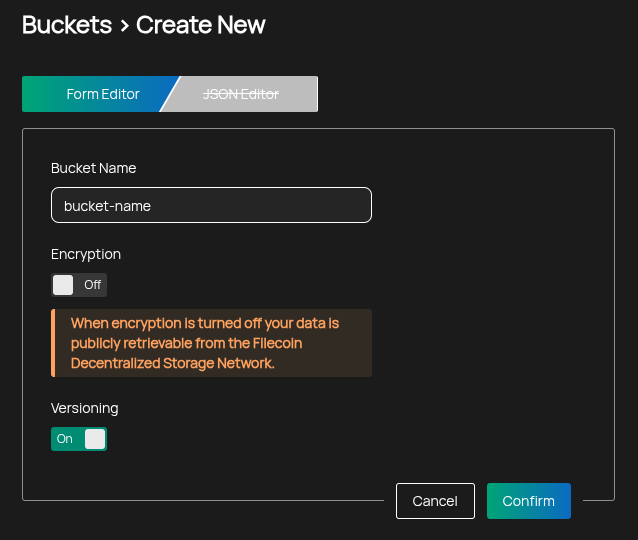
- Go to Buckets → Create Bucket.
- Enter a globally unique name.
- Must contain only lowercase letters, numbers, periods (.), and hyphens (-)
- Must start and end with a letter or number
- Choose server‑side encryption.
- Enabled by default; encryption can only be chosen during bucket creation and cannot be changed afterwards
- Turning encryption off requires a per-bucket confirmation that the bucket will not contain personal data or confidential or regulated data
- If encryption is disabled, data is publicly retrievable from the Filecoin network
- SSE-KMS Managed by Aurora when enabled; AWS SSE-S3 semantics do not apply
- Cannot be configured via CLI or API
- For custom KMS solutions, contact Aurora support
- Choose whether to enable versioning.
- Can only be enabled during bucket creation in the Dashboard UI
- When enabled, each write creates a new immutable version
- You can restore older versions and audit changes over time
- Deleting without a version ID creates a delete marker rather than permanently removing prior versions
Delete a bucket
You can delete a bucket from the Portal when it is empty and not shared. Deletion is irreversible, and the bucket's name remains reserved by your tenant afterwards. See Deleting Buckets for the full requirements.
API Keys
API keys are S3-compatible credentials for programmatic access. Use them with tools like AWS CLI, rclone, CI/CD pipelines, or application backends. Keys can be restricted to selected buckets, granted only specific permissions, and optionally set to expire to simplify rotation and reduce risk.
Create an API key
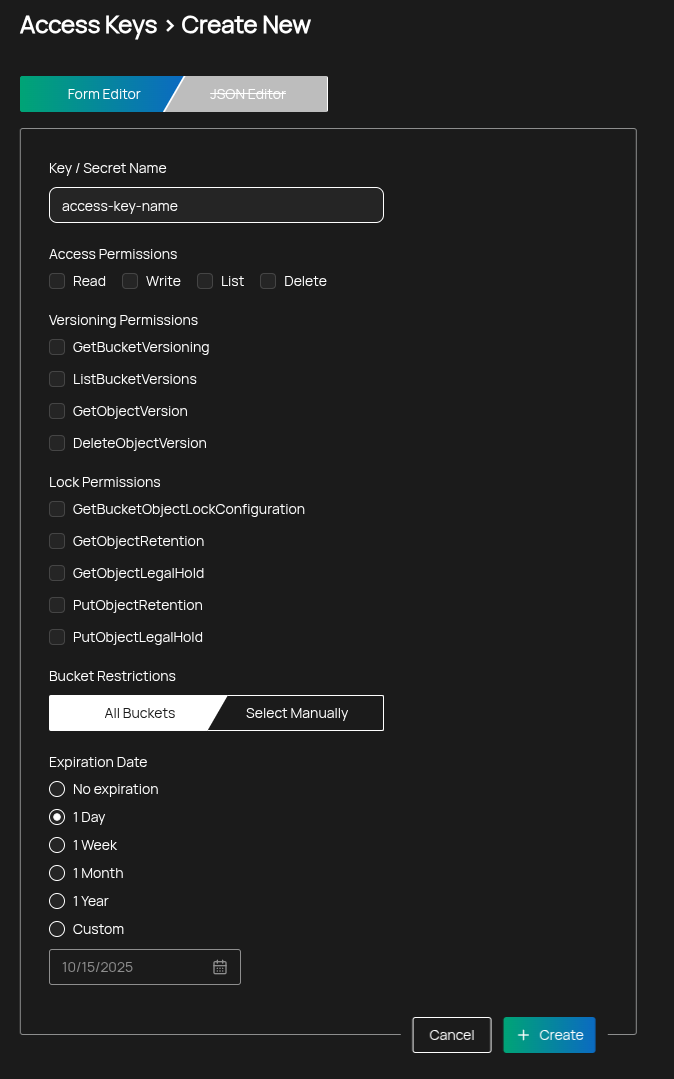
- Go to Credentials → S3 Access Keys, then select New Access Key.
- Select the permissions the key should have (see below).
- Optionally restrict the key to specific buckets.
- Optionally set an expiration date.
- Create the key and copy the Access Key and Secret immediately — they are shown only once.
Permissions
When permissions are selected, a minimal set of defaults is always included so the key can discover buckets it is allowed to use:
- Default (always included):
s3:GetBucketLocation,s3:ListAllMyBuckets
The following permissions can be granted explicitly:
Access
- Read — download objects and inspect multipart upload parts
- S3 actions:
s3:GetObject,s3:ListMultipartUploadParts
- S3 actions:
- Write — upload objects and manage ongoing multipart uploads
- S3 actions:
s3:PutObject,s3:AbortMultipartUpload
- S3 actions:
- List — list objects and multipart uploads within a bucket
- S3 actions:
s3:ListBucket,s3:ListBucketMultipartUploads
- S3 actions:
- Delete — delete the current object version (or create a delete marker on versioned buckets)
- S3 action:
s3:DeleteObject
- S3 action:
If List is not granted, clients can still access an object by its exact key if they have Read permission, but they will not be able to enumerate bucket contents.
Versioning
- GetBucketVersioning — view whether versioning is enabled on a bucket
- S3 action:
s3:GetBucketVersioning
- S3 action:
- ListBucketVersions — list all versions of objects in a bucket
- S3 action:
s3:ListBucketVersions
- S3 action:
- GetObjectVersion — download a specific object version by version ID
- S3 action:
s3:GetObjectVersion
- S3 action:
- DeleteObjectVersion — permanently delete a specific object version
- S3 action:
s3:DeleteObjectVersion
- S3 action:
Deleting specific versions is irreversible and may be blocked by object lock/retention policies.
Lock (Object Lock)
- GetBucketObjectLockConfiguration — view the bucket’s object lock settings
- S3 action:
s3:GetBucketObjectLockConfiguration
- S3 action:
- GetObjectRetention — view retention policy and expiry for an object version
- S3 action:
s3:GetObjectRetention
- S3 action:
- GetObjectLegalHold — view legal hold state for an object version
- S3 action:
s3:GetObjectLegalHold
- S3 action:
- PutObjectRetention — set or update retention for an object version (subject to bucket policy/mode)
- S3 action:
s3:PutObjectRetention
- S3 action:
- PutObjectLegalHold — add or remove a legal hold on an object version
- S3 action:
s3:PutObjectLegalHold
- S3 action:
In compliance mode, retention cannot be shortened or removed, and legal holds must be cleared before deletion where required by policy.
Bucket restrictions
You can scope a key to specific buckets or allow all buckets:
- All Buckets — key applies to all buckets you can access
- Select Manually — choose one or more buckets; the key’s policy limits access to those buckets only
Expiration
Set an expiration to automatically disable the key after a date:
- No expiration — key remains valid until you revoke it
- Custom date — key expires at the end of the selected day (23:59:59 UTC)
Security tips
- Prefer least privilege: grant only the permissions a workflow needs
- Restrict keys to specific buckets whenever possible
- Rotate keys periodically and store secrets in a secure vault